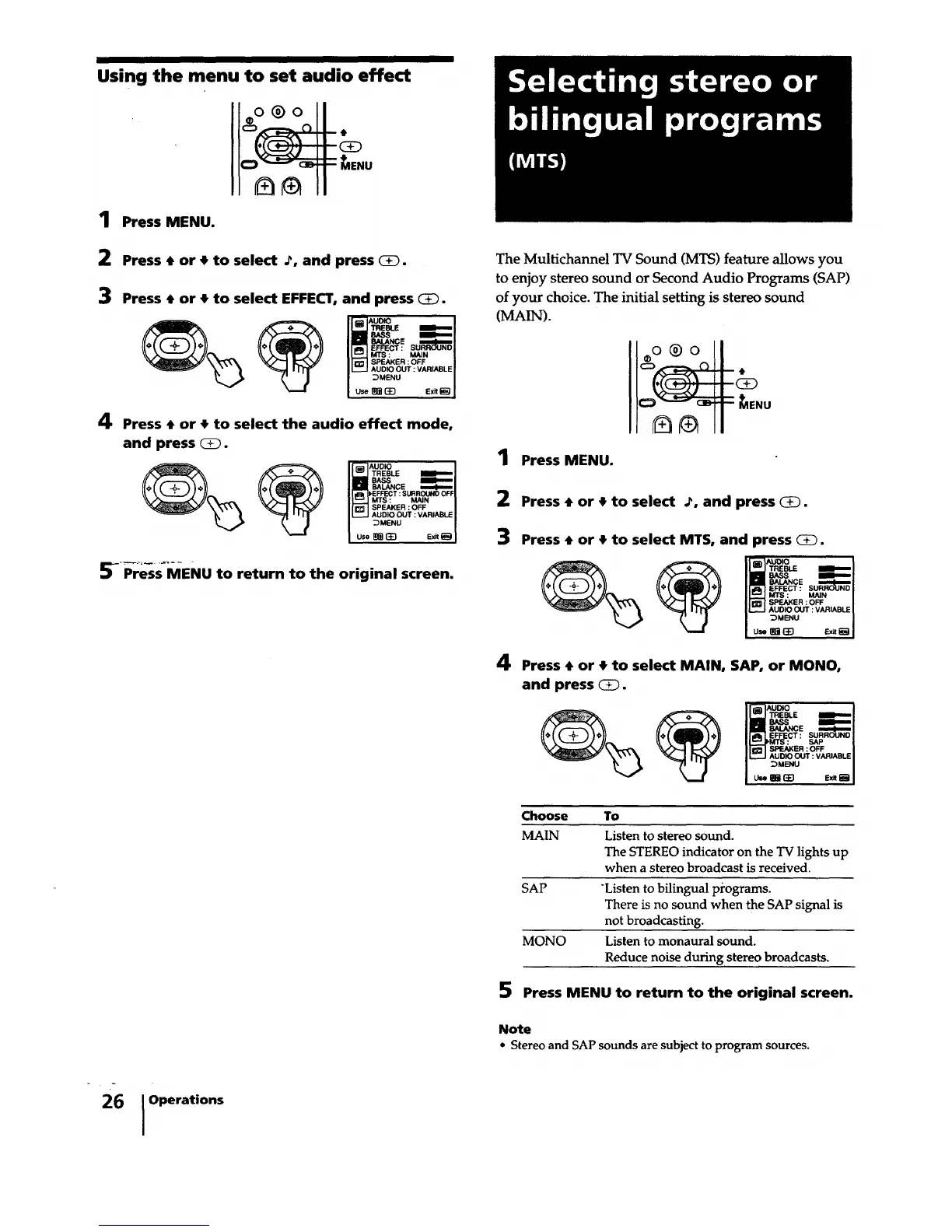
Using the menu to set audio effect
I°®° I
1 Press MENU.
2 Press • or • to select ._, and press CD.
3 Press _ or • to select EFFECT, and press CE).
__ _ TREBLE mmm
BASS
BALANCE SU_I_NO
EFFECT :
MTS : MAIN
SPEAKER : OFF
AUDIO OUT : VARIABLE
DMENU
Use m (3_ Exit
4 Press • or • to select the audio effect mode,
and press _.
AUDIO I
TREBLE IIImm' I
BASS
BALANCE m,,,4m,. I
_FFECT : S_R_O OFF|
MTS : MAIN I
SPEAKER :OFF I
AUDIO OUT : VARIABLE I
3MENU I
use_ [3_ Exit_ I
5- Gess-I_ENu to return to the original screen.
26 I Operations
The Multichannel TV Sound (MTS) feature allows you
to enjoy stereo sound or Second Audio Programs (SAP)
of your choice. The initial setting is stereo sound
(MAIN).
C_ _ENU
1 Press MENU.
2 Press • or • to select ,_, and press _.
3
Press • or t to select MTS, and press _.
BALANCE _1
EFFECT : SURROUND I
Mrs : MAIN I
SPEA,'<ER:OFF I
AUDIO OUT : VARIABLE
_MENU ]
u-,-_ _1
4 Press # or • to select MAIN, SAP, or MONO,
and press _.
__(_ _ TREBLE Immmmm
BASS am,,mm
,._KER : OFF
AUDIO OUT : VARIABLE
:_MENU
u_mG_ Extra
Choose To
MAIN Listen to stereo sound.
The STEREO indicator on the TV lights up
when a stereo broadcast is received.
SAP "Listen to bilingual programs.
There is no sound when the SAP signal is
not broadcasting.
MONO Listen to monaural sound.
Reduce noise during stereo broadcasts.
5 Press MENU to retum to the original screen.
Note
• Stereo and SAP sounds are subject to program sources.







 To Next Page