Notes
• Ifmorethanonecodenumberislisted,tryenteringthemone
byone,untilyoucometothe correct code for your equipment.
• In some rare cases, you may not be able to operate your non-
Sony video equipment with the supplied remote commander.
This is because your equipment may use a code that is not
included with this remote commander. In this case, please use
the equipment's own remote control unit.
• The code numbers for Sony equipment are assigned at the
factory as follows:
VHS VCR 301 (preset code for the supplied
remote commander)
8 mm VCR 302
Beta, ED Beta VCRs 303
• Whenever you remove the batteries -- to replace them, for
example -- if too much time is taken, the code number may
revert to the factory setting and must be reset.
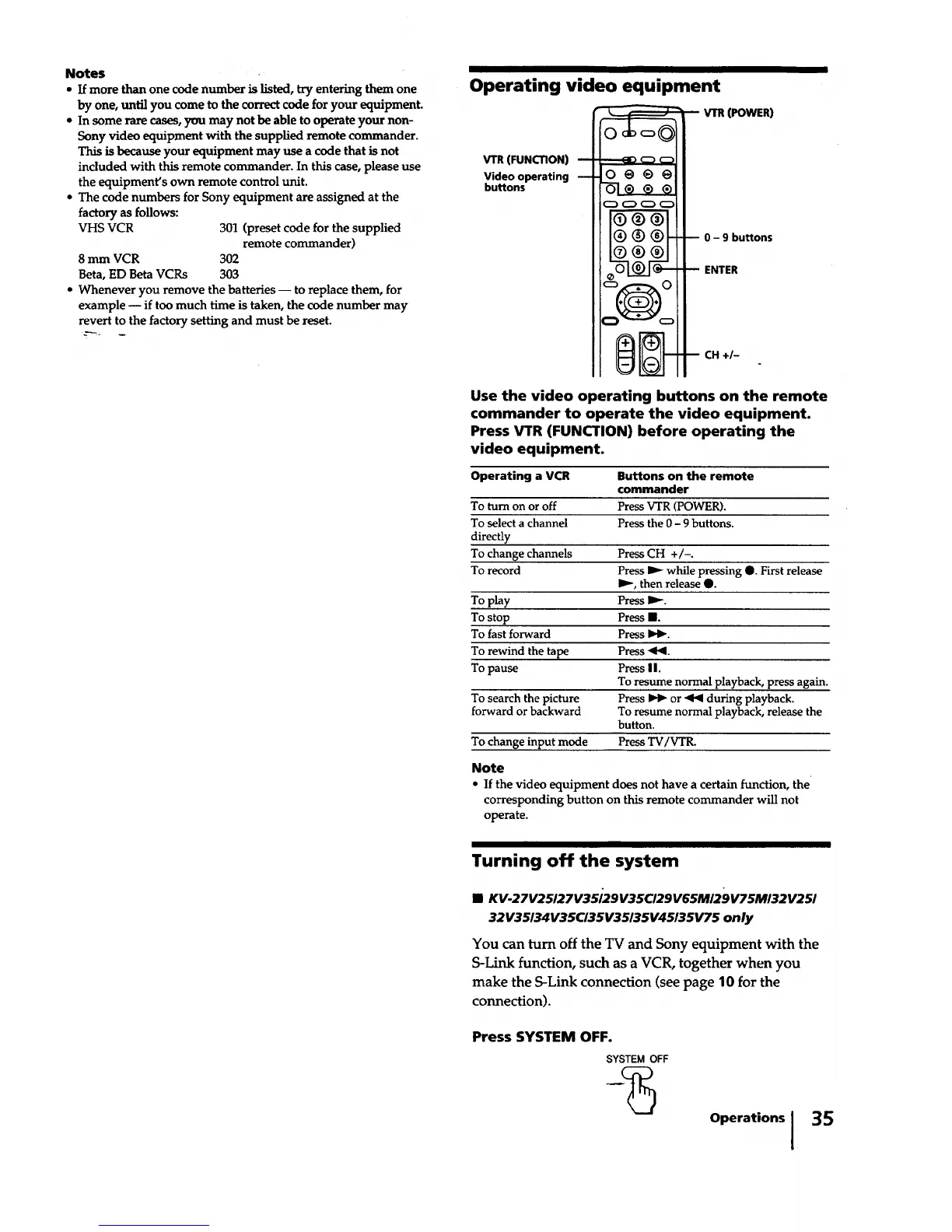
Operating video equipment
VTR (FUNCTION)
Video operating
buttons
-- O@_@
O---1®®®
C_ C_ C_ C_
®®@
®®@
®®@
11"4-I III -I- III
ii -- i III -- iii
VTR (POWER)
-- 0 - 9 buttons
-- ENTER
-- CH +/-
Use the video operating buttons on the remote
commander to operate the video equipment.
Press VTR (FUNCTION) before operating the
video equipment.
Operating a VCR Buttons on the remote
commander
To turn on or off Press VTR (POWER).
To select a channel Press the 0 - 9 buttons.
directly
To change channels Press CH +/-.
To record Press I_ while pressing O. First release
I_, then release O.
To play Press I_.
To stop Press II.
To fast forward Press _.
To rewind the tape Press -91_1.
To pause Press I I.
To resume normal playback, press again.
To search the picture Press _ or _ during playback.
forward or backward To resume normal playback, release the
button.
To change input mode Press TV/VTR.
Note
• If the video equipment does not have a certain function, the
corresponding button on this remote commander will not
operate.
Turning off the system
• KV-27V25/27V35/29V35CI29V65M/29V75M132V251
32V35134V35C/35V35/35V45/35V75 only
You can turn off the TV and Sony equipment with the
S-Link function, such as a VCR, together when you
make the S-Link connection (see page 10 for the
connection).
Press SYSTEM OFF.
SYSTEM OFF
Operations I
35






 To Next Page