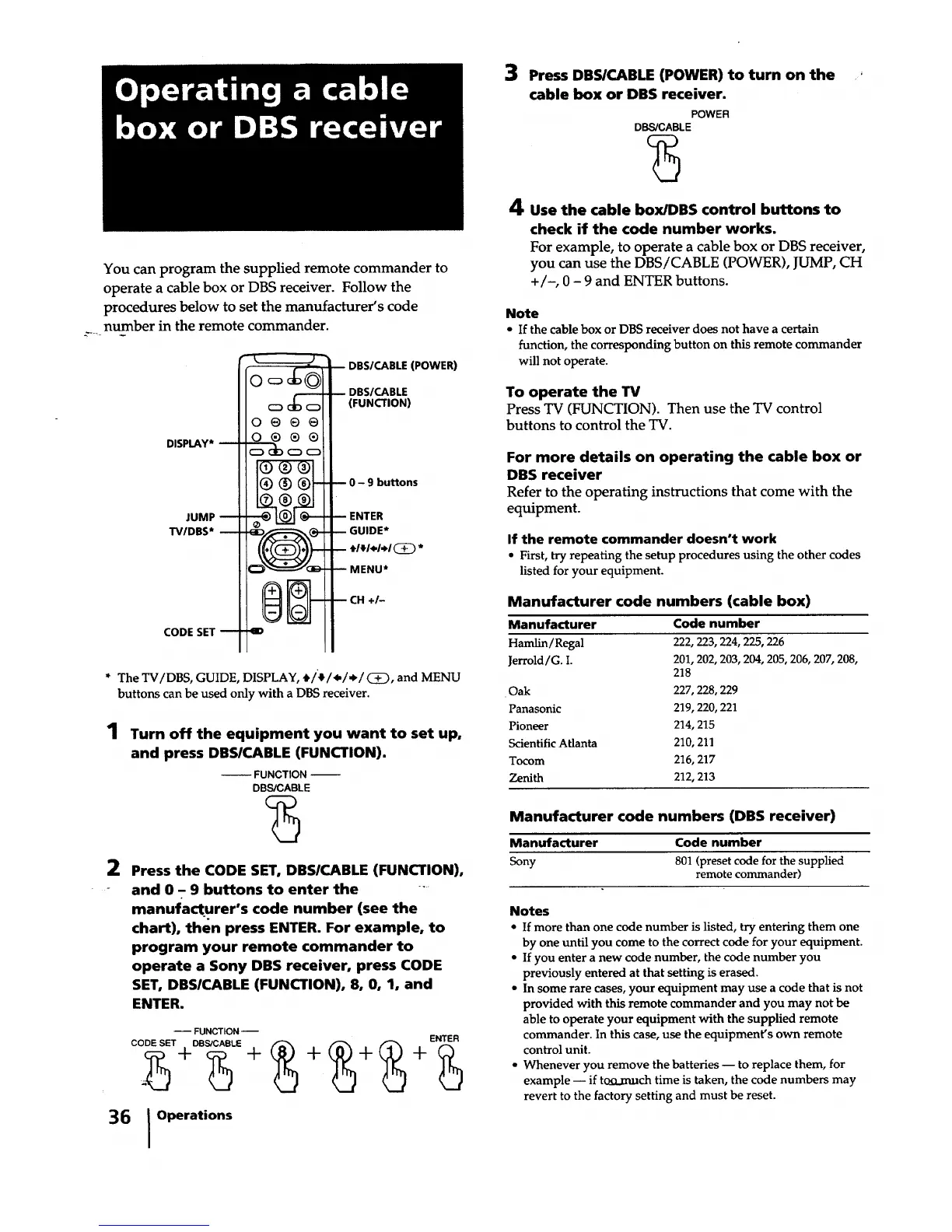
You can program the supplied remote commander to
operate a cable box or DBS receiver. Follow the
procedures below to set the manufacturer's code
__ number in the remote commander.
DISPLAY*
JUMP
TV/DBS*
CODE SET 1
o@@@
0®®®
I®®_
1(7) (8) (9
--_ ILOJI r_
v_v
II_m IIl--I
.4D
DBS/CABLE (POWER)
-- DBS/CABLE
(FUNCTION)
-- 0 - 9 buttons
- ENTER
-- GUIDE*
-- _I_I4.I,H(_ *
-- MENU*
-- CH +1-
* The TV/DBS, GUIDE, DISPLAY, t/'_l.t./.I CD, and MENU
buttons can be used only with a DBS receiver.
1
Turn off the equipment you want to set up,
and press DBSICABLE (FUNCTION).
-- FUNCTION --
DBS/CABLE
2 Press the CODE SET, DBSICABLE (FUNCTION),
and 0 - 9 buttons to enter the ....
manufacturer's code number (see the
chart), then press ENTER. For example, to
program your remote commander to
operate a Sony DBS receiver, press CODE
SET, DBSlCABLE (FUNCTION), 8, 0, 1, and
ENTER.
-- FUNCTION --
CODE SET JI'-DBS/CABLE Jl" _ -'1"- _ Jl'- (_ Jl'- ENTErs}.:._ (_
36 I Operations
3 Press DBS/CABLE (POWER) to turn on the '
cable box or DBS receiver
POWER
DBS/CABLE
?3
4 use the cable box/I)BS control buttons to
check if the code number works.
For example, to operate a cable box or DBS receiver,
you can use the DBS/CABLE (POWER), JUMP, CH
+/-, 0 - 9 and ENTER buttons.
Note
• If the cable box or DBS receiver does not have a certain
function, the corresponding button on this remote commander
will not operate.
To operate the TV
Press TV (FUNCTION). Then use the TV control
buttons to control the TV.
For more details on operating the cable box or
DBS receiver
Refer to the operating instructions that come with the
equipment.
If the remote commander doesn't work
• First, try repeating the setup procedures using the other codes
listed for your equipment.
Manufacturer code numbers (cable box)
Manufacturer Code number
Hamlin/Regal 222, 223, 224, 225, 226
Jerrold/G. I. 201, 202, 203, 204, 205, 206, 207, 208,
218
•Oak 227, 228, 229
Panasonic 219, 220, 221
Pioneer 214, 215
Scientific Atlanta 210, 211
Tocom 216, 217
Zenith 212, 213
Manufacturer code numbers (DBS receiver)
Manufacturer Code number
Sony 801 (preset code for the supplied
remote commander)
Notes
• If more than one code number is listed, try entering them one
by one until you come to the correct code for your equipment.
• If you enter a new code number, the code number you
previously entered at that setting is erased.
• In some rare cases, your equipment may use a code that is not
provided with this remote commander and you may not be
able to operate your equipment with the supplied remote
commander. In this case, use the equipment's own remote
control unit.
• Whenever you remove the batteries -- to replace them, for
example -- if tcEkmuch time is taken, the code numbers may
revert to the factory setting and must be reset.






 To Next Page