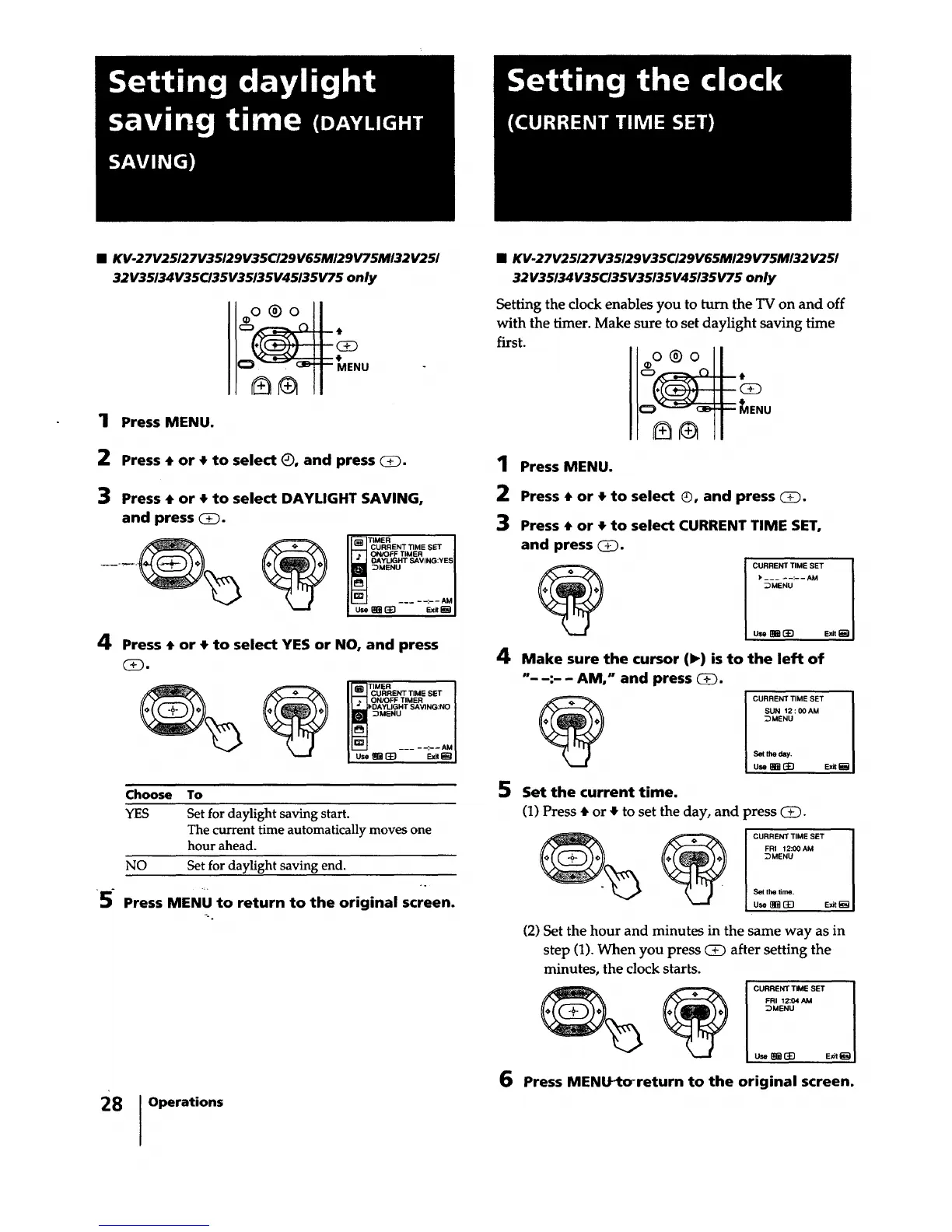
• KV-27V25127V35129V35CI29V65MI29V75M132V25/
32V35/34V35CI35V35/35V45135V75 only
1
2
3
4
Press MENU.
MENU
Press • or • to select (_, and press _1
Press • or • to select DAYLIGHT SAVING,
and press CD.
TIMER I
CURRENTTIME SET I
ONK_FF TIMER I
DAYLIGHT SAVING:YESI
_MENU I
___--:--AMIusemmEB Exit_
Press • or • to select YES or NO, and press
(!).
I Iii___JCURRENT TIME SET |
II _ I ON!OFFTIMER |
I L.__J_DAYLIGHT SAVING:NO I
:DMENU
IL_-J -:--AMI
Choose To
YES Set for daylight saving start.
The current time automatically moves one
hour ahead.
NO Set for daylight saving end.
÷.
5- Press MENU to return to the original screen.
28 Operations
• KV-27V25127V35129V35C/29V65M/29V75M/32V25/
32V35/34V35CI35V35135V45/35V75 only
Setting the clock enables you to turn the TV on and off
with the timer. Make sure to set daylight saving time
first.
oo®o I
-o..u
1
2
3
Press MENU.
Press • or • to select ®, and press _.
Press • or • to select CURRENT TIME SET,
and press _.
e
CURRENT TIME SET I
I
u.m_ E,_t_ I
4 Make sure the cursor (1_) is to the left of
"- -:- - AM," and press (D.
5 Set the current time.
(1) Press • or • to set the day, and
CURRENT TIME SET I
SUN 12: 00AM I
_MENU I
Set the day. I
(2) Set the hour and minutes in the same way as in
step (1). When you press (3D after setting the
minutes, the clock starts.
6 Press MENtYtorreturn to the original screen.
)ress (E).
CURRENT TIME SET I
FRI 12:00 AM I
_MENU I
Sel the time. I
u_ mm_D E_t_aI






 To Next Page