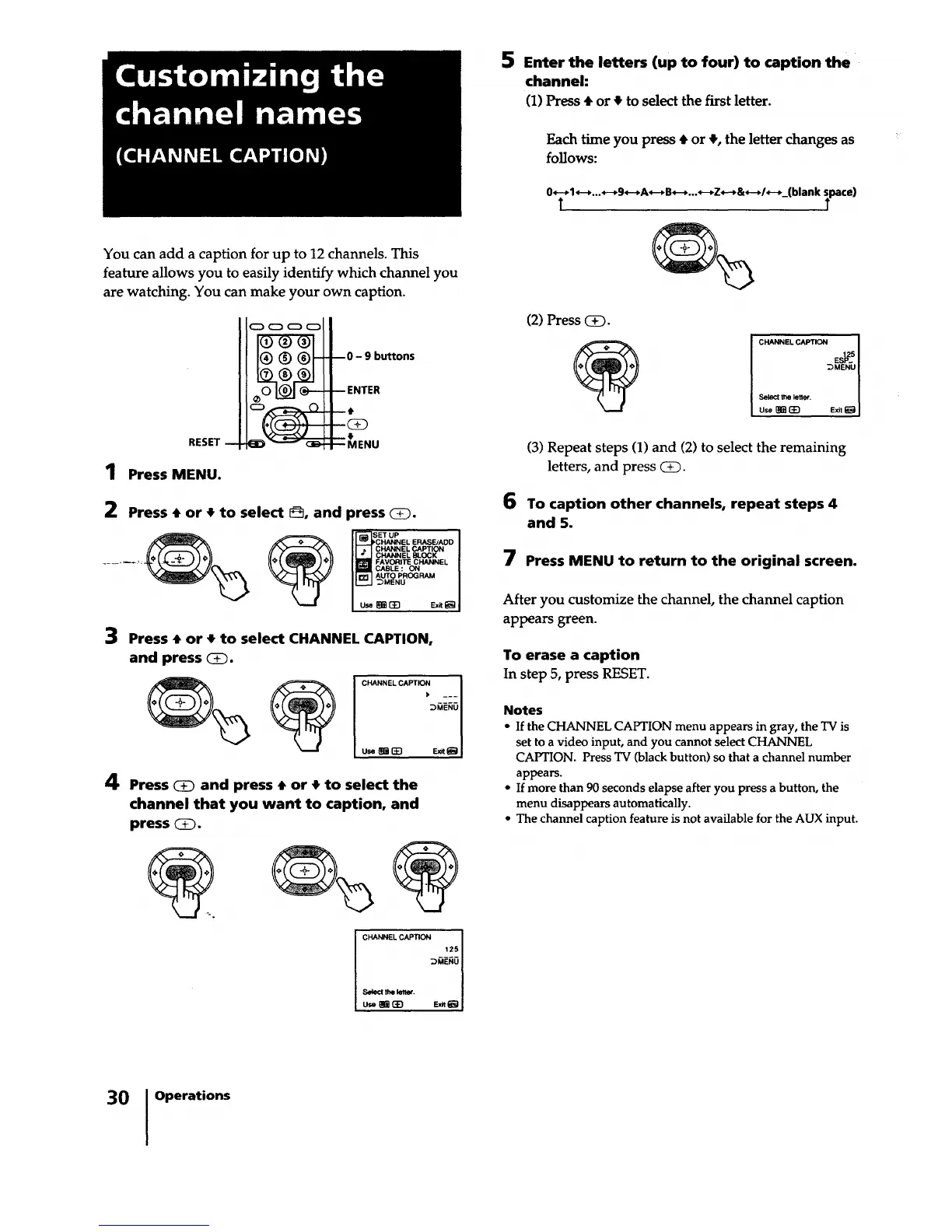
5 Enter the letters (up to four) to caption the
channel:
(1) Press • or • to select the first letter.
Each time you press _ or _, the letter changes as
follows:
0_-_l_-_..._-+9_-,A_-_B_-_..._-_Z,--_&_-_/*-__(blankT _pace)
You can add a caption for up to 12 channels. This
feature allows you to easily identify which channel you
are watching. You can make your own caption.
RESET --
1 Press MENU.
--0 - 9 buttons
-- ENTER
t
41.
--MENU
2 Press • or 4Fto select 8, and press _.
_(_ _ SET UP
I [_CHANNEL ERASE/ADD I
I I b I CHANNELCAPTION I
I I_ CHANNEL BLOCK I
-----_-'; I i!_I_ FAVORITE CHANNEL I
I _CABLE : ON I
IIr_ I AUTO PROGFIAM I
I L_--I DMENU I
I use_ E_,_I
3 Press • or • to select CHANNEL CAPTION,
and press _.
C NE O,PT __1
usemE} Ex_ I
4 Press _ and press 4. or t to select the
channel that you want to caption, and
press _.
e
CHANNEL CAPTION I
Select the lenet. I
L_ s_._ I
(2) Press (3_.
e
CHANNEL CAPTION I
E#_I
MENU I
Use I]_E_ Ex,_J
(3) Repeat steps (1) and (2) to select the remaining
letters, and press @D.
6 To caption other channels, repeat steps 4
and 5.
7 Press MENU to return to the original screen.
After you customize the channel, the channel caption
appears green.
To erase a caption
In step 5, press RESET.
Notes
• If the CHANNEL CAPTION menu appears in gray, the TV is
set to a video input, and you cannot select CHANNEL
CAPTION. Press TV (black button) so that a channel number
appears.
• If more than 90 seconds elapse after you press a button, the
menu disappears automatically.
• The channel caption feature is not available for the AUX input.
30 Operations






 To Next Page