I seffingthe CURRENTTIME
r
MUTING SLEEP POWER
_®®
_®®
_®®
_3
7-1 _
..5
!
-4
RM-Y102
0 -- 9 bu_ons
•2-5 ENTER
RESET
-1MENU
-2,5
A/V WINDOW
+/-
EXIT
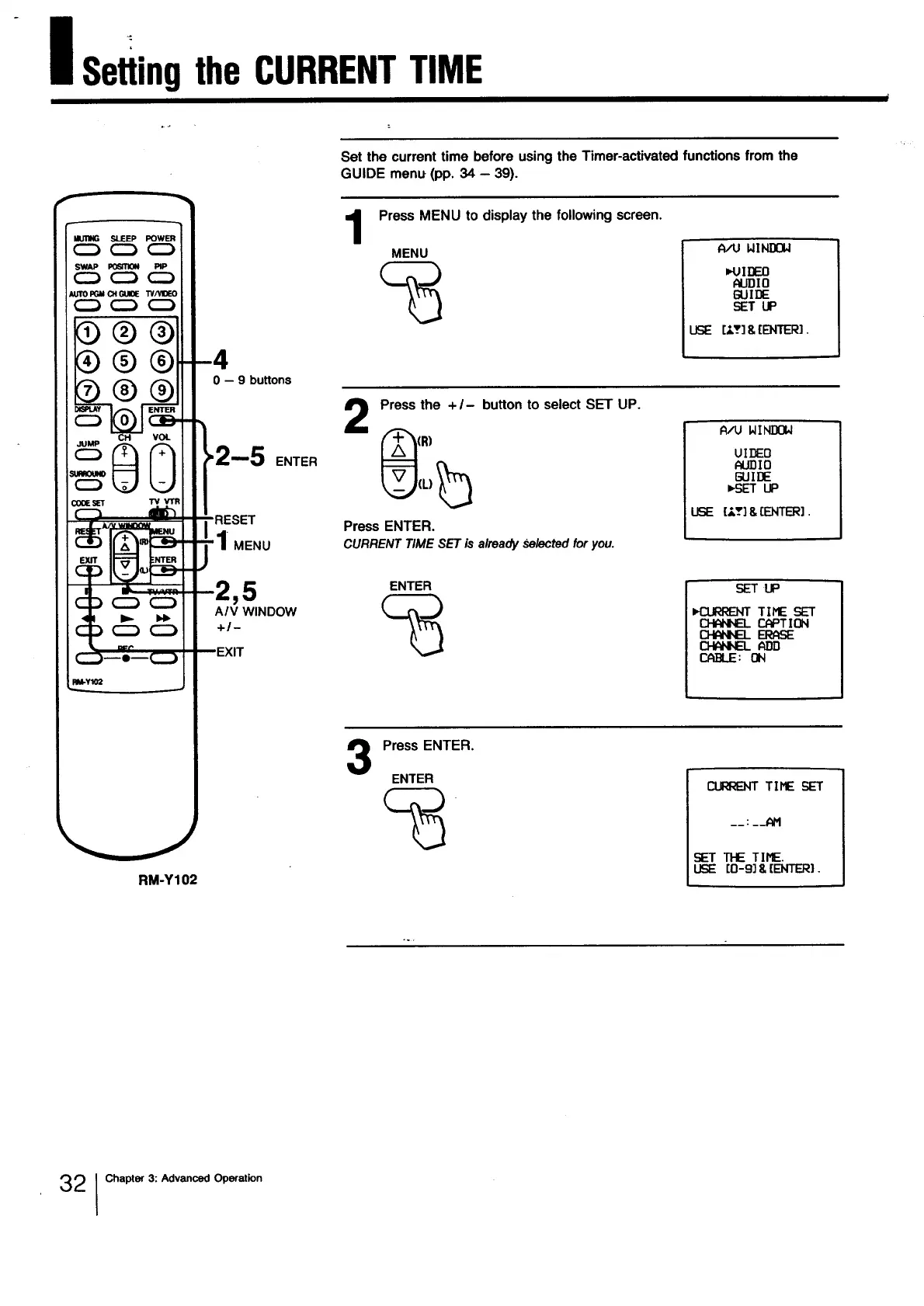
Set the current time before using the Timer-activated functions from the
GUIDE menu (pp. 34 - 39).
1
Press MENU to display the following screen.
MENU
m.4JIDEO
ALJDIn
GUIDE
SET UP
USE [_.T] &(ENTER].
2
Press the + I- button to select SET UP.
Press ENTER.
CURRENTTIME SETis alreadySelectedforyou.
A/U WINDOW
UIDEEO
J_LIDIO
GUIDE
USE [:T] & [ENTER).
ENTER
SETUP
HZ_GRENT TIME SET
r__..e_Tl ON
_ ERr_E
_P_D
CABLE: ON
3
Press ENTER.
ENTER
1
I
__ : __AM
SET TIE TIME.
[O-9] & [ENTER).
32 I Chapter 3: Advanced Operation







 To Next Page