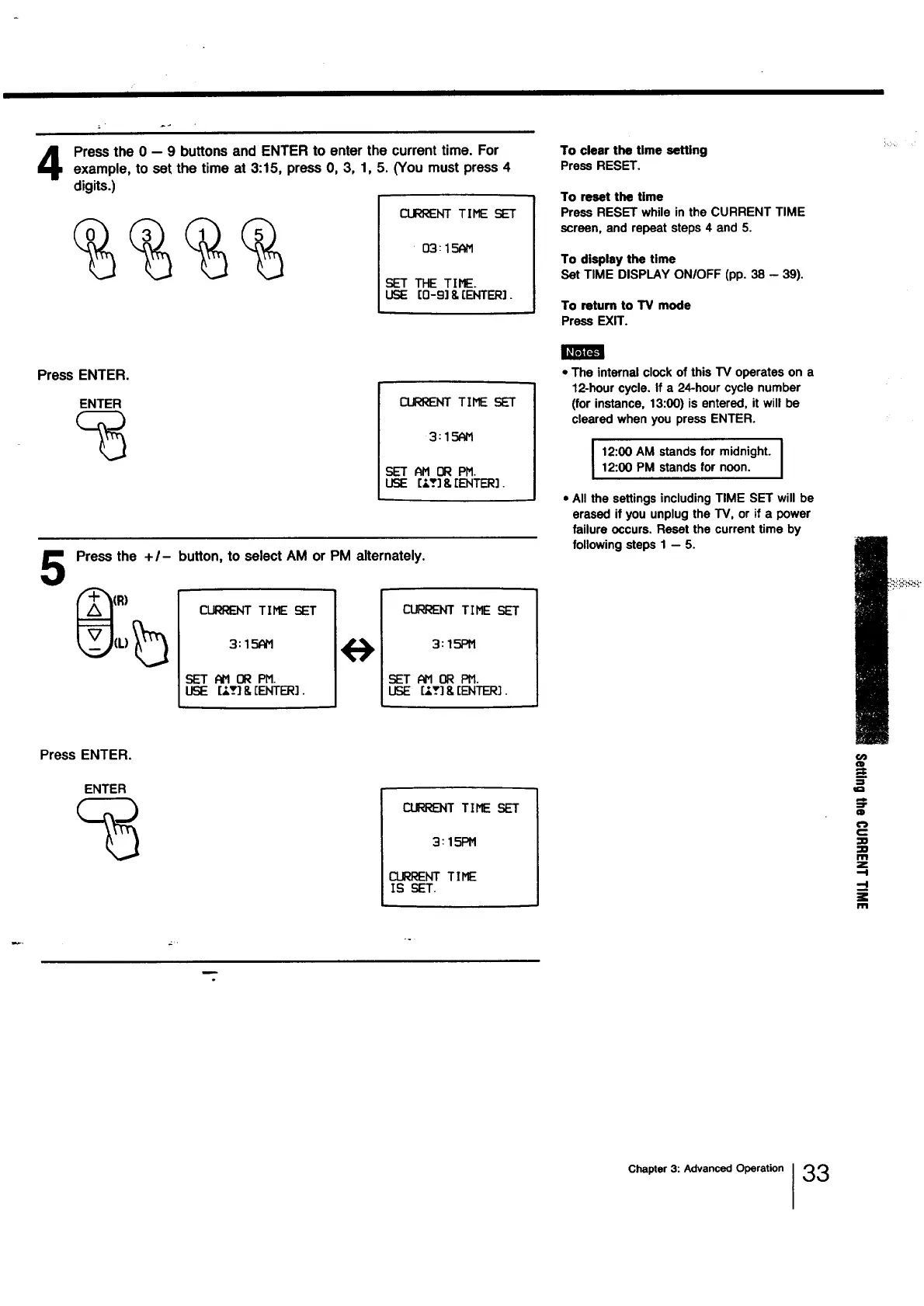
Press the 0 -- 9 buttons and ENTER to enter the current time. For
example, to set the time at 3:15, press O, 3, 1, 5. (You must press 4
digits.)
1
CURRENT TIME SET /
/
• 03: 15AM
SEI" THE TIME.
USE [0-9]8,[ENTER].
To clear the time setting
Press RESET.
To reset the time
Press RESET while in the CURRENT TIME
screen, and repeat steps 4 and 5.
To display the time
Set TIME DISPLAY ON/OFF (pp. 38 - 39).
To return to TV mode
Press EXIT.
Press ENTER.
ENTER
%
CURRENTTIME SET
3:15N'1
SETAM 0RPM.
USE [-'._]& [ENTER].
5
Press the + I- button, to select AM or PM alternately.
CLRRENT TIME SET
3: 15AH
SET AH OR PM.
LF3E [:_v] & [ENTER].
<..7
CURRENTTIME
3: 15PM
SET N'10R PH.
USE [_,-_]& [ENTER].
• The internal clock of this TV operates on a
12-hour cycle. If a 24-hour cycle number
(for instance, 13:00) is entered, it will be
cleared when you press ENTER.
12:00 AM stands for midnight. I12:00 PM stands for noon.
• All the settings including TIME SET will be
erased if you unplug the TV, or if a power
failure occurs. Reset the current time by
following steps 1 -- 5.
Press ENTER.
ENTER
_T TIME
3: 151:_!
CLRRENT TIME
IS SET.
:=
¢1
m
€_
C
m
Z
i
m
P
Chapter 3: Advanced Operation I33




 To Next Page