EasyManua.ls Logo

Sony Trinitron KV-27V10 - Operating Video Equipment; Controlling a VCR; Controlling a Laser-disc Player

Sony Trinitron KV-27V10
27 pages
Print Icon
To Next Page IconTo Next Page
To Previous Page IconTo Previous Page
Loading...
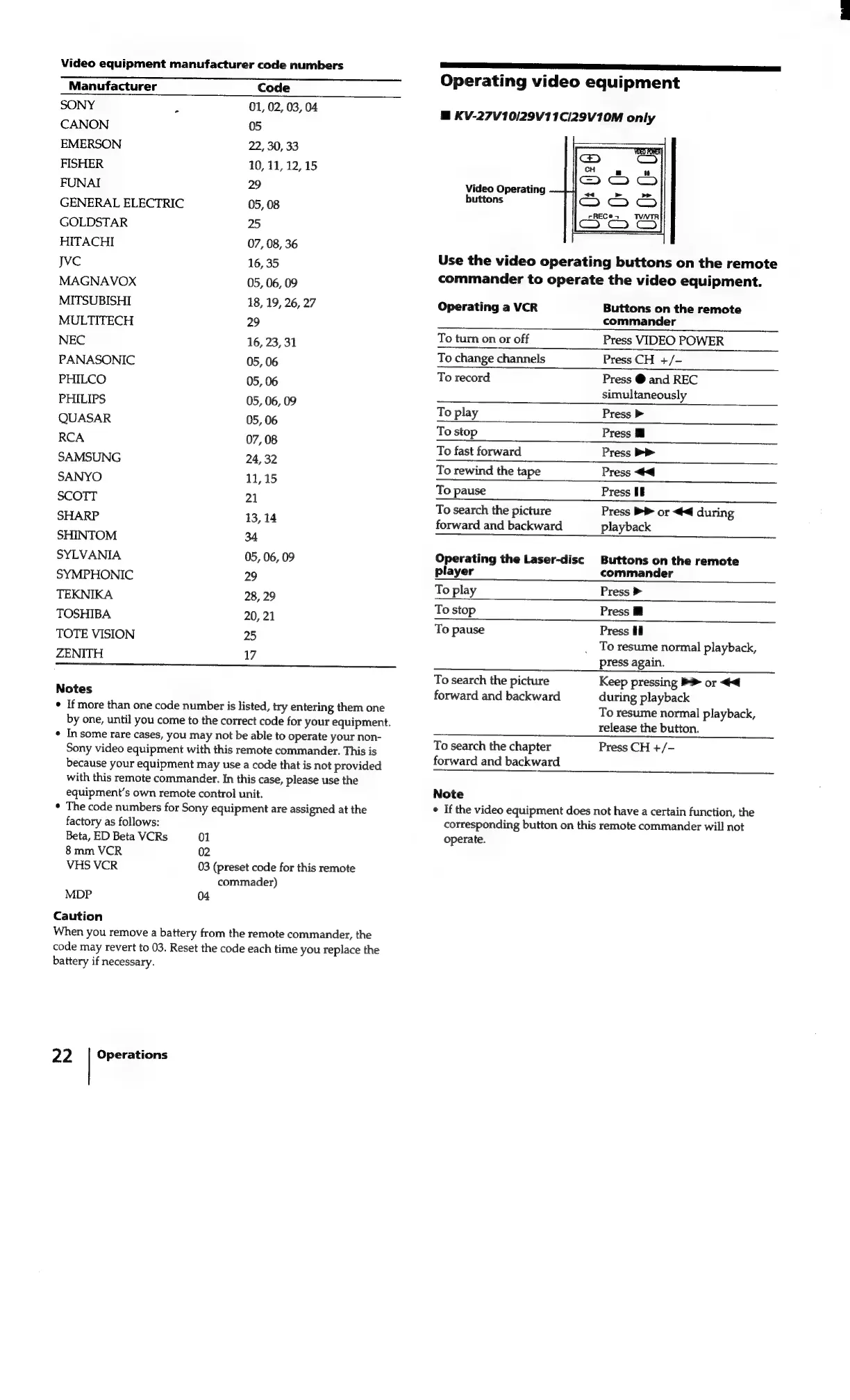
Video
equipment
manufacturer
code
numbers
Manufacturer
Code
SONY
z
01,
02, 03,
04
CANON
05
EMERSON
22, 30,
33
FISHER
10,
11,
12,
15
FUNAI
29
GENERAL
ELECTRIC
05,
08
GOLDSTAR
25
HITACHI
07, 08,
36
Jvc
16,
35
MAGNAVOX
05, 06,
09
MITSUBISHI
18,
19,
26,
27
MULTITECH
29
NEC
16,
23,
31
PANASONIC
05,
06
PHILCO
05,
06
PHILIPS
05, 06,
09
QUASAR
05,
06
RCA
07,
08
SAMSUNG
24,
32
SANYO
11,15
SCOTT
21
SHARP
13,
14
SHINTOM
34
SYLVANIA
05,
06,
09
SYMPHONIC
29
TEKNIKA
28,
29
TOSHIBA
20,
21
TOTE
VISION
25
ZENITH
17
Sr
SS
Notes
*
If
more
than
one
code
number
is
listed,
try
entering
them
one
by
one,
until
you
come
to
the
correct
code
for
your
equipment.
*
Insome
rare
cases,
you
may
not
be
able
to
operate
your
non-
Sony
video
equipment
with
this
remote
commander.
This
is
because
your
equipment
may
use
a
code
that
is
not
provided
Sars
ee
le
eee
Operating
video
equipment
@
KV-27V10/29V11C/29V10M
only
Video
Operating
buttons
Use
the
video
operating
buttons
on
the
remote
commander
to
operate
the
video
equipment.
Operating
a
VCR
Buttons
on
the
remote
commander
To
turn
on
or
off
Press
VIDEO
POWER
To
change
channels
Press
CH
+/-
To
record
Press
@
and
REC
simultaneously
To
play
Press
>
To
stop
Press
Mi
To
fast
forward
Press
>>
To
rewind
the
tape
Press
<4
To
pause
Press
HE
a
se
To
search
the
picture
Press
PP
or
<4
during
forward
and
backward
playback
Operating
the
Laser-disc
Buttons
on
the
remote
player
commander
To
play
Press
>
To
stop
Press
B
To
pause
Press
Hi
To
resume
normal
playback,
press
again.
To
search
the
picture
Keep
pressing
>
or
<<
forward
and
backward
during
playback
To
search
the
chapter
forward
and
backward
To
resume
normal
playback,
release
the
button.
Press
CH
+/—
with
this
remote
commander.
In
this
case,
please
use
the
equipment’s
own
remote
control
unit.
*
The
code
numbers
for
Sony
equipment
are
assigned
at
the
factory
as
follows:
Beta,
ED
Beta
VCRs
01
8mm
VCR
02
VHS
VCR
03
(preset
code
for
this
remote
commader)
MDP
04
Caution
When
you
remove
a
battery
from
the
remote
commander,
the
code
may
revert
to
03.
Reset
the
code
each
time
you
replace
the
battery
if
necessary.
22.
|
Operations
Note
e
If
the
video
equipment
does
not
have
a
certain
function,
the
corresponding
button
on
this
remote
commander
will
not
operate.