EasyManua.ls Logo

Sony Trinitron KV-27V10 - Getting Started: Hookup; Connecting Antenna;Cable TV without VCR; Connecting Different Cable Types

Sony Trinitron KV-27V10
27 pages
Print Icon
To Next Page IconTo Next Page
To Previous Page IconTo Previous Page
Loading...
Getting
Started
Step
1:
Hookup
Although
you
can
use
either
an
indoor
antenna
or
outdoor
antenna
with
your
TV,
we
recommend
you
to
connect
an
outdoor
antenna
or
a
cable
TV
system
to
get
better
picture
quality.
How
to
connect
different
types
of
cables
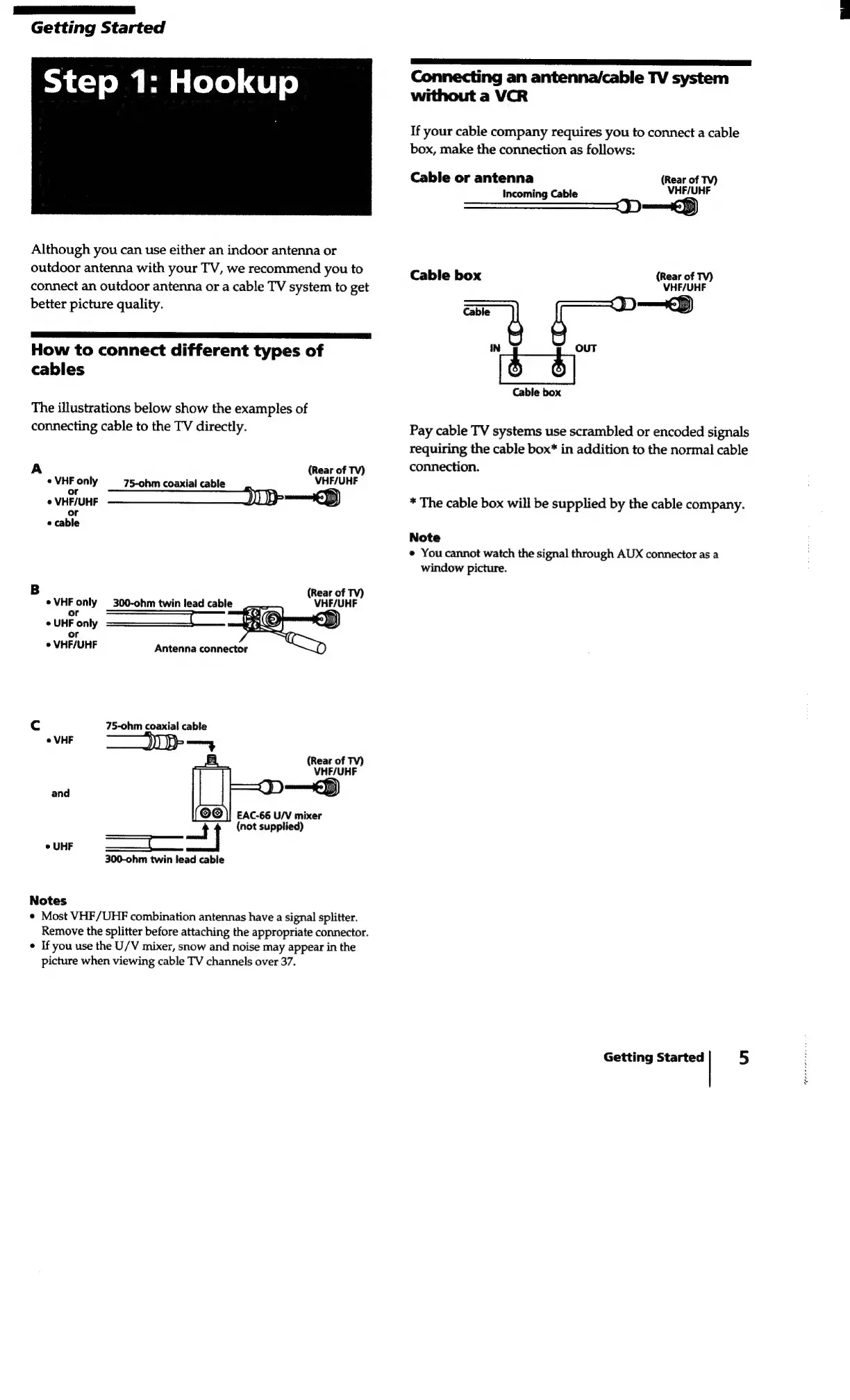
The
illustrations
below
show
the
examples
of
connecting
cable
to
the
TV
directly.
i
of
TV)
«
VHF
only
75-ohm
ial
cabl
HF/UHF
-
coaxial
cable
o
VHF/UHF
<p)
or
e
cable
B
(Rear
of
TV)
¢VHF
only
300-ohm
twin
lead
cable
VHF/UHF
r
Poh
e
UHF
only
or
e
VHF/UHF
Cc
75-ohm
coaxial
cable
°
VHF
>
(Rear
of
TV)
VHF/UHF
J)
amet)
EAC-66
U/V
mixer
a
|
(not
supplied)
300-ohm
twin
lead
cable
and
Notes
*
Most
VHF/UHF
combination
antennas
have
a
signal
splitter.
Remove
the
splitter
before
attaching
the
appropriate
connector.
*
If
you
use
the
U/V
mixer,
snow
and
noise
may
appear
in
the
picture
when
viewing
cable
TV
channels
over
37.
A
ee
el
Connecting
an
antenna/cable
TV
system
without
a
VCR
If
your
cable
company
requires
you
to
connect
a
cable
box,
make
the
connection
as
follows:
Cable
or
antenna
Incoming
Cable
(Rear
of
TV)
VHF/UHF
tS)
Cable
box
(Rear
of
TV)
VHF/UHF
Cable
|
,
3
|
D
ED)
IN
:
:
OUT
Cable
box
Pay
cable
TV
systems
use
scrambled
or
encoded
signals
requiring
the
cable
box*
in
addition
to
the
normal
cable
connection.
*
The
cable
box
will
be
supplied
by
the
cable
company.
Note
e
You
cannot
watch
the
signal
through
AUX
connector
as
a
window
picture.
Getting
Started
5