EasyManua.ls Logo

Sony Trinitron KV-35S26 - Connecting to an S Video Equipped VCR

Sony Trinitron KV-35S26
36 pages
Print Icon
To Next Page IconTo Next Page
To Previous Page IconTo Previous Page
Loading...
EEE
Connecting
and
Installing
the
TV
(continued)
ot
be
Disconnect
all
power
sources
before
making
any
connections,
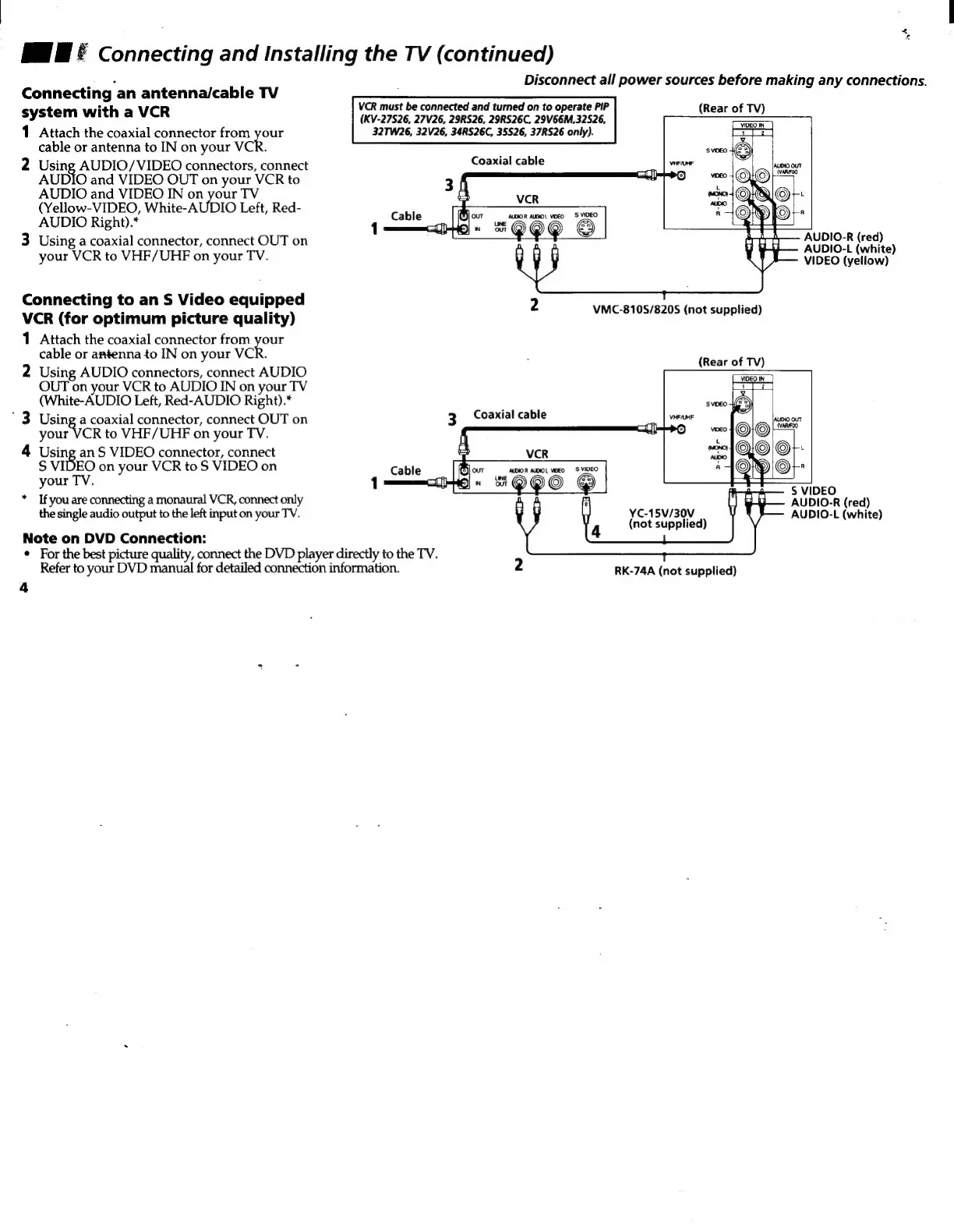
Connecting
an
antenna/cable
TV
system
with
a
VCR
VCR
must
be
connected
and
turned
on
to
operate
PIP
(Rear
of
TV)
(KV-27S26,
27V26,
29RS26,
29RS26C,
29V66M,32S26,
1
Attach
the
coaxial
connector
from
pour
32TW26,
32V26,
34RS26C,
35526,
37RS26
only).
cable
or
antenna
to
IN
on
your
VCR.
2
rere
AUDIO/VIDEO
connectors,
connect
Coaxial
cable
AUDIO
and
VIDEO
OUT
on
your
VCR
to
AUDIO
and
VIDEO
IN
on
your
TV
(Yellow-VIDEO,
White-AUDIO
Left,
Red-
AUDIO
Right).*
oe
3
Using
a
coaxial
connector,
connect
OUT
on
your
VCR
to
VHF/UHF
on
your
TV.
AUDIO-R
(red)
AUDIO-L
(white)
VIDEO
(yellow)
Connecting
to
an
S
Video
equipped
2
VCR
(for
optimum
picture
quality)
1
Attach
the
coaxial
connector
from
on
cable
or
antenna
to
IN
on
your
VCR.
2
Using
AUDIO
connectors,
connect
AUDIO
OUT
on
your
VCR
to
AUDIO
IN
on
your
TV
(White-AUDIO
Left,
Red-AUDIO
Right).*
3
Da
coaxial
connector,
connect
OUT
on
your
VCR
to
VHF/UHF
on
your
TV.
4
Using
an
S
VIDEO
connector,
connect
S
VIDEO
on
your
VCR
to
S
VIDEO
on
your
TV.
*
If
you
are
connecting
a
monaural
VCR,
connect
only
the
single
audio
output
to
the
left
input
on
your
TV.
VMC-810S/8205
(not
supplied)
(Rear
of
TV)
3
Coaxial
cable
S
VIDEO
AUDIO-R
(red)
AUDIO-L
(white)
YC-15V/30V
(not
supplied)
Note
on
DVD
Connection:
¢
For
the
best
picture
quality,
connect
the
DVD
player
directly
to
the
TV.
Refer
to
your
DVD
manual
for
detailed
connection
information.
2
RK-74A
(not
supplied)
4

Other manuals for Sony Trinitron KV-35S26

Related product manuals