EasyManua.ls Logo

Sony VPH-1041Q - SHARPNESS Control; INPUT SELECT Buttons

Sony VPH-1041Q
22 pages
Print Icon
To Next Page IconTo Next Page
To Previous Page IconTo Previous Page
Loading...
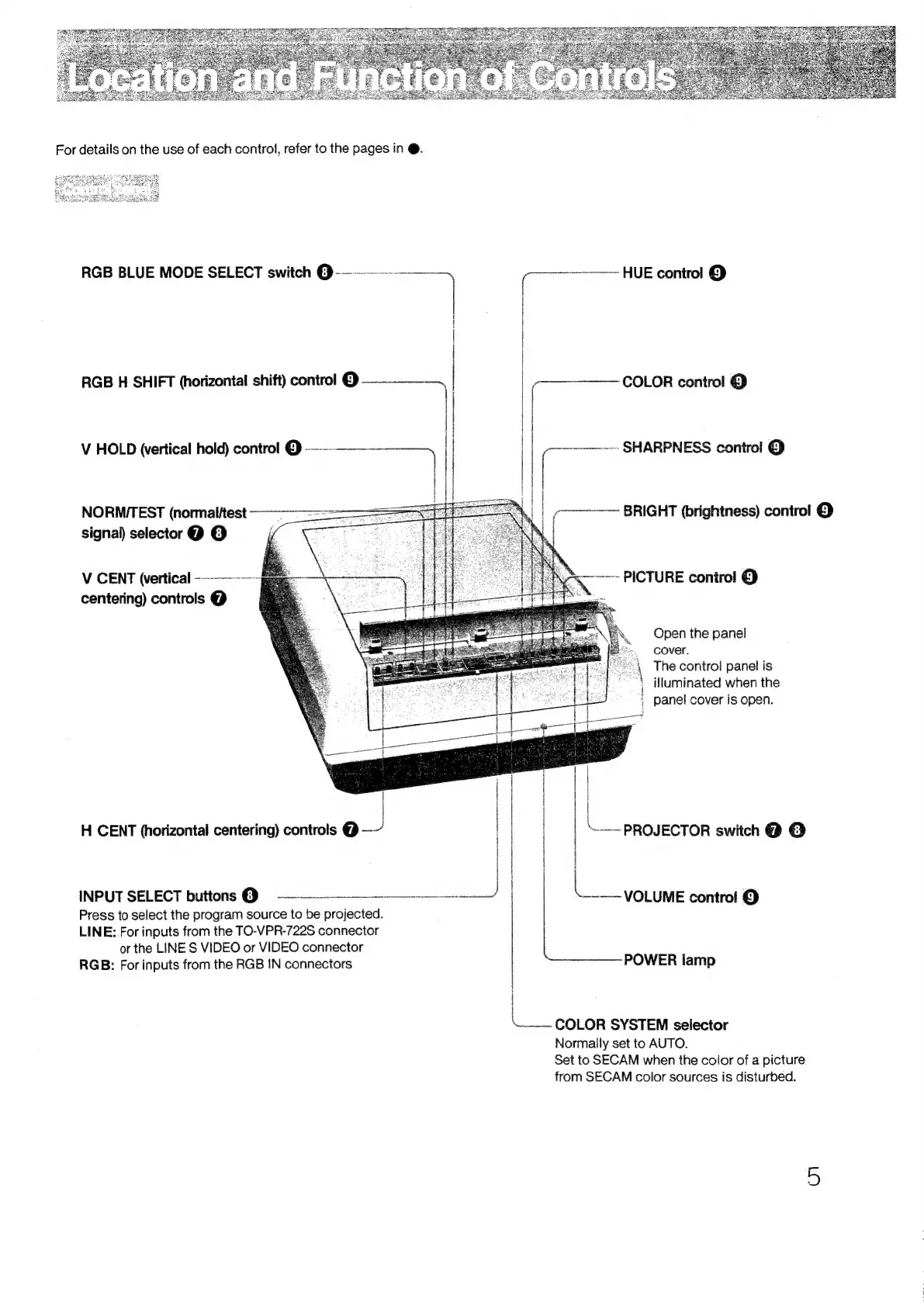
For
details
on
the
use
of
each
control,
refer
to
the
pages
in
@.
RGB
BLUE
MODE
SELECT
switch
@-----—----—
_
=
HUE
control
@
|
|
|
|
|
RGB
H
SHIFT
(horizontal
shift)
control
ren
|
|
a
COLOR
control
@
|
i
'
||
||
V
HOLD
\ertical
hold)
control
@
-——--——----
|
||
~~»
SHARPNESS
control
@
EL
ir
|
|
NORMTEST
(nommalitest
———--==:
7
BRIGHT
(brightness)
control
@
signal)
selector
@
©
POON
tenia
Se
ELAS
PICTURE
contro!
@
centering)
controls
@
if
aes
oS
Open
the
panel
cover.
\
The
control
panel
is
illuminated
when
the
;
panel
cover
is
open.
|
|
|
!
H
CENT
(horizontal
centering)
controls
@
|
PROJECTOR
switch
@
@
kee
control
©
|
heiceeas
POWER
lamp
INPUT
SELECT
buttons
@
9
—————
eae
Press
to
select
the
program
source
to
be
pralected
LINE:
For
inputs
from
the
TO-VPR-722S
connector
or
the
LINE
S
VIDEO
or
VIDEO
connector
RGB:
For
inputs
from
the
RGB
IN
connectors
nc
nen
en
\__-
COLOR
SYSTEM
selector
Normally
set
to
AUTO.
Set
to
SECAM
when
the
color
of
a
picture
from
SECAM
color
sources
is
disturbed.

Related product manuals