EasyManua.ls Logo

Sony VPH-1041Q - Page 6

Sony VPH-1041Q
22 pages
Print Icon
To Next Page IconTo Next Page
To Previous Page IconTo Previous Page
Loading...
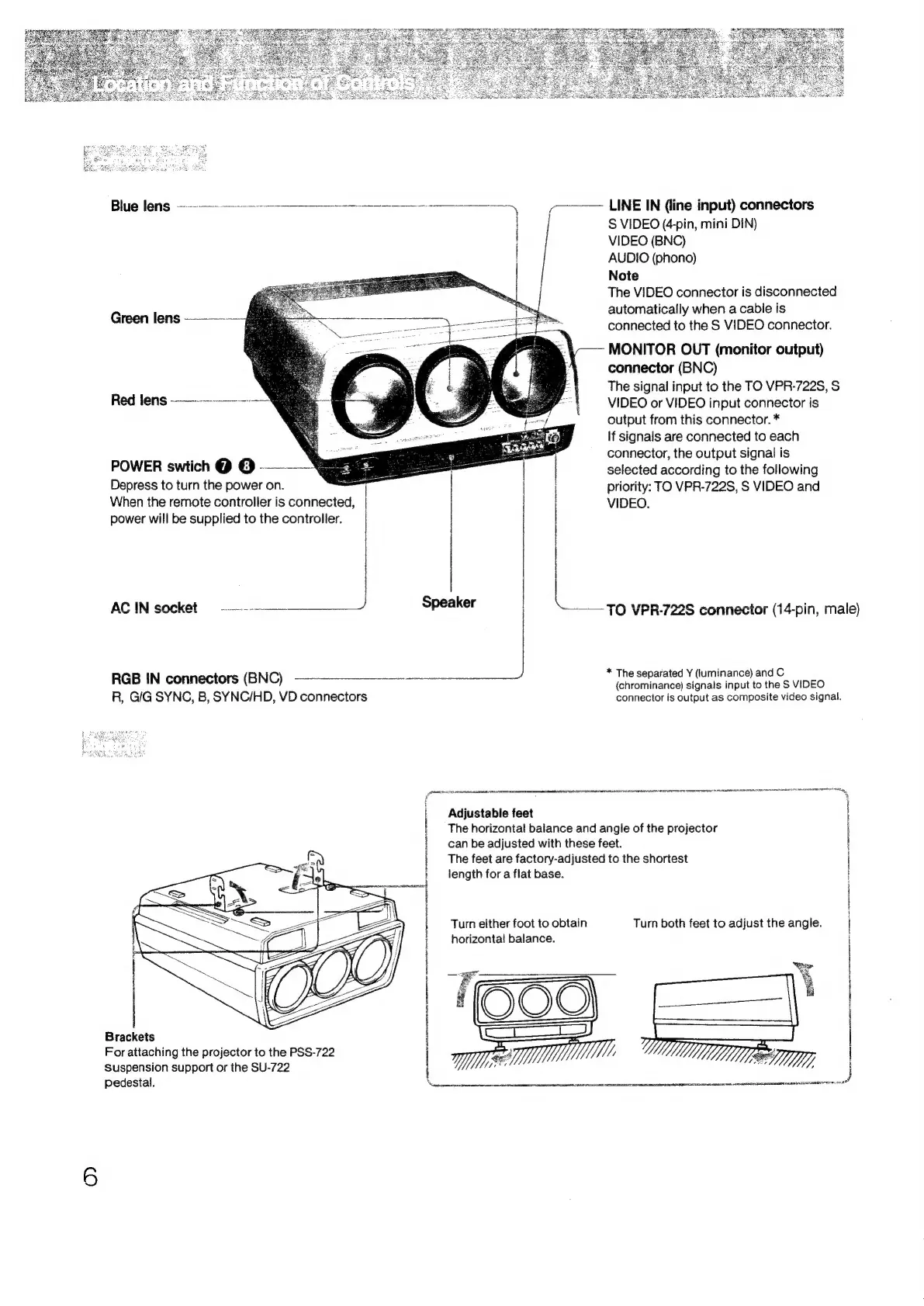
Blue
lens:
Se
ee
)
7
LINE
IN
(line
input)
connectors
S
VIDEO
(4-pin,
mini
DIN)
VIDEO
(BNC)
AUDIO
(phono)
Note
The
VIDEO
connector
is
disconnected
automatically
when
a
cable
is
connected
to
the
S
VIDEO
connector.
MONITOR
OUT
(monitor
output)
connector
(BNC)
The
signal
input
to
the
TO
VPR-722S,
S
VIDEO
or
VIDEO
input
connector
is
output
from
this
connector.
*
If
signals
are
connected
to
each
connector,
the
output
signal
is
Green
lens
Red
lens
——--—---—-%
POWER
swtich
@
©
--—-_%
selected
according
to
the
following
Depress
to
turn
the
power
on.
|
priority:
TO
VPR-722S,
S
VIDEO
and
When
the
remote
controller
is
connected,
i
VIDEO.
power
will
be
supplied
to
the
controller.
|
1
|
ACIN
socket
——.--———_____J
Speaker
TO.
VPR-722S
connector
(14-pin,
male)
RGB
IN
connectors
(BNC)
ee
*
The
separated
Y
(luminance)
and
C
(chrominance)
signals
input
to
the
S
VIDEO
R,
GIG
SYNC,
B,
SYNC/HD,
VD
connectors
connector
is
output
as
composite
video
signal.
entree
semana
ee
EON
AT
CHM
AE
EA
ORSON
PWS
AAUEN
STRUM
STEEN
Adjustable
feet
The
horizontal
balance
and
angle
of
the
projector
Brackets
For
attaching
the
projector
to
the
PSS-722
Suspension
support
or
the
SU-722
Pedestal.
Lees
ee
7S
SEER
HE
ROICRENI
T-ASE
ON
eR
STE
AT
{
|
|
|
can
be
adjusted
with
these
feet.
i
}
The
feet
are
factory-adjusted
to
the
shortest
i
}
length
fora
flat
base.
i
1
|
}
i
|
\
Turn
either
foot
to
obtain
Turn
both
feet
to
adjust
the
angle.
|
|
horizontal
balance.
i
|
er
i
ee
t
|
i
|
|
|
j
|
|
|
}

Related product manuals