EasyManua.ls Logo

Sony VPH-1041Q - Page 7

Sony VPH-1041Q
22 pages
Print Icon
To Next Page IconTo Next Page
To Previous Page IconTo Previous Page
Loading...
&
OPERATION
|
Installation
and
preliminary
adjustments
should
be
When
the
projector
is
installed
on
a
desk
or
on
the
floor
carried
out
by
qualified
Sony
personnel.
using
the
pedestal,
it
can
be
easily
moved
but
it
may
be
necessary
to
readjust
the
registration.
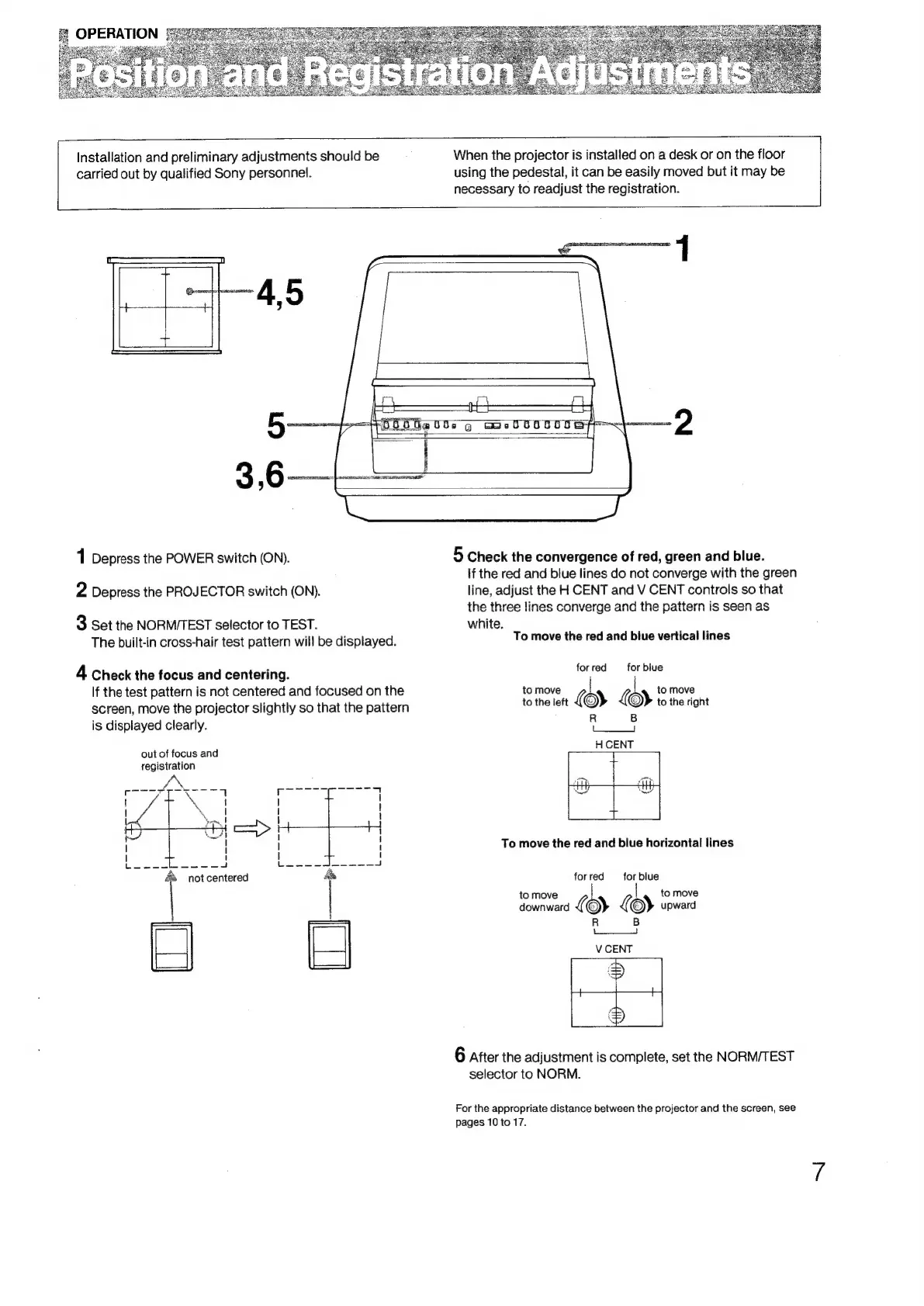
1
Depress
the
POWER
switch
(ON).
5
Check
the
convergence
of
red,
green
and
blue.
If
the
red
and
blue
lines
do
not
converge
with
the
green
2
Depress
the
PROJECTOR
switch
(ON).
line,
adjust
the
H
CENT
and
V
CENT
controls
so
that
the
three
lines
converge
and
the
pattern
is
seen
as
3
Set
the
NORMITEST
selector
to
TEST.
white.
The
built-in
cross-hair
test
pattern
will
be
displayed.
To
move
the
red
and
blue
vertical
lines
4
Check
the
focus
and
centering.
ioted
eos
If
the
test
pattern
is
not
centered
and
focused
on
the
to
move
ae
b
to
move
screen,
move
the
projector
slightly
so
that
the
pattern
lo
the
left
{)
)
to
the
right
—————
is
displayed
clearly.
out
of
focus
and
registration
To
move
the
red
and
blue
horizontal
lines
'
1
|
I
t
oe
oe
el
not
centered
&
for
red
for
blue
to
move
to
move
|
|
downward
(
©)
x
©)
upward
R B
6
Atter
the
adjustment
is
complete,
set
the
NORM/TEST
selector
to
NORM.
For
the
appropriate
distance
between
the
projector
and
the
screen,
see
pages
10
to
17.

Related product manuals