9
Connecting the Projector
Preparation
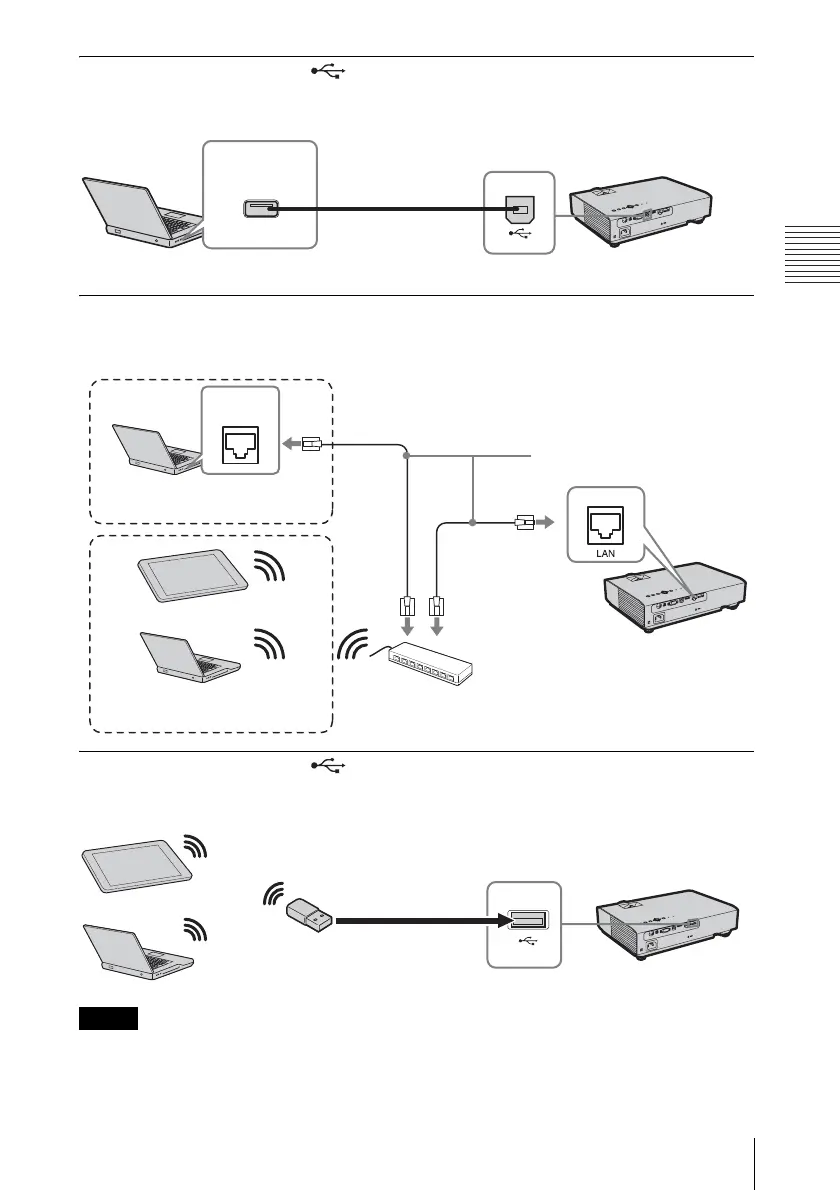
USB connector (Type B) ( )
For connecting to a computer with a USB connector (“Playing Video and Audio using USB
Connection” (page 43)).
LAN connector
For connecting to a computer, tablet PC, or smartphone via a hub or router (“Presentation
Function via Network” (page 39)).
USB connector (Type A) ( )
For connecting a USB wireless LAN module IFU-WLM3 (supplied) (“Presentation Function
via Network” (page 39)).
• Undesignated USB wireless LAN modules do not work.
• When connecting/disconnecting the USB wireless LAN module, make sure that the projector is in
Standby mode (Standby Mode: “Low”), or the AC power cord is unplugged from the wall outlet.
USB A-B cable (not
supplied)
Computer
USB connector
(Type A)
Notes
LAN cable (straight type)
(not supplied)
Computer
LAN
connector
Wired connection
Tablet PC/Smartphone
Computer
Wireless connection
Hub, router (wireless), etc.
USB wireless LAN module
IFU-WLM3 (supplied)
Tablet PC/Smartphone
Computer


 To Next Page