EasyManua.ls Logo

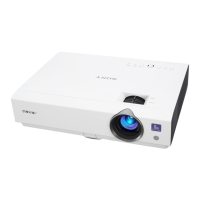
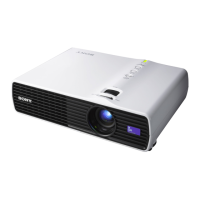
Sony VPL-DX10 - User Manual

Sony VPL-DX10
79 pages
Print Icon
To Next Page IconTo Next Page
Loading...
4-128-127-12 (2)
© 2009 Sony Corporation
Data
Projector
Operating Instructions
Before operating the unit, please read this manual thoroughly
and retain it for future reference.
VPL-DX10/DX11/DX15
Not all models are available in all countries and area. Please check
with your local Sony Authorized Dealer.

Table of Contents

Other manuals for Sony VPL-DX10

Questions and Answers

  • B
    benjamin01Sep 15, 2025
    How to fix image extending beyond the screen on Sony VPL-DX10 Projector?
    • K
      kerrdevonSep 15, 2025
      If the image extends beyond the screen on your Sony Projector: * The APA key has been pressed even though there are black edges around the image: Display the full image on the screen and press the APA key. * The screen setting is not proper: Adjust “Shift” on the Screen setting menu.
  • J
    Jasmine MorrowAug 25, 2025
    How to fix a Sony VPL-DX10 that won't turn on?
    • Y
      Yolanda ReynoldsAug 25, 2025
      If your Sony Projector is not turning on, make sure the AC power cable is firmly connected. Also, check that the lamp or lamp cover is securely closed.
  • T
    Tina TaylorAug 25, 2025
    Why is the picture too dark on my Sony VPL-DX10?
    • M
      myersmadisonAug 26, 2025
      If the picture on your Sony Projector is too dark, it could be due to improperly adjusted contrast or brightness settings. Adjust the Contrast or Brightness in the Picture menu. It's also possible that the lamp has burnt out or is dim. Check the Lamp Timer in the Information menu.
  • R
    Ryan SimmonsAug 26, 2025
    How to fix incorrect color balance on Sony VPL-DX10 Projector?
    • K
      Kiara SandovalAug 27, 2025
      If the color balance on your Sony Projector is incorrect, the image quality setting may not be proper; adjust it in the Picture menu. Also, the setting of “Input-A Signal Sel.” in the Setup menu might be incorrect; select “Computer,” “Video GBR” or “Component” according to the input signal. Finally, ensure “Color System” in the Setup menu matches the color system being input.
  • L
    Lisa SimmonsSep 16, 2025
    How to stop picture flickering on Sony VPL-DX10 Projector?
    • S
      stephen18Sep 16, 2025
      If the picture flickers on your Sony Projector, adjust “Phase” on Screen setting menu.
  • P
    pdavisSep 23, 2025
    What to do if the ?/1 key flashes red (6 flashes) on Sony VPL-DX10?
    • T
      Tyler WilliamsSep 23, 2025
      Unplug the AC power cord from the wall outlet after the ?/1 key goes out, plug the power cord to the wall outlet, and then turn the projector on again. If the ?/1 key flashes in red and the problem persists, consult with qualified Sony personnel.
  • J
    Jessica ConwaySep 7, 2025
    Why is the LAMP/COVER indicator flashing orange with 3 flashes on my Sony VPL-DX10 Projector?
    • B
      Brooke ThompsonSep 8, 2025
      If the LAMP/COVER indicator is flashing orange with a repetition rate of 3 flashes, it could be due to the interior of the unit reaching a high temperature. Make sure nothing is blocking the fresh-air inlet and exhaust outlet. It could also mean the lamp has reached a high temperature, in which case you should wait for 90 seconds for the lamp to cool, then turn the power on again.
  • D
    Deanna AllenSep 8, 2025
    How to turn on on-screen display on Sony VPL-DX10?
    • T
      tracey60Sep 9, 2025
      If the on-screen display does not appear on your Sony Projector, check if “Status” in the Setup menu has been set to “Off.” If so, set it to “On.”
  • P
    Pamela ArnoldSep 2, 2025
    What does it mean when the ?/1 key flashes red on my Sony VPL-DX10?
    • G
      Gary JohnsonSep 2, 2025
      If the ?/1 key flashes red with a repetition rate of 2 flashes, it indicates that the internal temperature is unusually high. Check to see that nothing is blocking the ventilation holes. It could also mean the projector is being used at a high altitude; in this case, ensure that “High Altitude Mode” in the Setup menu is set to “On.”
  • R
    Randall LambAug 31, 2025
    Why is the LAMP/COVER indicator flashing orange on my Sony VPL-DX10 Projector?
    • R
      Rickey RiveraAug 31, 2025
      If the LAMP/COVER indicator on your Sony Projector is flashing orange with a repetition rate of 2 flashes, it means the lamp cover is detached. Attach the cover securely.

Summary

Precautions

On safety

Essential safety guidelines for operating the projector.

On preventing internal heat build-up

Instructions to avoid overheating and potential damage.

Notes on Installation and Usage

Physical Installation Constraints

Avoid toppling, tilting, blocking vents, or obstructing the lens.

Overview

Projector Controls and Components

Identifies and explains main unit controls and panels.

Remote Commander Functions

Details the operation of the remote control.

Projecting the Picture

Connecting a Computer

Steps for connecting a computer for display output.

Maintenance

Replacing the Lamp

Step-by-step guide for replacing the projector lamp.

Others

Troubleshooting Common Issues

Solutions for common projector problems and error messages.

Sony VPL-DX10 Specifications

General IconGeneral
Resolution1024 x 768 (XGA)
Contrast Ratio2000:1
Display Technology3 LCD
Projection Size30 to 300 inches
Aspect Ratio4:3
Lamp TypeUHP
Input ConnectorsS-Video, Composite Video
Power Consumption220W

Related product manuals