EasyManua.ls Logo

Sony Walkman TCD-D7 - Power Sources; Battery Installation and Usage; Battery Power Status Display; Low-Power Consumption Mode

Sony Walkman TCD-D7
30 pages
Print Icon
To Next Page IconTo Next Page
To Previous Page IconTo Previous Page
Loading...
Power
Sources
Using
with
Batteries
Use
four
size
AA
(LR6)
alkaline
batteries.
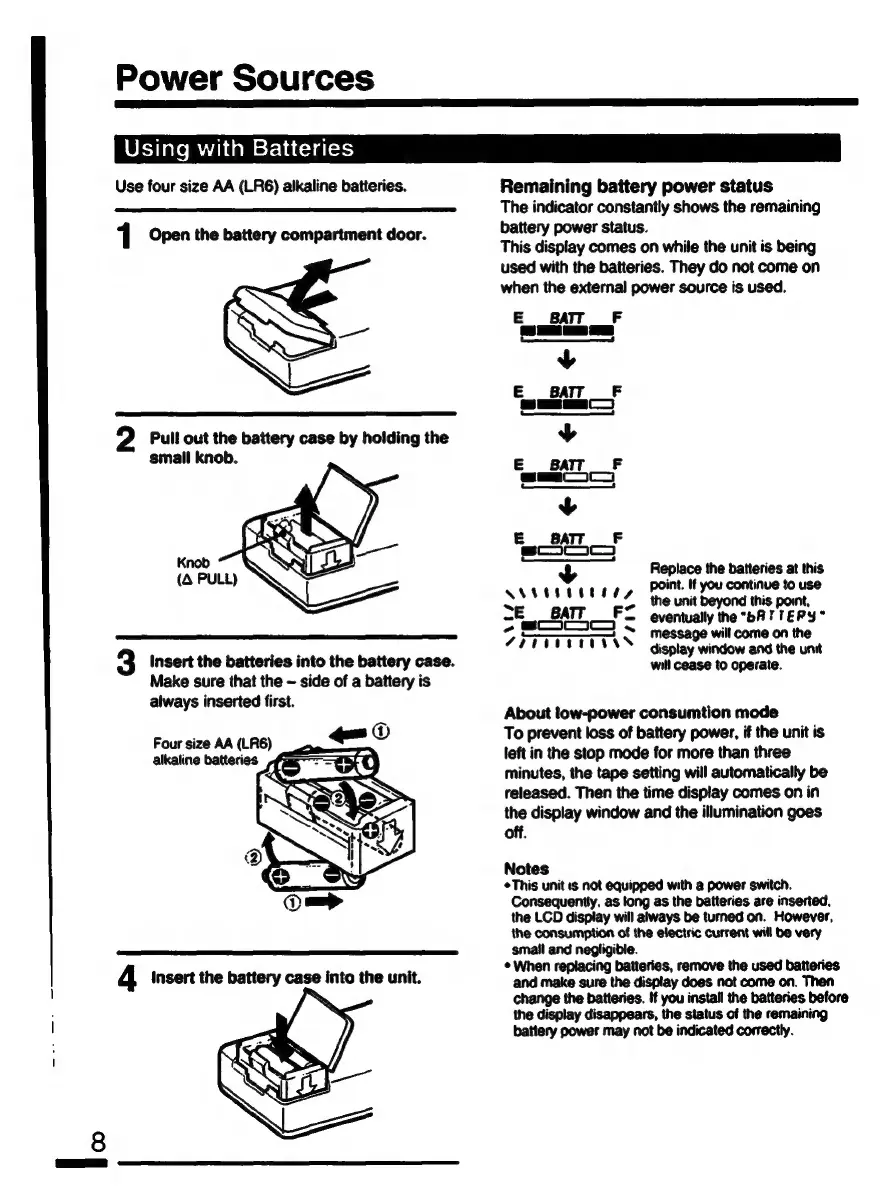
1
Open
the
battery
compartment
door.
2
Pull
out
the
battery
case
by
holding
the
small
knob.
3
Insert
the
batteries
into
the
battery
case.
Make
sure
that
the
~
side
of
a
battery
is
always
inserted
first.
Four
size
AA
(LR6)
alkaline
batteries
Remaining
battery
power
status
The
indicator
constantly
shows
the
remaining
battery
power
status.
This
display
comes
on
while
the
unit
is
being
used
with
the
batteries.
They
do
not
come
on
when
the
external
power
source
is
used.
E
BATT
F
A
s]
sd
y
BATT
_F
BDE
EAC
y
E
BATT
F
am
y
E
BAT
F
sanm
+
Replace
the
batteries
at
this
point.
If
you
continue
to
use
+
;
poy
+
as
the
unit
beyond
this
point,
7
SOLO
T
eventually
the
“bATTEPY*
Žr
iiias
Message
will
come
on
the
display
window
and
the
unit
will
cease
to
operate.
About
low-power
consumtion
mode
To
prevent
loss
of
battery
power,
if
the
unit
is
left
in
the
stop
mode
for
more
than
three
minutes,
the
tape
setting
will
automatically
be
released.
Then
the
time
display
comes
on
in
the
display
window
and
the
illumination
goes
off.
Notes
This
unit
ıs
not
equipped
with
a
power
switch.
Consequently.
as
long
as
the
batteries
are
inserted.
the
LCD
display
will
always
be
turned
on.
However,
the
consumption
of
the
electric
current
will
be
very
small
and
negligible.
+
When
replacing
batteries,
remove
the
used
batteries
and
make
sure
the
display
does
not
come
on.
Then
change
the
batteries.
If
you
install
the
batteries
before
the
display
disappears,
the
status
of
the
remaining
battery
power
may
not
be
indicated
correctly.

Related product manuals