Help Guide
Wireless Stereo Headset
WF-SP900
Charging the battery
Both the player and the charging case have rechargeable batteries. Before you use the player, store the player inside the
charging case and charge all of the batteries.
The charging case is not water resistant. Before you store the player inside the charging case, ensure the following.
The player is not wet.
The accessories (earbuds, arc supporters, and leash cord) are not wet.
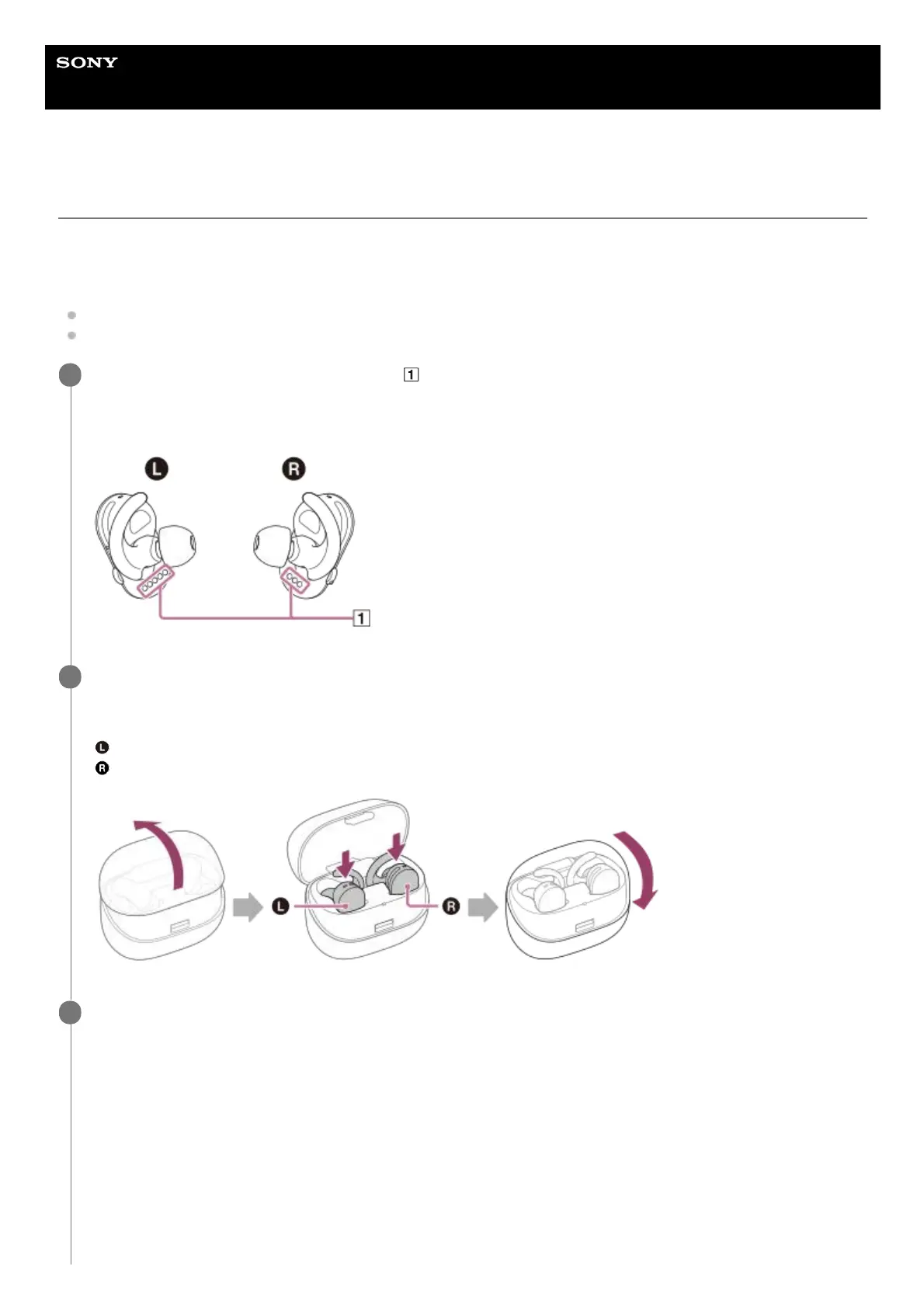
Use a soft, dry cloth to wipe the terminals (
) of the player well.
If there is moisture on the player or on the accessories, wipe it off completely. Leave the player and accessories at
room temperature to dry until no moisture remains before you start charging.
1
Store the player inside the charging case correctly, and close the cover.
Confirm the left and right indications on the charging case and the player when you store the player inside the
charging case.
: left
: right
2
Connect the USB Type-C cable to the USB Type-C port of the charging case and a USB AC adaptor. (USB
Type-C cable: supplied) Then, connect the USB AC adaptor to the wall socket (wall outlet). Or, use the USB
Type-C cable to connect the charging case to a running computer.
Connecting the charging case to a wall socket (wall outlet)
3



 To Next Page