EasyManua.ls Logo

Sony WRT-810A - Page 15

Sony WRT-810A
24 pages
Print Icon
To Next Page IconTo Next Page
To Previous Page IconTo Previous Page
Loading...
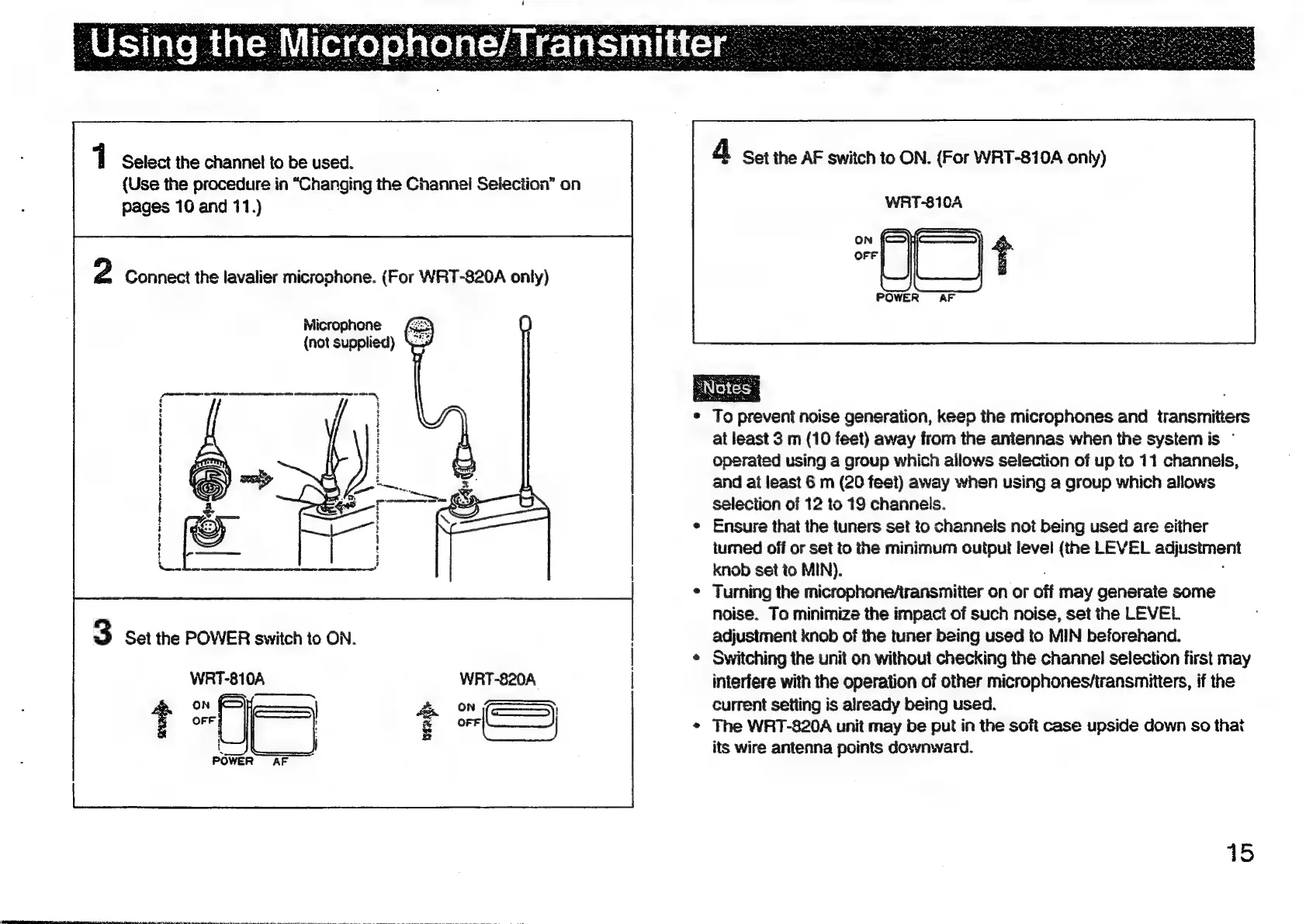
Select
the
channel
to
be
used.
(Use
the
procedure
in
“Changing
the
Channel
Selection”
on
pages
10
and
11.)
2
Connect
the
lavalier
microphone.
(For
WRT-820A
only)
Microphone
(not
supplied)
ee
ao
i)
Jie
3
Set
the
POWER
switch
to
ON.
|
=|
f
ie
\
foams
:
!
}
§
H
}
i
:
i
t
:
Le
oF
an
WRT-820A
tO
.
-(—)
UL
4
Set
the
AF
switch
to
ON.
(For
WRT-810A
only)
WRT-810A
oo
To
prevent
noise
generation,
keep
the
microphones
and
transmitters
at
least
3
m
(10
feet)
away
from
the
antennas
when
the
system
is
°
operated
using
a
group
which
allows
selection
of
up
to
11
channels,
and
at
least
6
m
(20
feet)
away
when
using
a
group
which
allows
selection
of
12
to
19
channels.
Ensure
that
the
tuners
set
to
channels
not
being
used
are
either
turned
off
or
set
to
the
minimum
output
level
(the
LEVEL
adusiment
knob
set
to
MIN).
Turing
the
microphoneAransmitter
on
or
off
may
generate
some
noise.
To
minimize
the
impact
of
such
noise,
set
the
LEVEL
adjustment
knob
of
the
tuner
being
used
to
MIN
beforehand.
Switching
the
unit
on
without
checking
the
channel
selection
first
may
interfere
with
the
operation
of
other
microphones/transmitiers,
if
the
current
setting
is
already
being
used.
The
WRT-820A
unit
may
be
put
in
the
soft
case
upside
down
so
that
its
wire
antenna
points
downward.
45

Other manuals for Sony WRT-810A

Related product manuals