EasyManua.ls Logo

Sony WRT-810A - Page 7

Sony WRT-810A
24 pages
Print Icon
To Next Page IconTo Next Page
To Previous Page IconTo Previous Page
Loading...
Si
a
aS
ha
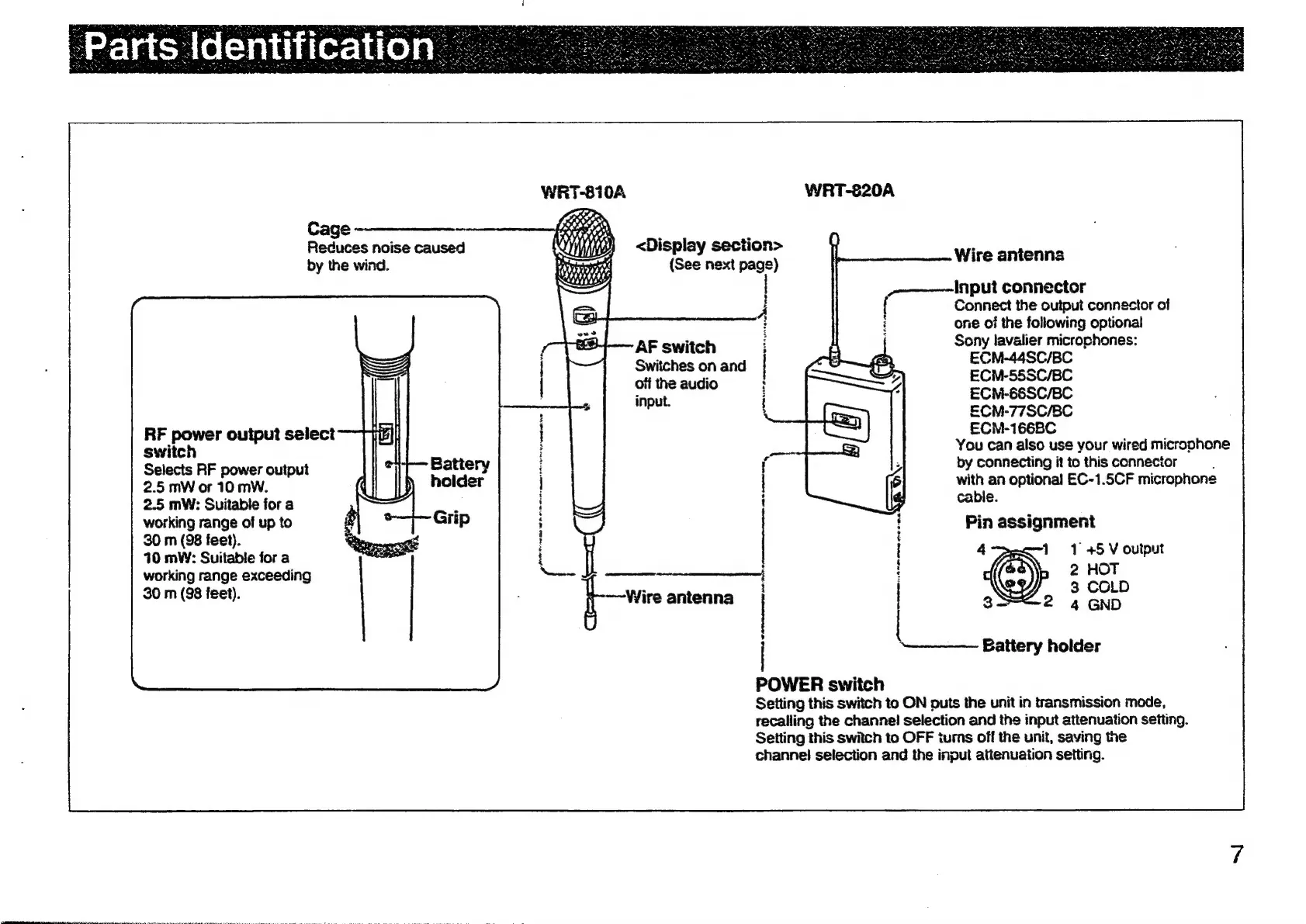
WRT-810A
WRT-820A
Cage
--——__—-
Reduces
noise
caused
by
the
wind.
<Display
section>
(See
next
page)
Wire
anienna
-~———~~-Input
connector
{
Connect
the
output
connector
of
i
one
of
the
following
optional
Sony
lavalier
microchones:
AF
switch
Switches
on
and
ECM-44SC/BC
off
the
audio
ECN-55SC/BC
input.
ECM-68SC/BC
ECN-77SC/8C
ECM-166BC
RF
power
output
select
switch
Selects
RF
power
output
2.5
mW
or
10
mW.
2.5
mW:
Suitable
for
a
working
range
of
up
to
30
m
(98
feet).
You
can
also
us¢
your
wired
microphone
by
connecting
it
to
this
connector
with
an
optional
EC-1.5CF
microphone
cable.
Pin
assignment
1
1
45
V
ouiput
PNET
ee
ah
A
Om
ene
emt
Oe
cee
10
mW:
Suitable
for
a
working
range
exceeding
bene
2
HOT
30
m
(98
jeet).
3
COLD
3
2
4
GND
Battery
holder
=
a
2
a
s
5
i
bee
paat
pret
aaiiaramaiacs.
POWER
switch
Setting
this
switch
to
ON
puts
the
unit
in
transmission
mode,
recalling
the
channel!
selection
and
the
input
attenuation
setting.
Setting
this
switch
to
OFF
tums
off
the
unit,
saving
the
channel
selection
and
the
input
attenuation
setting.

Other manuals for Sony WRT-810A

Related product manuals