Camera
About the camera
With your phone camera, you can take regular 2D photos. Send your photos and videos
to friends as multimedia messages, or upload them to a web service.
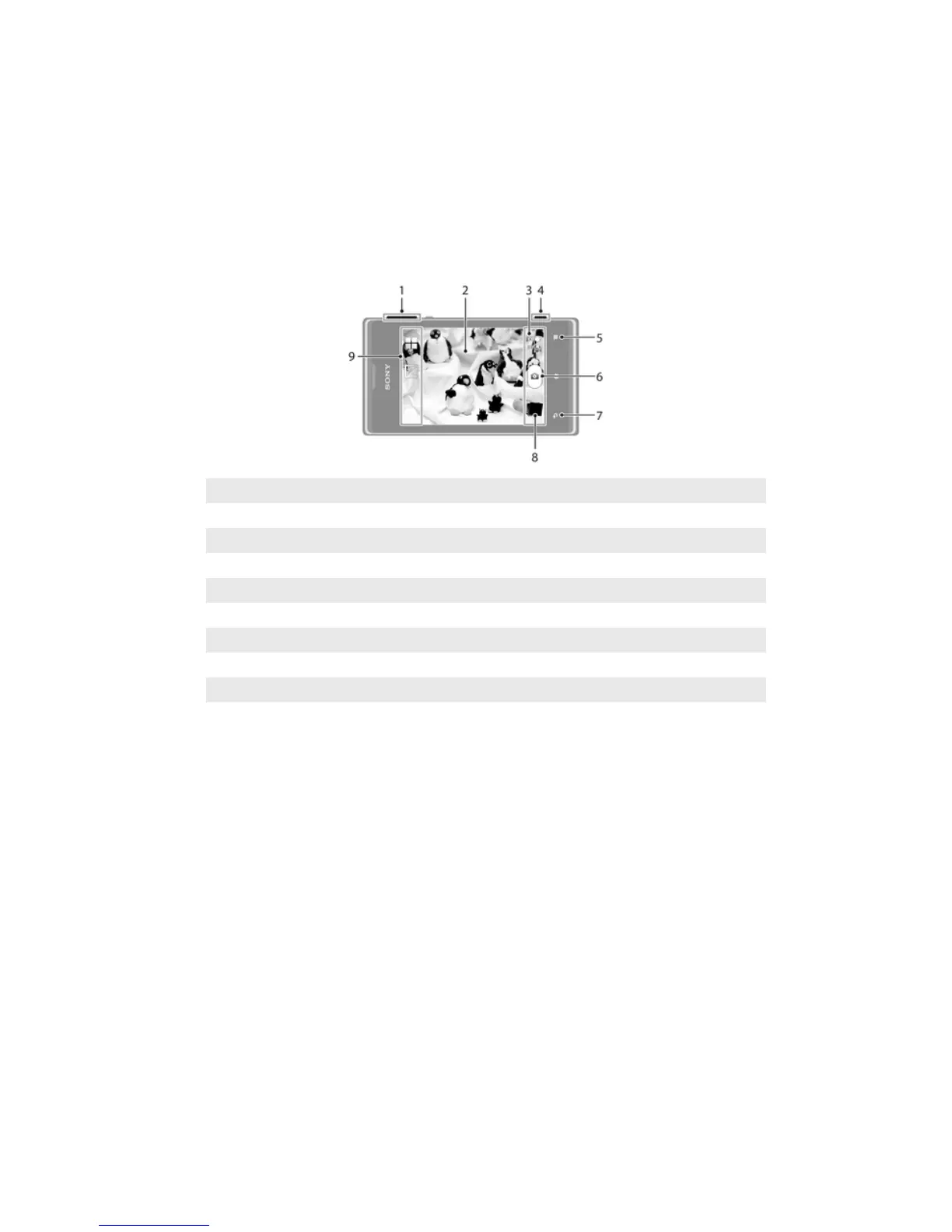
Camera controls overview
1 Zoom in or out
2 Main camera screen
3 Switch between still and video camera
4 Camera key – Activate the camera/Take photos/Record videos
5 Display all settings
6 Take photos or record video clips
7 Go back a step or exit the camera
8 View photos and videos
9 Camera setting icons
Tips on using the camera
Rule of thirds
Don’t place your subject in the middle of the frame. By placing it a third of the way in,
you achieve a better result.
Hold it steady
Avoid blurry photos by holding the camera steady. Try to steady your hand by leaning it
against a solid object.
Get closer
By getting as close as possible to your subject, you can fill the camera screen view with
your subject.
Consider variety
Think about different angles, and move towards the subject. Take some vertical photos.
Try different positions.
Use a plain background
A plain background helps highlight your subject.
Keep your lens clean
Cell phones are used in all kinds of weather and places, and carried in pockets and
bags. This results in the camera lens becoming dirty and covered with fingerprints. Use a
soft cloth to clean the lens.
65
This is an Internet version of this publication. © Print only for private use.



 To Next Page