Help Guide
Wireless Speaker
SRS-XV500
Listening to music of a USB device
The speaker supports the following audio file formats.
MP3: file extension [.mp3]
WMA: file extension [.wma]
WAV: file extension [.wav]
Hint
While loading from the connected device is in progress, USB on the speaker keeps flashing.
Note
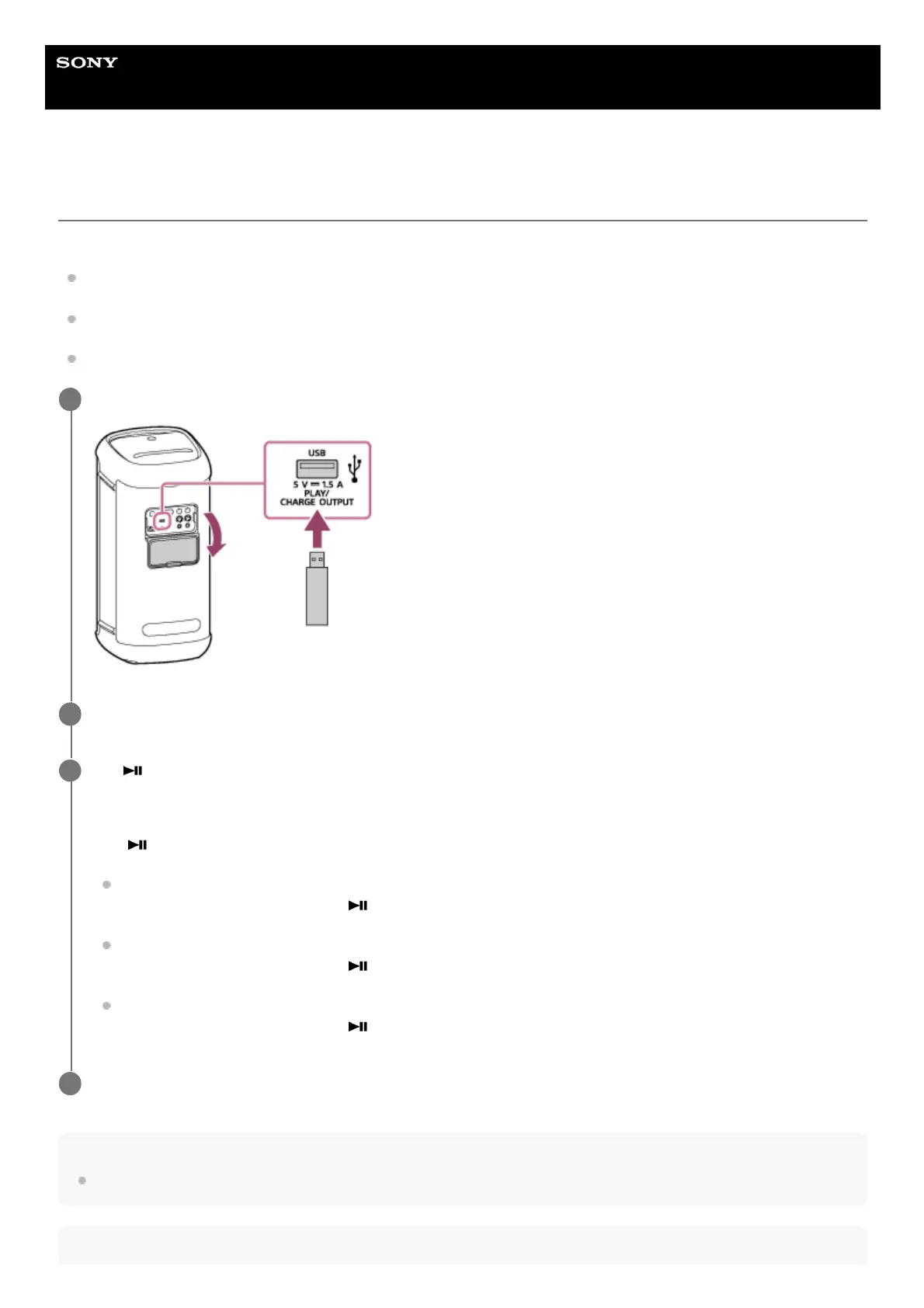
Connect a USB device to the PLAY/CHARGE OUTPUT port (USB).
1
Tap USB on the speaker.
2
Tap (play) on the speaker to start playback.
You can use “Sony | Music Center” for playback operations or effortless music selection from the music list on the
USB device.
With
(play) on the speaker, you can perform the following operations as well.
Pausing the playback
While playback is in progress, tap
(play) on the speaker. To restart the playback, tap it once again.
Skipping to the next track
While playback is in progress, tap
(play) on the speaker twice in a quick succession.
Skipping to the beginning of the current or previous track
While playback is in progress, tap
(play) on the speaker 3 times in a quick succession.
3
Tap –/+ (volume) on the speaker to adjust the volume.
4



 To Next Page