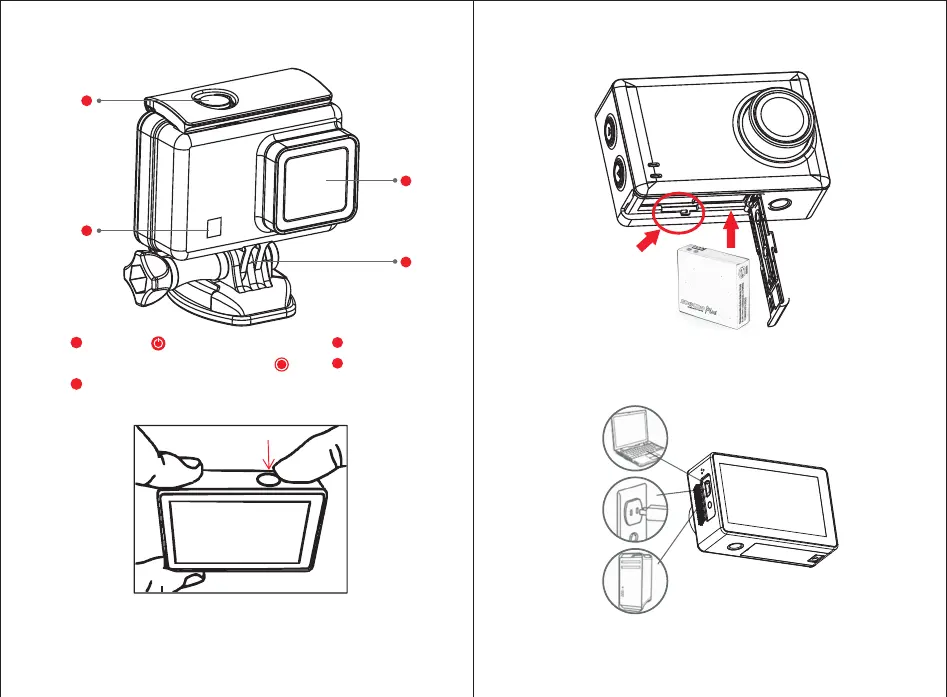
Charge the battery by connecting camera to 5V/1A AC/DC
adapter(not included), or connecting to PC.
1
2
3
4
3、Waterproof Case Instruction
1
2
ON/OFF
3
4
Lens
Base amount
Video/Photo and OK button
Indicators window
4、Battery Installation and Charging
Open the battery cover, insert Mirco SD card first and then insert battery.
(Please pay attention to the direction of battery and Mirco SD card. )
TF Card
Only one button on the top of waterproof case. Short press
button to turn camera on and long press to turn camera
off. When camera is turned on, short press the button ot
take a photo a video according to the preset modes.


 To Next Page