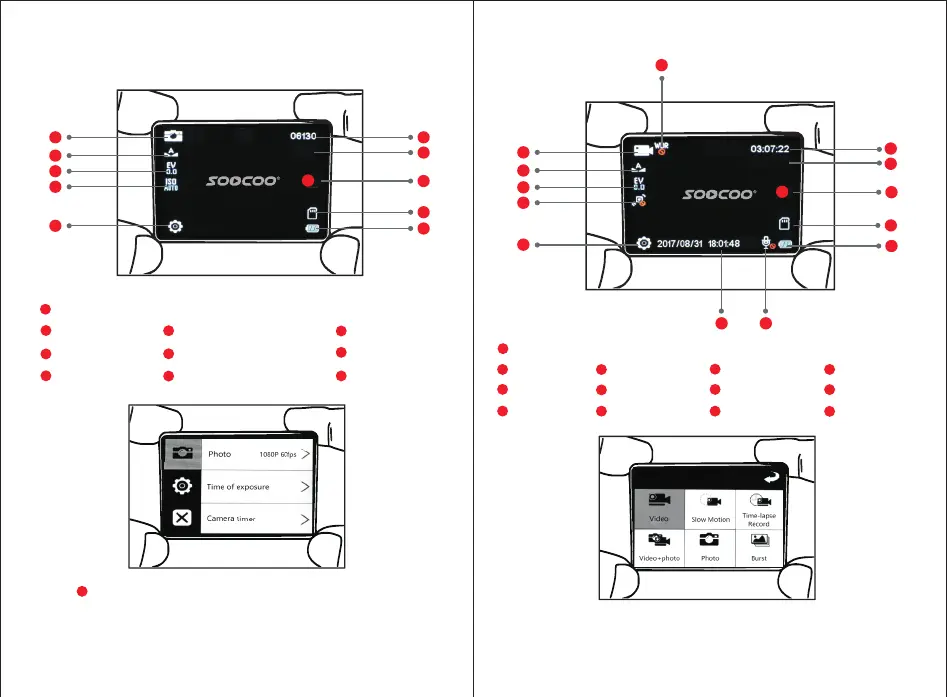
5、Photo Mode UI Introduction
1
Current Mode(Video/Slow Motion/Time Lapse/Take photo during video)
1
Current mode (Photo/Burst)
Press Setting or slide Right to enter photo setting interface,
select menu by touching and sliding on screen.
Press Up/Down to view menu and select the setting by pressing
Power button. Long press Down button to select another 3 menus
on the left.
6、Video Mode UI Introduction
1
2
3
4
5
6
7
10
9
8
1
2
3
4
6
7
9
11
5
8
13 12
10
Mirco SD Card
12
2
White Balance
3
Exposure
Gyro
4
5
Setting
11
Audio Status
10
Power Indicator
Date and Time
13
8
Video Resolution
9
Video Start/Stop
6
WDR
7
Time of Video Remaining
9
Micro SD card
8
Photo Button
10
Power Indicator
7
Image resolution
6
Photos Quantity Remaining
3
Exposure
2
White Balance
4
ISO
Setting
5
Slide up on screen to enter above interface, then touch on screen
to select any mode.
Short press Up button to enter above interface, then press
Up/Down and Power button to select a mode.
12M P
4K3 0
5


 To Next Page