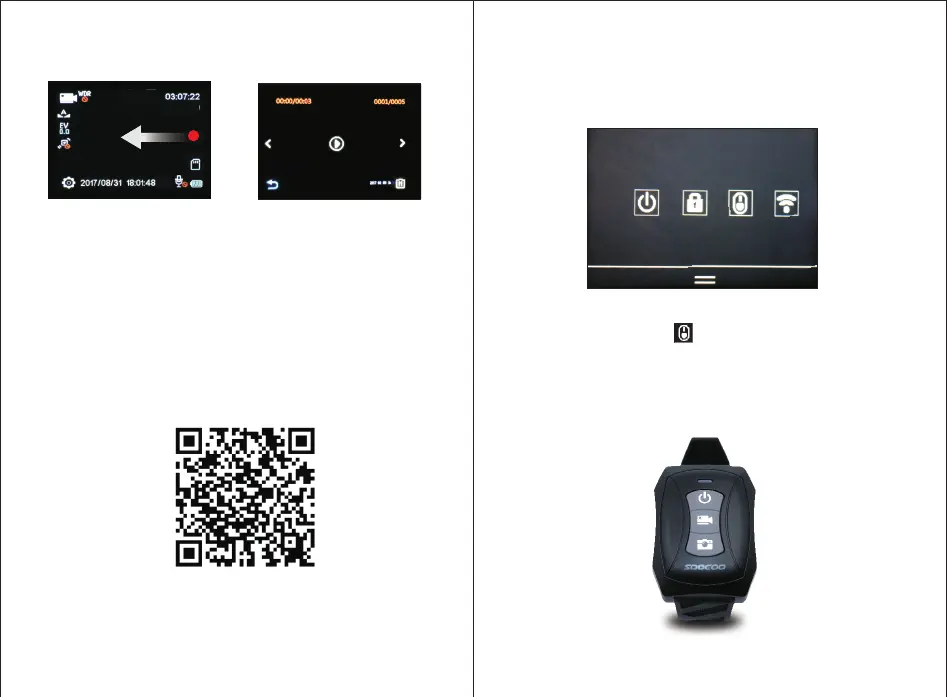
7、APP Usage Introduction
Open WIFI Setting in the mobilephone, and find the camera
IP,then connect wifi with password on camera.
Scan QR Code below to download APP
8、How to Match Bluetooth Remote Control
1. Slide down on the screen, open the shortcut menu.
2.Touch bluetooth icon to enter matching mode.
3.Press Photo button and Power Off button on remote control
at the same time and release until blue indicator flashes.
4.Blue indicator stop flashing when match is finished.
4K 3 0
Slide from right to left to enter Playback interface.
Universal for Android and Apple


 To Next Page