- 5 -
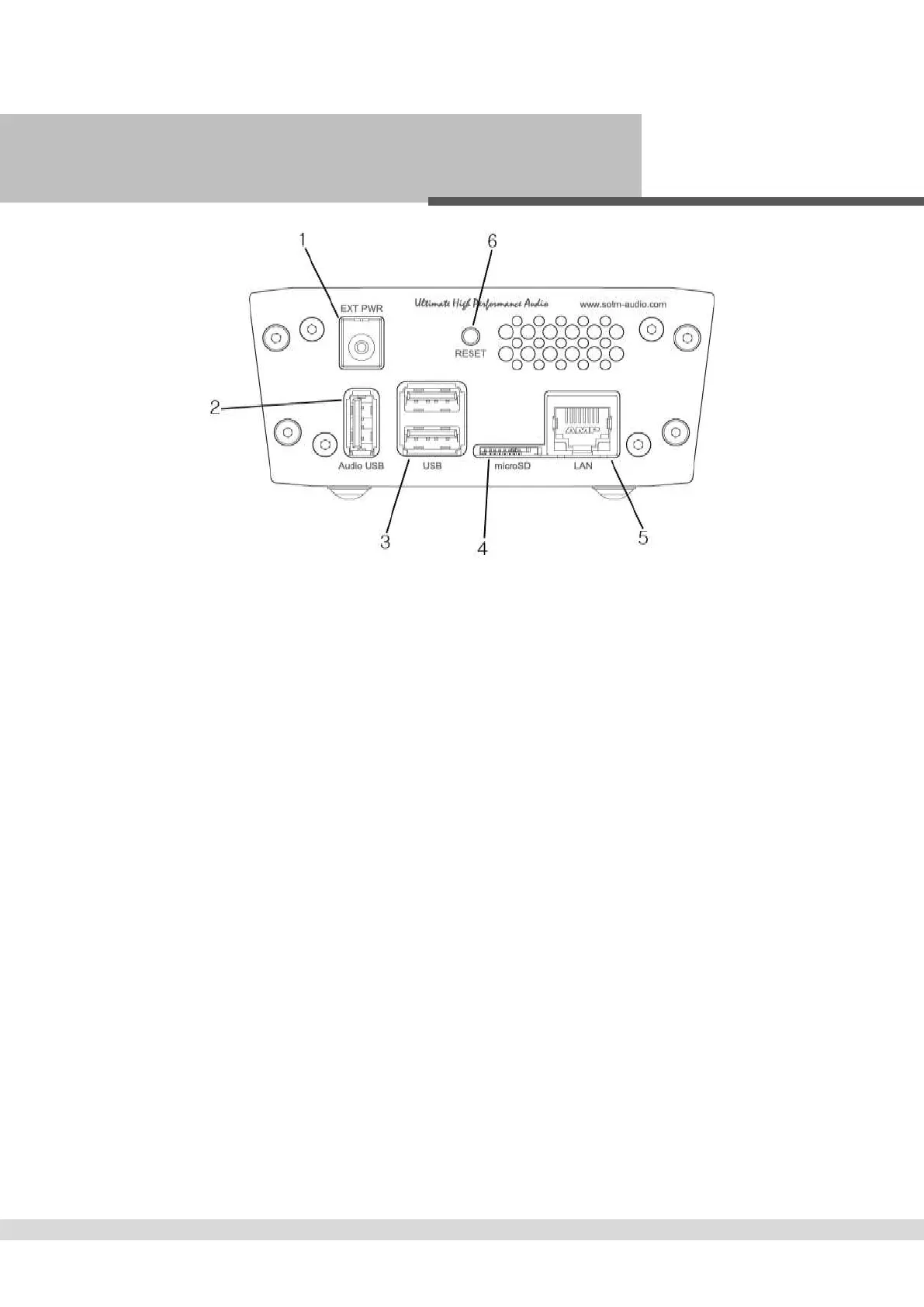
후면구조(Rear Panel)
① 전원 입력 잭 : 전원 공급 장치와 연결 합니다.
Power input jack : Connect to a power supply.
② 오디오 전용 USB 포트 : USB 오디오 기기를 연결 합니다.
High-End audio grade USB port : Connect to USB audio device.
③ USB 2.0 포트 : USB 저장 장치와 연결 합니다.
USB 2.0 port : Connect to USB storage device.
④ microSD 카드 커넥터 : 제품의 OS 가 저장되어 있는 microSD 카드가 삽입되어 있습니다.
microSD card connector : The micro SD card which the product OS is loaded on is inserted.
주의 : 제품 전원이 인가 되어 있을 때에는 절대 microSD 카드를 빼지 마십시오. 제품이 파손 될 수 있습니다.
Caution: do not pull out the micro SD card while the unit is powered on. Product might be damaged.
⑤ LAN 포트 : 네트워크 케이블을 이용하여 공유기와 연결 합니다.
LAN port : Connect to a router by network cable.
⑥ Reset 스위치 : 제품을 강제로 재시작 합니다.
Reset switch : Reset the product by force.



 To Next Page