Need help?
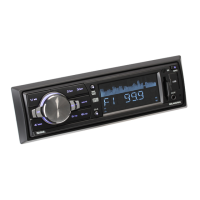
Do you have a question about the Sound Storm ML40USA and is the answer not in the manual?
Identifies and labels buttons on the remote handset for user operation.
Advises on fire, shock risk, repair, driving concentration, and temperature.
Details the PWR/SRC button for power and input source selection.
Explains memorizing and recalling radio stations using preset buttons.
Lists power, output, dimensions, weight, and fuse details.
Details FM and AM frequency ranges and channel steps.
Lists items included with the unit, like manual and remote.
Addresses common issues with power and audio output.
Solutions for weak signals or noisy broadcasts.
Fixes for reset presets and USB/SD card playback problems.
Details how to display and adjust the unit's clock.
Describes the SD/MMC Card and USB input ports.
Explains how to adjust volume and select EQ modes.
Covers FF/FB buttons for track skip and auto-tuning.
Details band selection, AM/FM scan, and mute operation.
Information on the AUX IN jack and the reset button.
Diagrams RCA output sockets and speaker wire connections.
Details power supply wiring and antenna connection.
Specifies the required dashboard opening size and thickness.
Instructions for inserting and securing the mounting collar.
Guidance on fixing the unit using mounting bolts and cushions.
 General
| Brand | Sound Storm |
|---|---|
| Model | ML40USA |
| Category | Car Receiver |
| Language | English |

 To Next Page