SoundLine AUX cables sold separately.
When you plug in the audio cable, it automatically switches to AUX mode. When using the
AUX mode, control audio playback using the connected device. Oh please.
True Wireless Stereo (TWS) mode cannot be used in AUX mode. is .
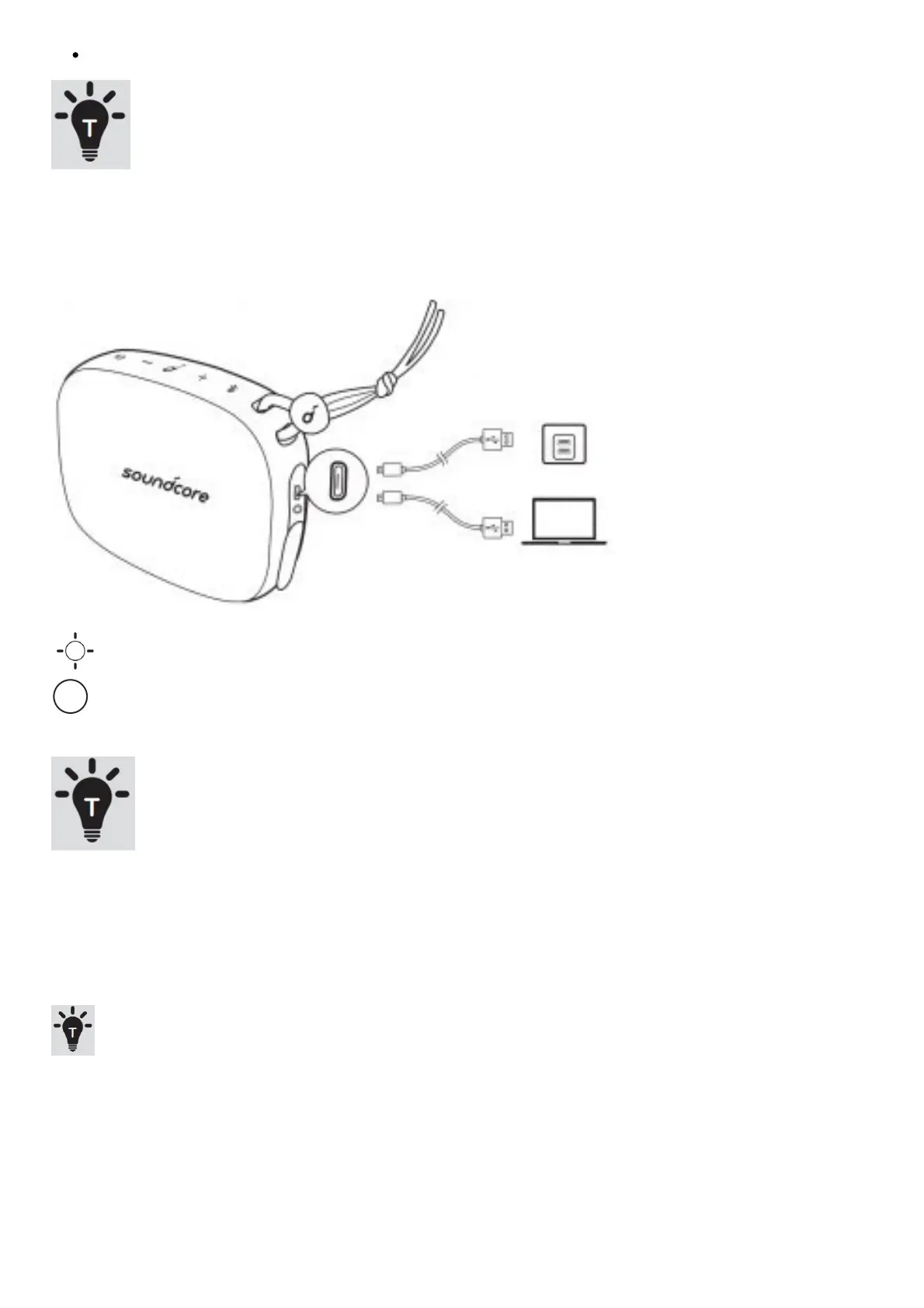
Charging the Soundcore Icon Mini
Flashing slowly in red: Low battery
Keep red: Charging
Off: Fully charged
Charge the Soundcore Icon Mini with the included USB cable.
Five . When using for the first time, be sure to fully charge it before use.
When fully charged, disconnect the speaker from the charger. Fully charged
Do not charge the speaker afterwards.
Keep the speaker in a cool place when not in use.
Specification
Specifications are subject to change without prior notice.
Input: 5 V 1 A
Audio output: 3 W
Battery capacity: up to 900mAh
Charging time: 3 hours
Playing time (depending on volume level and music content): 8 hours
Size: 95 x 76 x 36 mm / 3.7 x 2.9 x 1.4 inches
Weight (without packaging): 215 g/7.6 oz
Bluetooth version: V4.2
Bluetooth range: 30m/99ft









 To Next Page