EasyManua.ls Logo

Soundcore Motion B - Power and Charging; Charging Your Speaker; Charging USB Devices; Powering On and Off

Soundcore Motion B
38 pages
Print Icon
To Next Page IconTo Next Page
To Previous Page IconTo Previous Page
Loading...
English English
05 06
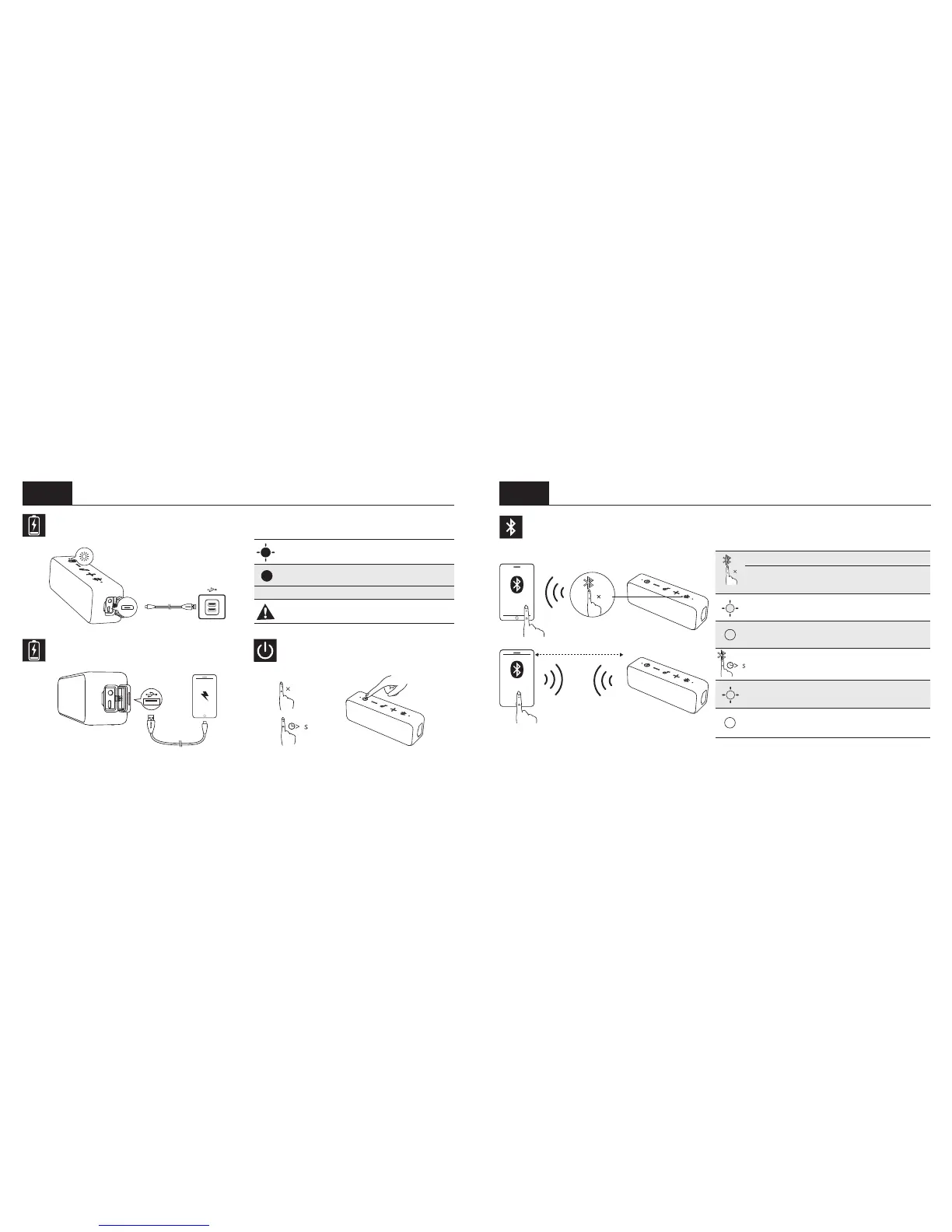
Charge Your Speaker
Slow flashing red
(Power indicator)
Low battery
Steady red (Power
indicator)
Charging
O (Power indicator) Fully charged
To preserve battery lifespan, fully
charge at least once every 45 days.
Charge USB Devices Turn on / off
1
2
On
O
2
Bluetooth Pairing
ON
Soundcore
Motion B
1m
1
1
Enter pairing mode.
Un-pair connected device and re-enter
pairing mode
Flashing blue
(Bluetooth indicator)
Pairing mode
Steady blue
(Bluetooth indicator)
Connected to a
device
2
Enter True Wireless Stereo pairing mode /
Disconnect True Wireless Stereo
Flashing white
(Bluetooth indicator)
True Wireless
Stereo pairing mode
Steady white
(Bluetooth indicator)
Connected to True
Wireless Stereo

Related product manuals