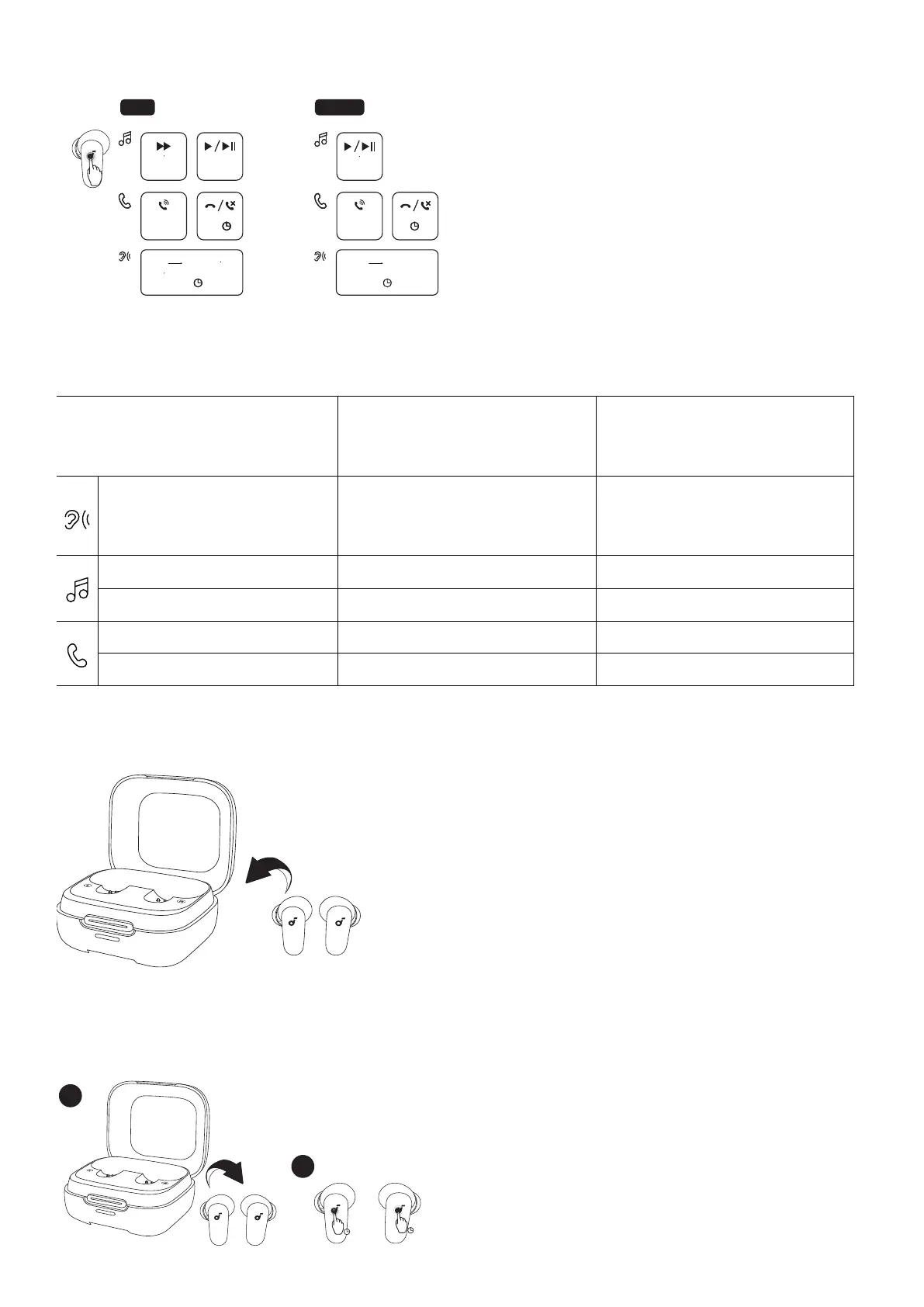
CONTROLS
MONOTWS
×2
ANC Transparency
L
×2
R
×2
Normal Transparency
2s
L/R
2s2s
TOUCH CONTROLS
L/R
×2
L/R
2s2s2s2s
×2
2s2s
×2: Tap twice 2s: Tap and hold for 2 seconds
*You can also customize controls in the soundcore app.
TWS mode Mono mode
Switch ambient sound modes
(ANC / Transparency / Normal)
Tap and hold for 2 seconds (L/R) Tap and hold for 2 seconds
Play / Pause Tap twice (R) Tap twice
Next track Tap twice (L) /
Answer a call Tap twice (L/R) Tap twice
Reject / end a call Tap and hold for 2 seconds (L/R) Tap and hold for 2 seconds
POWERING OFF
To power off, return the earbuds to the charging case.
RESET
2
1
10s
10s







 To Next Page