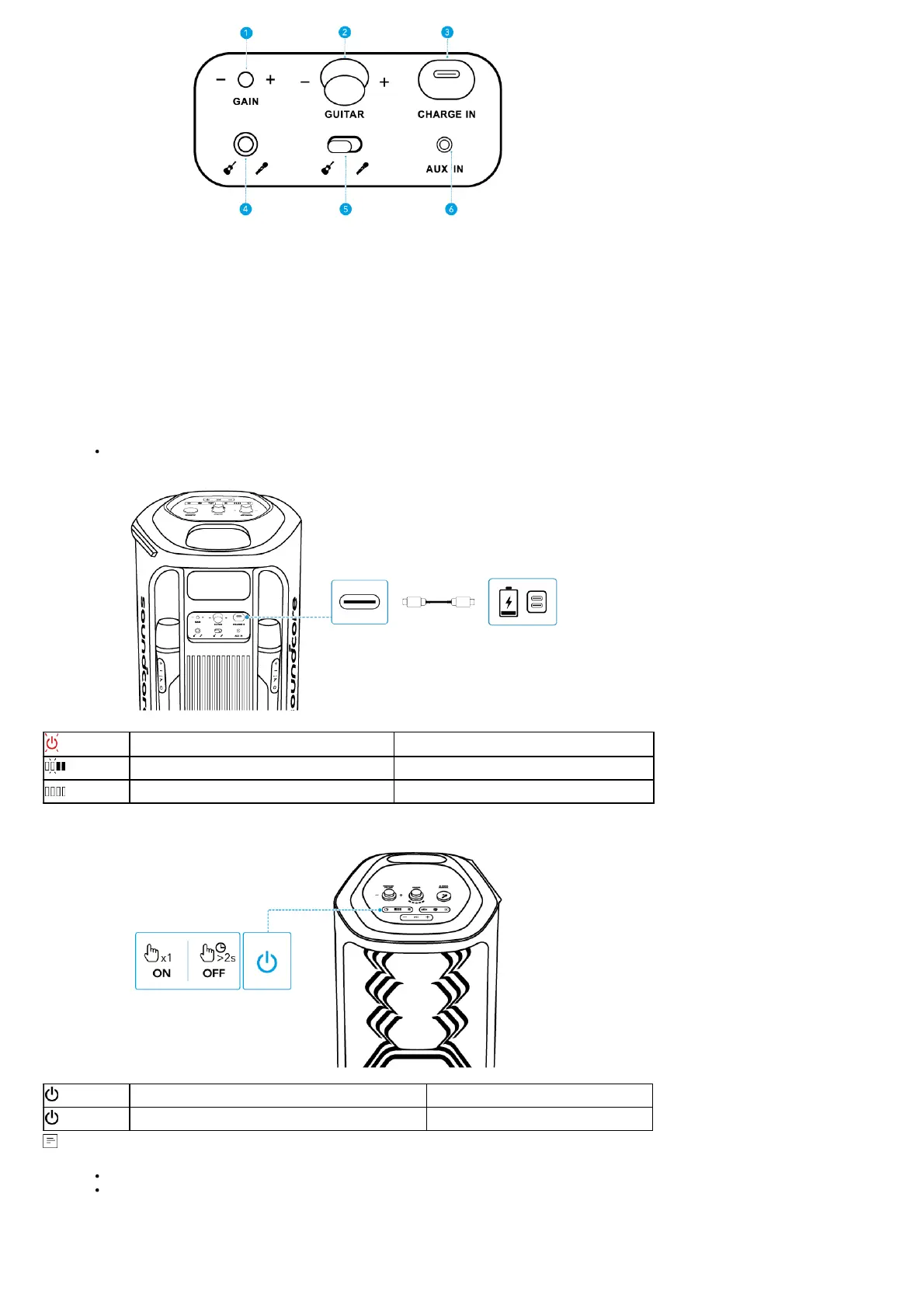
1. Gain (Guitar): Adjust gain of the connected guitar.
2. Guitar Volume Control: Rotate clockwise / counterclockwise to increase / decrease the volume of the connected guitar.
3. USB-C Charging Port: Plug in the provided C-C cable to charge the device.
4. Guitar / Microphone Socket (6.5mm): Connect to a guitar or wired microphone.
5. Input Switch Toggle: Switch to the connected guitar or microphone input.
6. AUX IN: Connect to an external audio device through a 3.5 mm audio cable (not supplied).
Charging
Charging Your Speaker
Use a certified C-C cable and charger to prevent any damage.
Flashing Red Low Battery
Flashing White Being Charged
Steady White Fully Charged
Powering On/Off
Press Once Power On
Press and Hold for 2 Seconds Power Off
This speaker will power off automatically after 20 minutes of no audio input.
You can also set an auto-power-off time in the soundcore app.
Using Your Speaker
Bluetooth Mode
Press the Bluetooth button to enter Bluetooth pairing mode, then select "soundcore Rave 3" from your device's Bluetooth list to connect.



 To Next Page