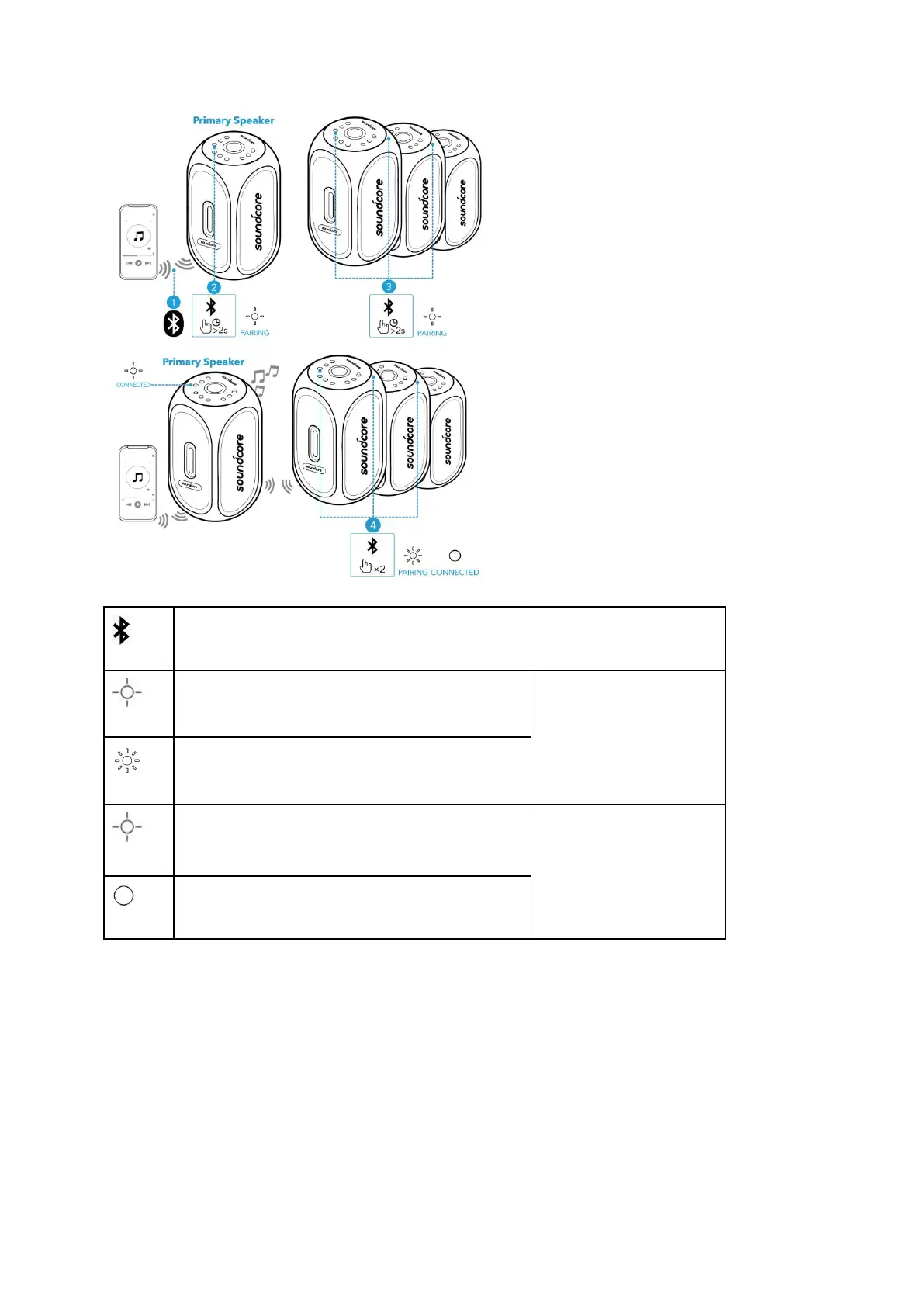
Press and hold for 2 seconds
Slowly flashing white (Primary speaker)
Rapidly flashing white (Secondary speaker)
Slowly flashing white (Primary speaker)
Steady white (Secondary speakers)
When PartyCast mode is successfully entered:
● You can power off, adjust the volume, or switch light modes for all speakers by controlling the
primary speaker only.
● You can power off or switch light modes for each secondary speaker individually.
● You can't adjust the volume for each secondary speaker individually.
● Any secondary speaker can be switched to become the primary speaker by pressing the
Bluetooth button twice and connecting to your smartphone. Any primary speaker can be
switched to become the secondary speaker by pressing the Bluetooth button twice and
searching for an available primary speaker.
● To exit the PartyCast mode, press and hold the Bluetooth button on any speaker for 2
seconds.










 To Next Page