3
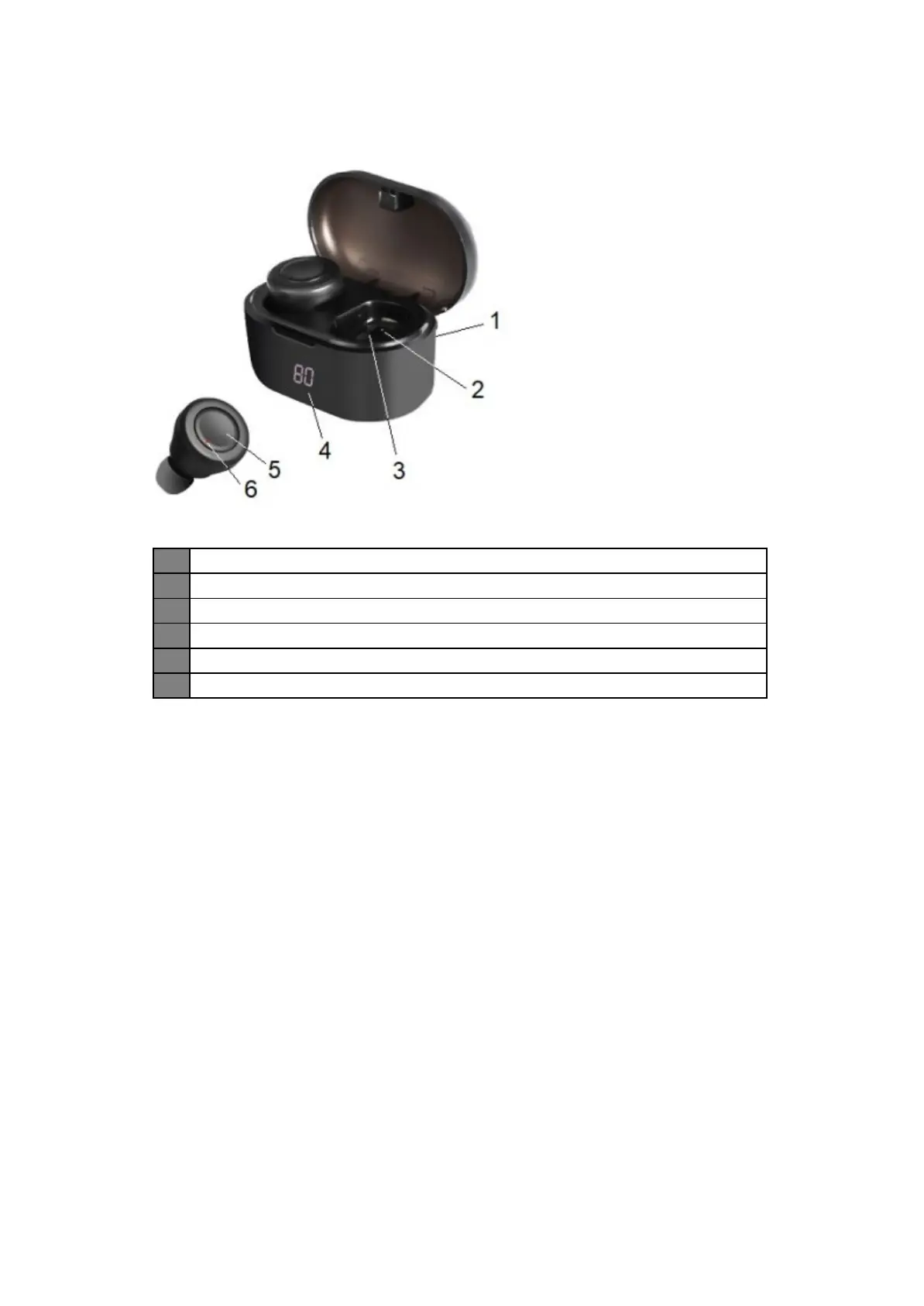
Description of Parts:
INSTRUCTIONS FOR USE
Charging Instructions
The Recharging Case and Bluetooth Earbuds come with a built-in rechargeable battery.
Be fore using it for the first time we recommend you charge the battery fully. Please recharge
the battery by following either methods every time they drain out.
To charge the Recharging Case (without Bluetooth Earbuds)
Plug the Micro USB end of the included USB charging cable into the charging port of th e
Recharging Case. Plug the other end into a suitable USB port such as the one on your
computer or other devi ces made for USB charging. The LCD screen will flash with battery
capacity value to indicate that its being charged.
It takes less than 2 hours for the case to charge fully. When the battery is fully charged, the
LCD screen will display battery capacity value 100.
To charge the Bluetooth Earbuds
1. After fully recharging the Recharging Case, disconnect it from charging.
2. Put th e Bluetooth Earbuds into re spective charging slots correctly.
3. The LED light indicator on the Earbuds turns red to indicate that the battery is being
charged. It takes less than 2 hours for the Earbuds to fully charge. When the battery
3 Charging Slot
Recharging Case LCD Screen
MF (Multi-Function) / Phone Button
6 LED Indicator / Bu ilt-In Microphone


 To Next Page