4
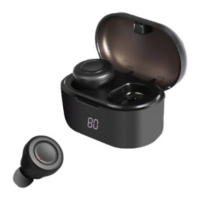
is fully charged, the red LED light will turn off, and the LCD screen will also turn off.
Turning on/off the Bluetooth Earbuds
Take out the Earbud from the Recharging Case, it will turn on automatically ( Or, if the Earbud
is not store d inside the Recharging Case, press and hold the MF button for 3 se conds to turn
ON.)
Press and hold the MF button of the Earbud for 6 seconds to turn OFF the device. ( Or, put
the Earbud back to the Recharging Case, it will turn off for recharging automatically.)
Pairing either one Bluetooth Earbud with Bluetooth devices (phone or tablet that
support call-answering)
• Take out one Earbud from the Recharging Case, it will turn on automatically and the
LED flashes red and blue ( Or, if the Earbud is not store d inside the Recharging Case,
press and hold the MF button for 3 seconds to turn ON. An indication tone will be
he ard and the LED flashes red and blue.)
• Place the Bluetooth Earbud and Bluetooth device (phone or tablet th at support call
answering) no further than 1m apart from each other;
• A ctivate the Bluetooth function on your mobile device. Please r efer to the
manufacturer’s instructions for instr uctio ns on enabling Bluetooth on your device.
• Once you have activated Bluetooth on your mobile device, select the “Digi-Buds”
from the list of available Bluetooth devices.
• You might be prompted with “Pair with Digi-Buds?” message on you r source device,
with “Cancel” and “OK” options. Please click “OK”.
• If required, e nter the password ‘0000’ to confirm & fina lize pairing.
• Once paired successfully, an indication tone will be he ard and the LED will flash blue
slowly.
• You can now start to use the Earbud.
• If pairing is unsuccessful, turn off the device first and then re-pair following the
above steps.
• Once y ou have paired the Bluetooth Earbud with a mobile device, the earbud will
reme mber this mobile device and will pair automatically whe n its Bluetooth is
activated within the range, during subsequently pairing. Yo u do not need to re-pair
any pr eviously connected devices.
• The Bluetooth Earbud will attempt to automatically connect to the last device it was
paired with when switched on. If you want to pair it with a new device, please follow
the steps outlined above.
Making a call with the Bluetooth Earbud in Bluetooth mode
Basic operation
Function Opera tion Button
Answer incoming
ca ll
Incoming Call S hort press the Phone button to answer an
incoming call.


 To Next Page
 Loading...