Need help?
Do you have a question about the SoundLogic XT TOUCH-SP and is the answer not in the manual?
Connect the USB charging cord to the DC 5V port and a power source. Red LED indicates charging.
Press and hold the Power button to turn the speaker on/off and adjust LED light brightness/mode.
Steps to put the speaker into pairing mode and connect a Bluetooth device.
Stream audio wirelessly from a paired Bluetooth device.
Insert USB flash drive or Micro SD card for automatic music playback.
Connect an audio device using a 3.5mm Aux cable for playback.
Control brightness of the warm white LED light.
Cycle through various LED colors or dynamic color changing mode.
Details on Bluetooth version, speaker power, unit size, and battery.
Solutions for problems like low sound level or distorted sound.
Guidelines for cleaning and storing the speaker.
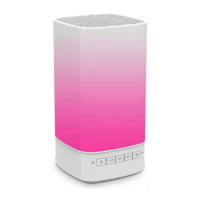
The Sound Touch LED Touch-Controlled Bluetooth Speaker, identified by item number TOUCH-SP, is a versatile audio device designed for wireless music playback and hands-free communication. This speaker features touch-controlled LED lighting, offering both aesthetic appeal and practical functionality in various environments.
The core function of this device is to serve as a Bluetooth speaker, allowing users to wirelessly stream audio from Bluetooth-enabled devices such as mobile phones, tablets, and computers. It incorporates a built-in 5W speaker for audio output and a long-lasting rechargeable battery for portability. Beyond Bluetooth connectivity, the speaker offers multiple input options, including a USB slot for flash drives, a Micro SD (TF) card slot for memory cards, and an Aux-in jack for wired connections to audio devices.
A key distinguishing feature is its LED touch-controlled lighting. The speaker provides two main LED light modes: Warm White LED light mode and Color Changing LED light mode. In Warm White mode, users can adjust the brightness through low, medium, and high settings. In Color Changing mode, the speaker cycles through various colors such as blue, green, red, cyan, purple, and turquoise, and also includes a dynamic mode that synchronizes light changes with music beats. The LED lights are not only for ambiance but also serve as indicators for various functions, such as Bluetooth pairing status and charging status.
For communication, the speaker includes a built-in microphone, enabling hands-free calls when paired with a mobile phone. Users can answer, reject, end calls, and even redial the last number directly from the speaker.
To begin, the speaker should be fully charged. This involves connecting the included USB charging cable to the DC 5V charging port on the speaker and a power source. A red LED light indicates charging, turning off once the battery is full, which typically takes 2-3 hours.
The speaker is turned on or off by pressing and holding the "Power" button for 1-2 seconds. Upon powering on, a blue LED indicator blinks, signaling that the speaker is in pairing mode. The same "Power" button is used to adjust the brightness of the warm white LED light or to switch between different color light modes. Tapping the top of the speaker also allows for brightness adjustments in Warm White mode or color changes in Color Changing mode. To switch between Warm White and Color Changing LED light modes, users tap and hold the top of the speaker for about 2 seconds.
To pair with a Bluetooth device, press and hold the "Power" button until an indication tone is heard and the blue LED blinks. Then, enable Bluetooth on the source device (phone, tablet, computer) and search for "Sound Touch." Select "Sound Touch" to pair. If prompted, confirm the pairing and enter '0000' as the password if required. Once successfully paired, an indication tone will sound, and the blue LED will remain steadily lit. The speaker can automatically re-pair with previously connected devices.
When a mobile phone is paired:
The unit should be cleaned with a soft, damp cloth. Harsh chemicals or abrasive materials should not be used, as they can damage the device.
Store the speaker in cool, dry conditions, away from wet or damp environments, to ensure its longevity and proper functioning.
The speaker is designed for indoor use and should not be used outdoors in excessive rain or extreme weather conditions.
 General
| Brand | SoundLogic |
|---|---|
| Model | XT TOUCH-SP |
| Category | Speakers |
| Speaker Type | Portable Bluetooth Speaker |
| Connectivity | Bluetooth |
| Charging | Micro USB |
| Built-in Microphone | Yes |
| Controls | Touch |
| Color Options | Black, Blue, Red |

 To Next Page