IR3200 / English Short Instruction Manual
1
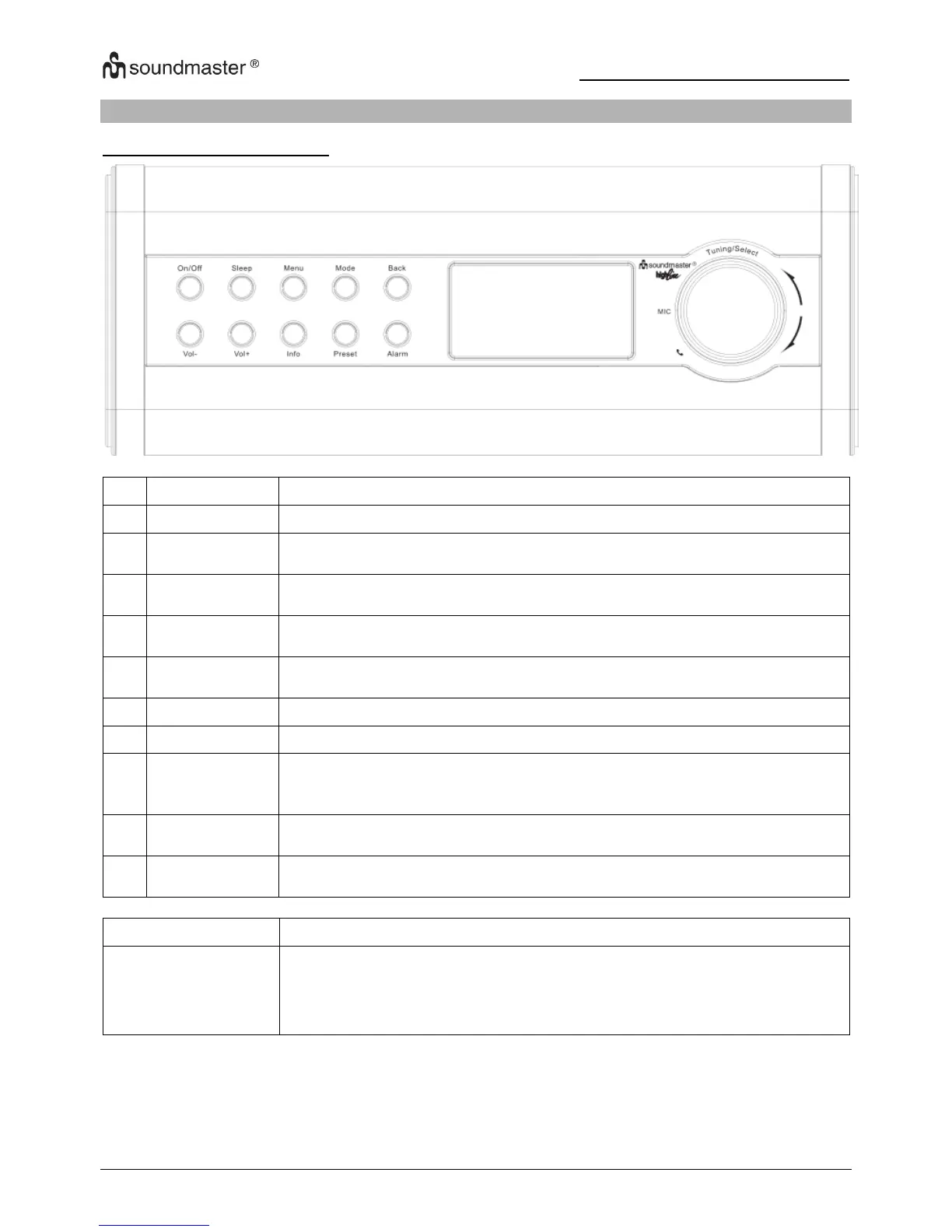
SHORT MANUAL - LOCATIONS OF CONTROLS
MAIN CONTROL KEY LIST
Turn on or turn off the unit.
When playing, standby after a set time. When alarm is sounding,
snooze for a set time.
Show menu for the current mode. Press again to show Now playing
screen.
Cycle through the modes: Internet Radio, Music player, DAB, FM, Aux
in, Bluetooth
®
Return to previous screen. In play mode, this button may be used to
return to the last track list or station list.
View more information about the station or track playing. Press again
to cycle through further information screens then return to the normal
Now playing screen.
Press for the preset recall or save menu. Scroll up or down to select
the preset number, then press “Tuning/Select” to confirm.
Enter alarm wizard, turns off alarm (when alarm is sounding) and, in
standby, sets which alarms are active.
Turn clockwise or anticlockwise to scroll down or up through a menu, list
of items or station list. The current item is highlighted in reverse text
(dark characters on a yellow background).Then press to select the
highlighted item, Answer/end/reject the call.
Note: Some buttons have alternate functions depending on whether they are pressed briefly or held
down for a few seconds.














 To Next Page