EasyManua.ls Logo

SOUNDMASTER NR50 - Rear View; Remote Control

SOUNDMASTER NR50
14 pages
Print Icon
To Next Page IconTo Next Page
To Previous Page IconTo Previous Page
Loading...
NR50 / English Instruction Manual
2
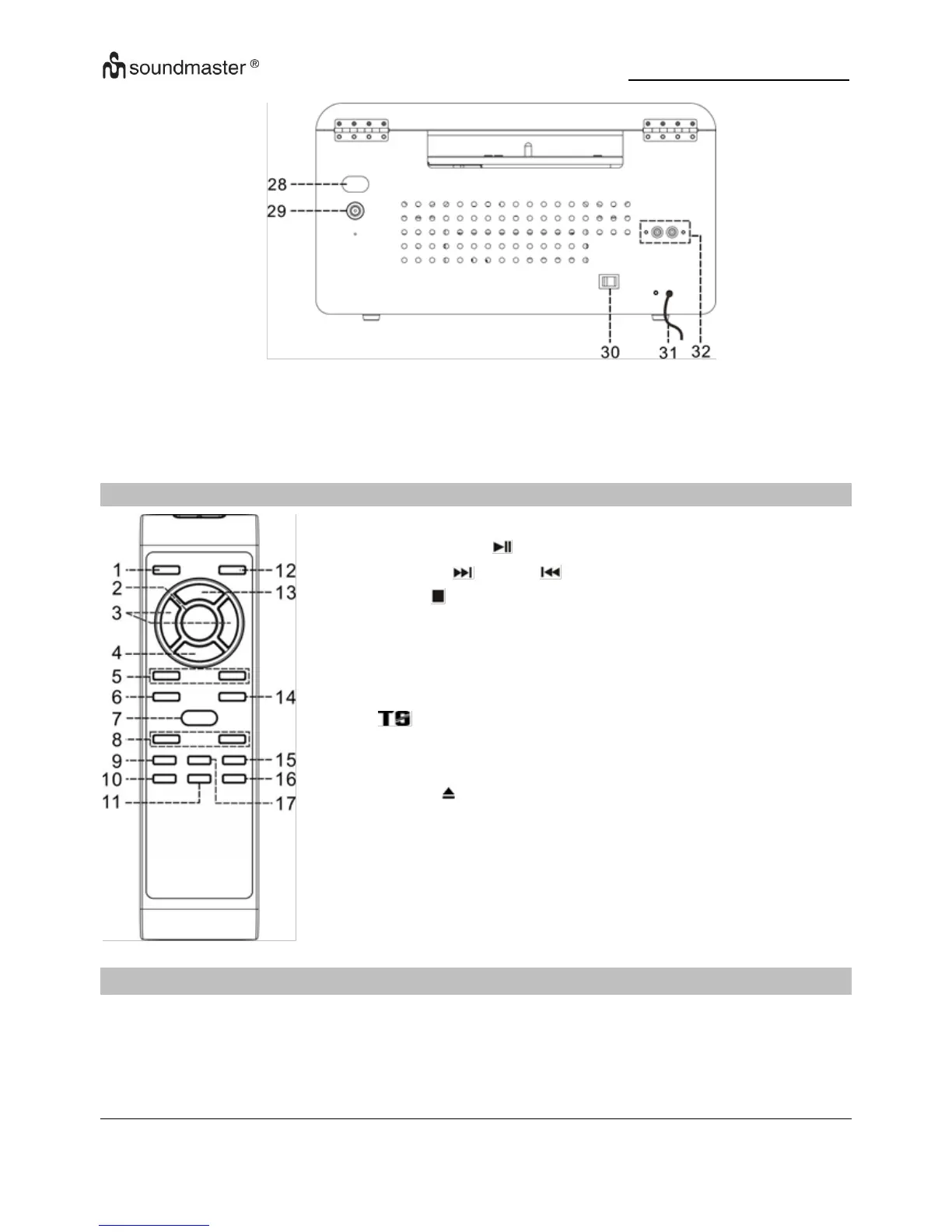
REAR VIEW
REMOTE CONTROL
1
ON/STANDBY button
2
PLAY/PAUSE / SCAN button
3
SKIP UP /DOWN / TUNE +/- button
4
STOP / ENTER button
5
FOLDER/PRE UP-DOWN button
6
SCAN button
7
REC button
8
VOLUME +/- button
9
button
10
SLEEP/TIMER button
11
Play Mode button
12
EJECT button
13
FUNCTION button
14
DEL / INFO button
15
PRESET EQ button
16
MUTE button
17
MEM/CLK-ADJ button
OPERATION YOUR REMOTE CONTROL
1. Remove the battery compartment door by pressing in on the lab and lifting it off.
2. Insert two AAA size batteries (not included) into the battery compartment following the
polarity markings inside the battery compartment.
3. Replace the battery compartment cover.
28
Turntable adjust hole
31
AC cord
29
FM antenna socket
32
Line Out socket
30
Main power switch

Other manuals for SOUNDMASTER NR50

Related product manuals