This document describes the soundmaster Modell PL-520USB turntable system, a versatile audio device capable of playing vinyl records, receiving radio broadcasts, and handling digital audio files from USB and SD/MMC cards. It also features recording and encoding capabilities.
General Description
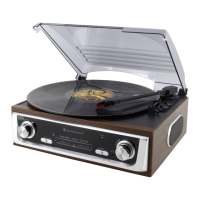
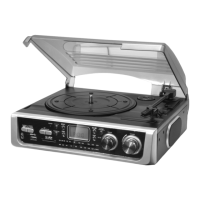
The soundmaster PL-520USB is an integrated audio system housed in a compact unit, featuring a transparent dust cover that protects the turntable. The front panel includes an LCD display, various control buttons, a tuning knob, and a volume knob, along with input ports for USB and SD/MMC cards. Speakers are integrated into the unit, with a left speaker visible on the front panel and a right speaker on the side. The back panel provides additional connections such as a line-out socket and an FM wire antenna.
Functions and Features
1. Turntable (Phono):
- Playback: Supports 33/45/78 RPM speed selection for playing vinyl records.
- Auto Stop: Features an auto-stop on/off switch (28) that automatically stops the platter rotation at the end of a record. If a record's auto-stop area is outside the unit's setting, the auto-stop can be turned off to allow the record to play to the end, requiring manual stopping or switching the auto-stop back on.
- Tone Arm: The tone arm includes a stylus protector and a pick-up holder (25). Users must remove the stylus protector and ensure the tone arm is detached from its rest before operation and re-secured afterwards.
- Spindle Adaptor: A spindle adaptor (23) is provided for records with larger center holes.
2. Radio (Tuner):
- Bands: Supports AM, FM, and FM-Stereo reception.
- Tuning: Manual tuning is performed using the Tuning Knob (19).
- Indicators: An FM Stereo LED Indicator (20) lights up when an FM stereo program is being received.
- Antennas: Features a built-in AM bar antenna and a built-in FM wire antenna (27) at the rear cabinet, which should be fully unraveled and extended for best reception.
3. USB/SD/MMC Card Playback (MP3/WMA):
- Compatibility: Decodes and plays MP3/WMA files stored on USB storage media (9) or SD/MMC cards (11).
- File Management: Supports folder navigation using the Folder Up button (12) and track skipping using the Skip Up (21) and Skip Down (13) buttons.
- Playback Modes: Offers Play/Pause/Stop (14), Skip/Search (forward/backward), and various repeat modes (Repeat 1, Repeat All Track, Repeat One Folder) and Random Play, and Intro Play (playing the first 10 seconds of each track).
- ID3 Tag Display: Can display song titles (ID3 tags) during MP3/WMA playback using the "INFO" button on the remote.
- File Format Requirements: Supports MP3 bit rates from 32 KBPS to 256 KBPS and WMA bit rates from 32 KBPS to 320 KBPS.
- Search Function: Allows searching for tracks by title or folder name in stop mode using the "FIND" button on the remote.
4. Recording and Encoding (ENCODE):
- Source: Can encode audio from Phono (turntable) to MP3 format and record it onto USB or SD/MMC media.
- Format: Records in MP3 format at a preset bit rate of 128 KBPS and a sampling rate of 44.1 KHz. A "AUDIO" folder is created on the storage media for encoded tracks.
- Bitrate Selection: Users can select desired encoding bitrates (32/64/96/128/192/256 KBPS) from CD or Phono to USB using the remote control.
- Track Separation: The "TS" (Track Separation) button on the remote allows users to divide the recording music from Phono into separate tracks during encoding.
- Copying Files: Allows copying MP3/WMA files between USB and SD/MMC cards, either single tracks or all tracks. A "FCOPY" folder is created for copied tracks.
5. File Deletion:
- Single File Delete: Allows deletion of individual files from USB or SD cards using the "INFO" button on the remote.
- All Files Delete: Allows deletion of all files from USB or SD cards.
6. Programming Tracks:
- Custom Playlists: Up to 32 tracks from MP3/WMA files on USB/SD can be programmed to play in a specific order.
7. Connectivity:
- USB Socket (9): For connecting USB storage devices.
- SD/MMC Card Slot (11): For inserting SD or MMC memory cards.
- 3.5 MM Headphone Jack (8): For private listening.
- Line Out Socket (26): Allows connection to an external hi-fi system using an RCA cable (not included).
- AC Power Cord (29): For connecting to an AC outlet.
Controls and Indicators
- LCD Display (2): Shows current mode, track number, folder number, playback time, and other relevant information.
- Power LED Indicator (5): Indicates the power status.
- Record Button (3): Initiates recording/encoding.
- Source Button (4): Selects the input source (USB or Card).
- Power Off/Functions Selector (7): Turns the unit on/off and selects the main function mode (Phono, USB/SD, Tuner).
- Radio Band Selector (10): Switches between AM, FM, and FM-Stereo bands.
- X-BASS On/Off Button (15): Enhances bass output.
- Remote Sensor (16): Receives signals from the remote control.
- Volume Up/Down Control Knob (18): Adjusts the audio volume.
- LED Dial Pointer (22): Indicates the tuned frequency on the radio dial.
Remote Control Functions
The remote control provides access to various functions, including:
- FIND: Activates file/folder name search in MP3/WMA mode.
- INFO: Selects encoding bitrate in Phono stop mode; displays ID3 tags during playback; initiates file deletion.
- REC: Activates recording or copy function.
- REP/INTRO/RAN: Selects repeat, intro, or random play modes.
- PROGRAM: Activates programming function for tracks.
- PLAY/PAUSE: Starts playback or pauses it.
- SKIP/SEARCH FORWARD/BACKWARD: Skips tracks or performs fast forward/backward search.
- STOP: Stops playback or cancels programmed tracks.
- FOLDER UP/DOWN: Navigates folders in MP3 mode.
- SOURCE: Selects USB or SD function.
- TRACK SEPARATION (TS): Divides recording tracks during encoding from turntable.
Installation and Precautions
- Unpacking: Remove all protective materials.
- Power Connection: Connect the power cord (29) to an AC outlet after checking the mains voltage.
- Ventilation: Ensure adequate space around the unit for ventilation and do not cover any vents.
- USB/SD Connection: Always ensure USB plugs are inserted face up and memory cards are inserted in the correct direction to avoid damage.
- Service: The unit should only be adjusted or repaired by qualified service personnel to avoid hazardous radiation exposure.
Maintenance
- Stylus Protection: Always use the stylus protector when the turntable is not in use.
- Tone Arm Security: Ensure the tone arm is secured in its rest when not in use or during transport.
This comprehensive system offers a blend of classic and modern audio functionalities, making it a versatile choice for music enthusiasts.

 Need help?
 General










 To Next Page