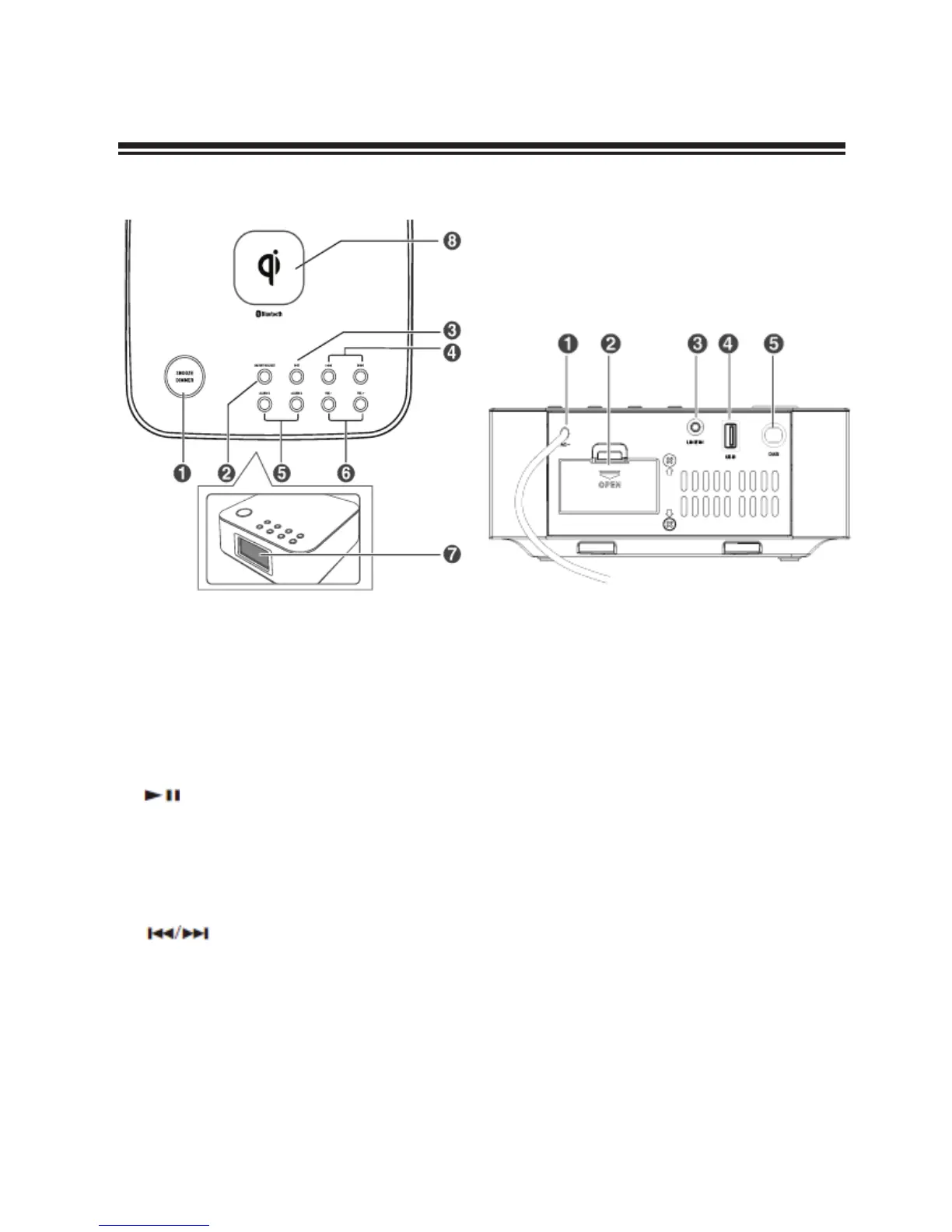
1 SNOOZE/DIMMER
- Repeat the alarm.
- Adjust the display brightness.
- Enter into time setup.
2 ON/OFF/SOURCE
- Switch the unit between ON and Standby
mode.
- Select the play function.
3
/PAIR
- In Bluetooth mode, start or pause playback.
- Press and hold to enable Bluetooth pairing
mode in Bluetooth mode.
- Search for a strong radio station in FM
mode / Full scan in DAB Mode.
4
- In Bluetooth mode, skip to previous/next
track.
- Search for a radio station (FM).
- Navigate to select an item on a menu
screen (DAB).
- Select the secondary station (DAB).
5 ALARM 1/ALARM 2
- Set the alarm timer.
- View alarm settings.
6 VOLUME +/-
- Increase or decrease the volume level.
7 Display Panel
- Show the current status.
8 (Qi) Charging
Rear View
1 AC~ Connect to power.
2 Battery Compartment
3 LINE IN socket
Connect to an external audio device.
4 USB socket
Use this socket to charge your smartphone
and tablet PC.
5 Antenna (FM/DAB) socket











 To Next Page