
 Need help?
Do you have a question about the SOUNDMASTER URD810iPH and is the answer not in the manual?
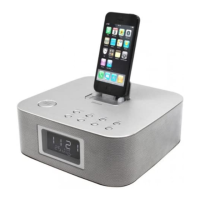
This document describes the URD810iPH, a soundmaster® CD clock radio with an integrated iPod/iPhone dock. It offers a range of functions including CD playback, FM radio tuning, an auxiliary input, and alarm features, all designed for ease of use and convenience.
The URD810iPH serves as a versatile audio system, combining a CD player, an FM radio, and a docking station for Apple iPods and iPhones. Its primary function is to provide audio playback from various sources, along with timekeeping and alarm capabilities.
The device supports playback of standard 12 cm and 8 cm compact discs, including CD-R/RW discs with MP3 or WMA (Windows Media Audio) files. Users can play tracks sequentially, skip tracks, search within tracks, and utilize repeat and random playback modes. For MP3/WMA CDs, the unit can recognize up to 99 folders and 999 files per disc, with support for up to 8 directory trees. It's important to note that some MP3/WMA CDs might not play in the recorded order, and certain file types (like WMA9 professional or DRM protected files) are not supported. The unit also features a programmed playback mode, allowing users to create a custom playlist of up to 64 tracks from a disc. This program can be checked and modified as needed.
The URD810iPH includes an FM tuner, allowing users to listen to their favorite radio stations. It offers both automatic and manual tuning options. Automatic tuning scans the band for receivable stations, while manual tuning allows for precise frequency selection. The device can preset up to 20 FM stations, making it easy to access frequently listened-to channels.
A key feature of this device is its integrated dock for iPods and iPhones. This allows users to play music from their Apple devices through the unit's speakers and control playback using the unit's controls or the remote. The dock comes with four removable adapters to ensure a proper fit for various iPod/iPhone models and to reduce stress on the connector. When an iPod/iPhone is docked and the unit is powered on, the device will charge the docked Apple product. The clock can also be synchronized automatically with the docked iPhone/iPod when a time signal is received.
For other audio sources, the URD810iPH provides an AUX IN jack on the rear panel. This allows connection of external devices such as MP3 players, CD walkmans, tape walkmans, or personal computers/laptops using a stereo 3.5mm jack cable (supplied). When the AUX function is selected, audio from the connected device will play through the unit's speakers.
The device features a digital clock display that can be set to either 12-hour or 24-hour mode. It also includes a wake-up alarm function, allowing users to set an on-time and choose a desired audio source (Tuner, CD, iPod, or Buzzer) to wake up to. The alarm sound gradually increases in volume (fade-in) and functions daily unless released. The unit also has a sleep timer, which automatically switches off the power after a preset time, with options for 120, 90, 60, 30, and 15 minutes.
The URD810iPH features a clear digital display that shows the current time, track information, radio frequency, and selected function. The front panel includes various buttons for controlling playback, tuning, volume, clock settings, and alarm functions. These include SNOOZE/DIMMER, STANDBY, FOLDER PRESET, SLEEP, FUNCTION, CLOCK ADJ./MEMORY/ENTER, ALARM, PLAY MODE, SKIP, VOLUME, SYNC/DISPLAY, and a CD DOOR.
The unit is powered by AC mains. The mains plug serves as the disconnect device and should remain readily operable. In case of a power failure or disconnection, the clock display dims, and the time needs to be reset.
Volume can be adjusted using the VOLUME buttons on the unit or the remote controller, with levels displayed numerically from 0 to 30.
If the unit's operation or display is abnormal, users are advised to unplug the mains plug, plug it back in, and then turn on the power to resume operation.
The manual emphasizes several safety precautions, including proper ventilation, using only specified attachments/accessories, avoiding exposure to rain or moisture, and ensuring secure attachment to prevent injury. It also warns about excessive sound pressure from earphones/headphones and the risk of explosion if batteries are incorrectly replaced.
The CD player lens should never be touched directly. If dust accumulates on the lens, it should be blown off using a camera lens blower. For more significant issues, consulting a dealer is recommended.
The exterior of the unit can be cleaned with a soft cloth moistened with lukewarm water. Harsh chemicals such as benzene, thinner, or alcohol should be avoided as they can mar the surface finish.
The product bears a marking indicating that it should not be disposed of with other household waste within the EU. Users are encouraged to recycle it responsibly through return and collection systems or by contacting the retailer to promote sustainable reuse of materials and environmental safety.
For compact discs, it is advised to avoid direct sunlight, high humidity, or high temperatures for extended periods. Discs should be returned to their cases after use, and paper or writing should not be applied to the disc surface. Discs should be handled by their edges, avoiding contact with the playing surface. Fingerprints and dust should be wiped off with a soft cloth in a straight motion from the center to the outside of the disc. Chemical cleaning sprays, antistatic sprays, or fluids should not be used to clean discs.
 General
| Brand | SOUNDMASTER |
|---|---|
| Model | URD810iPH |
| Category | Clock Radio |
| Bluetooth | Yes |
| Docking Station | Yes |
| Display | LCD |
| Alarm Function | Yes |
| Dual Alarm | Yes |
| FM Radio | Yes |
| Snooze Function | Yes |
| Sleep Timer | Yes |
| Presets | Yes |
| Auxiliary Input | Yes |
| USB Port | Yes |
| Battery Backup | Yes |
| Tuner | FM |
| Power Source | AC Power |


 To Next Page