EasyManua.ls Logo

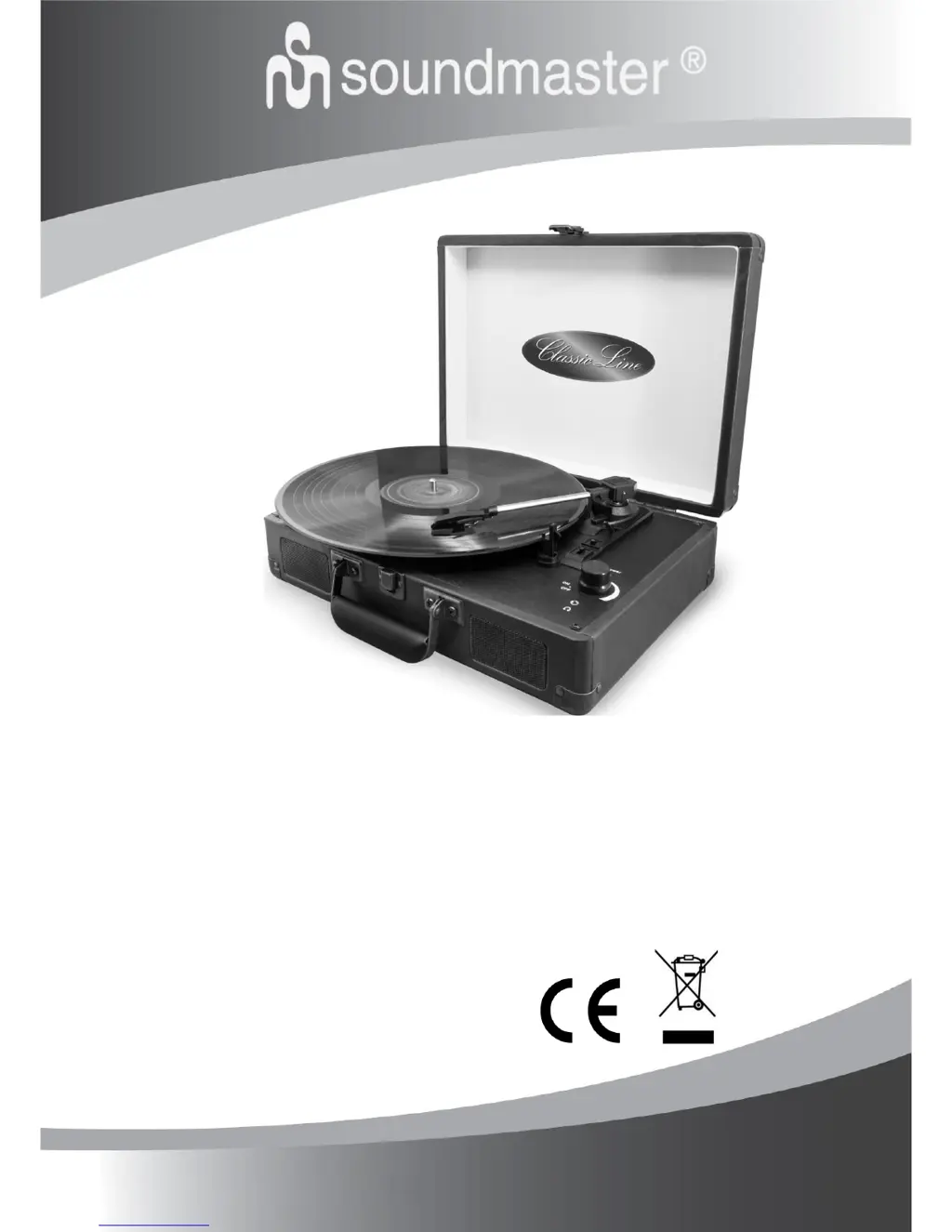
SOUNDMASTER VCS3 - User Manual

SOUNDMASTER VCS3
6 pages
Print Icon
To Next Page IconTo Next Page
Loading...
DEUTSCH
PORTUGUÊS
ENGLISH
NORSK
FRANÇAIS
SVENSKA
NEDERLANDS
DANSK
ITALIANO
SLOVENSKÝ
ESPANOL
ČEŠTINA
VCS3
Hersteller
Wörlein GmbH Tel.: +49 9103/71670
Gewerbestrasse 12 Fax.: +49 9103/716712
D 90556 Cadolzburg Email. info@woerlein.com
GERMANY Web: www.woerlein.com

Questions and Answers

  • C
    Christina MartinAug 8, 2025
    Why is there no sound coming from my SOUNDMASTER Turntable?
    • C
      Cheryl Moreno DDSAug 8, 2025
      If no sound is coming from the speakers of your SOUNDMASTER Turntable, first, check that the volume isn't turned down completely. If it is, adjust the volume. Also, ensure that the input selector matches the source you're trying to play. If it doesn't, re-select the correct input source.
  • A
    Ashley GarrettAug 13, 2025
    What to do if my SOUNDMASTER Turntable does not respond?
    • J
      Jamie HernandezAug 13, 2025
      If your SOUNDMASTER Turntable isn't responding, it might be due to external factors like ESD (electro-static discharge). To resolve this, remove the power cord and all other power supplies from the device. After waiting one minute, plug the unit back in.
  • M
    Mr. Joshua KaiserAug 19, 2025
    How to fix SOUNDMASTER Turntable if it does not turn on?
    • T
      Thomas GuzmanSep 12, 2025
      If your SOUNDMASTER Turntable doesn't power on when you switch it on, make sure the unit is properly connected to the AC power supply.
  • K
    Katie JonesAug 23, 2025
    Why is the sound distorted on my SOUNDMASTER Turntable?
    • K
      Kathryn HallAug 23, 2025
      If the sound from your SOUNDMASTER Turntable is distorted, it could be due to interference from a nearby TV or similar appliance. Try turning off the TV or other appliances and moving the unit to a different location.
  • B
    Brandon JohnsonAug 28, 2025
    What to do if SOUNDMASTER Turntable sound is distorted after some time?
    • G
      Gina Clark MDAug 28, 2025
      If the sound from your SOUNDMASTER Turntable becomes distorted after using it for a while, the stylus might be damaged. Please insert a new stylus.
  • A
    Anna RiveraSep 2, 2025
    How to fix distorted sound when playing record on SOUNDMASTER Turntable?
    • C
      Corey MartinezSep 2, 2025
      If the sound is distorted when playing a record on your SOUNDMASTER Turntable, it may be because the stylus is not placed in the centre. Make sure to place the stylus in the centre.

Summary

Environmental Protection and Safety Instructions

Environmental Protection Measures

Guidelines on proper disposal of the product and its components for recycling and environmental protection.

Safety Warnings and Precautions

Important safety warnings regarding electric shock, battery handling, hearing protection, and general device usage.

Device Controls and Setup

Locations of Controls

Identifies and describes the various controls and connection ports on the device for user reference.

Getting Started: AC Adaptor Operation

Instructions on how to connect and use the device with the provided AC-DC power adapter.

Operating the Turntable

Phonograph Function Operation

Step-by-step guide on how to operate the turntable, play records, and use playback controls.

Audio Connections: Line Out and Line In

Instructions for connecting external audio devices using the Line Out and Line In jacks.

Headphone Usage

Guidance on connecting headphones for private listening and preventing hearing damage.

Maintenance and Troubleshooting

Turntable Stylus Replacement

Detailed instructions on how to safely remove and install a new turntable stylus (needle).

Care and Maintenance of Vinyl Records

Advice on using cleaning kits, including Carbon Fibre Brush and Stylus Cleaning Brush, for record care.

Troubleshooting Common Issues

A guide to diagnosing and resolving common problems encountered with the unit.

SOUNDMASTER VCS3 Specifications

General IconGeneral
Playback speed33 1/3, 45, 78 RPM
Built-in speaker(s)Yes
USB portYes
BluetoothYes
TypeBelt Drive Turntable
Line outputs (RCA)Yes
Headphone outputsYes

Related product manuals