7
ENGLISH
PMX-8UBT User’s manual
(5) LOW
The LOW control in the EQ secon controls the low frequency range of the relave
channel, with a boost/aenuaon of ± 12 dB.
(6) GAIN
Use the this control to adjust the input gain. It should always be turned fully counter
clockwise whenever you connect or disconnect a signal source to one of the inputs.
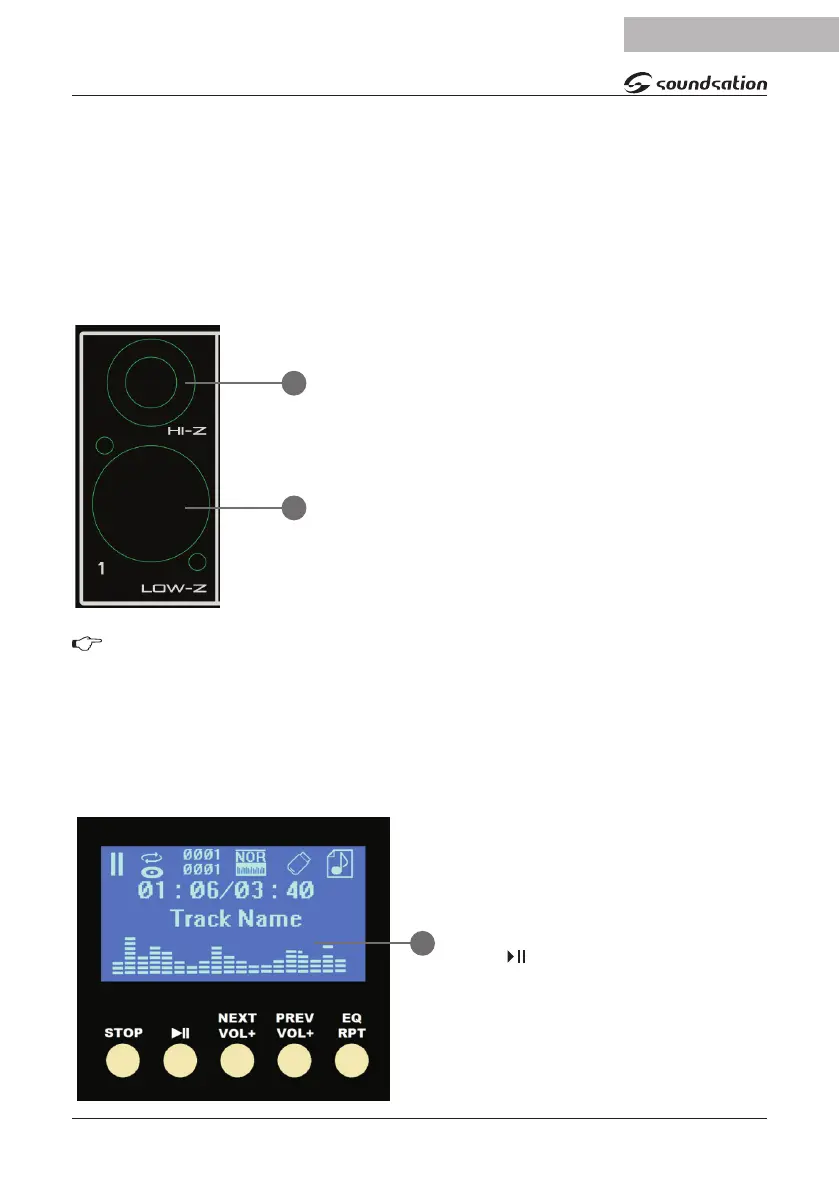
(7) Hl-Z
Each channel has a balanced line input on a ¼” TRS
jack, for audio sources such as keyboards, guitars,
bass, etc. Even unbalanced devices (mono jacks) can
be connected to these inputs. Remember that in the
same channel you can use either the microphone and
line input, but only one at a me. You cannot use both
inputs simultaneously!
(8) LOW-Z
Each input channel has a balanced microphone input
with switchable +48V Phantom power for condenser
microphones.
We suggest you to mute your system before you acvate the phantom power in
order to prevent bumps to your speakers. Please also refer to the instrucons in
paragraph (26) +48 Phantom.
(9) PEAK
This LED lights up when the input signal is too high. In this case, turn to the le the
GAIN control and, if necessary, check the EQ seng (HIGH and LOW) of the channel.
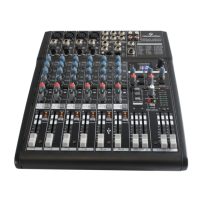
(10) DIGITAL MEDIA PLAYER
It manages all selecon and playback
funcons of the compressed audio
les accessible via the USB port. The
controller provides 5 buons (STOP /
SWH, , Next / Vol +, Prev / Vol-, EQ
/ RPT) and a wide LCD to display tles
and me code of the song playing. Fol-
lowing a list of all display features:
A. Play/pause status
7
8
10


 To Next Page