8
ENGLISH
PMX-8UBT User’s manual
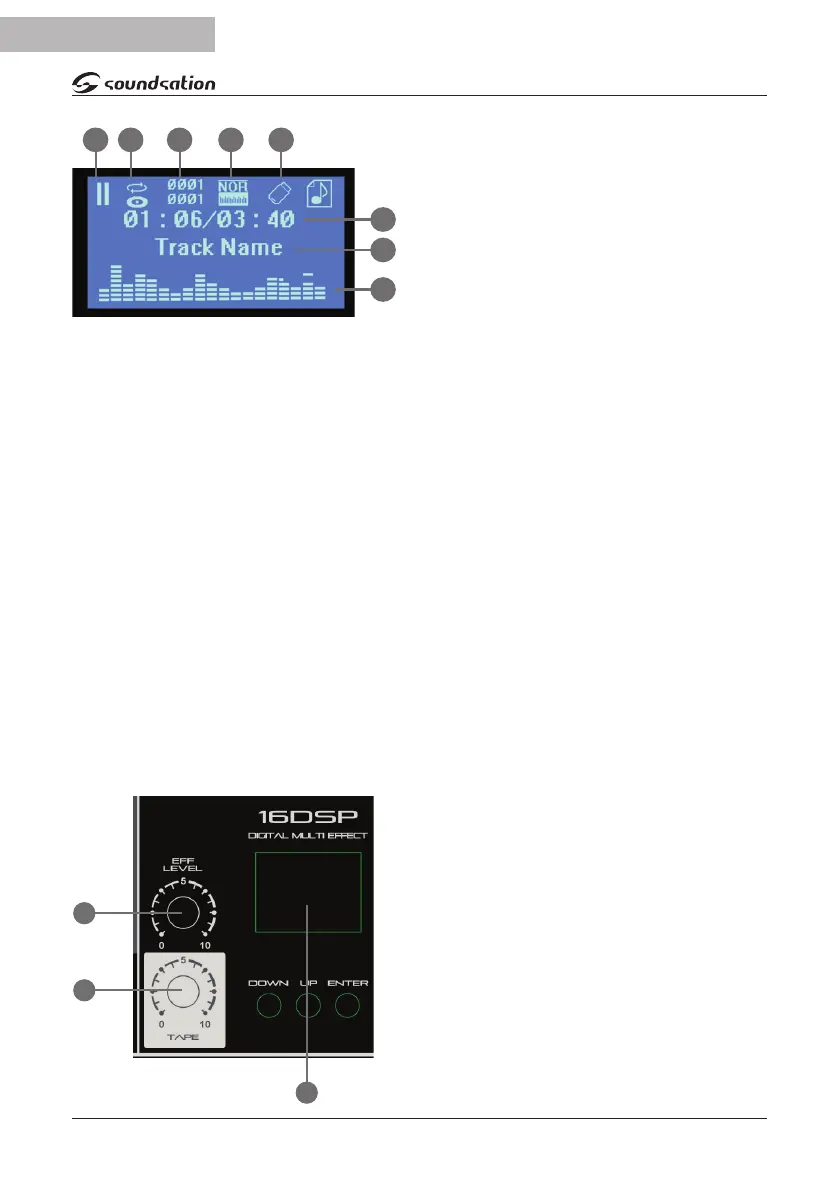
B. Repeat status
C. Folder and track number
D. EQ mode
E. USB device status
F. Track me elapsed & remaining
G. Track name
H. Playback acve display
To begin using the USB/SD audio player, in-
sert a USB drive with standard compressed
audio les stored on it into the USB type-A connector on the front panel (18). Maxi-
mum capacity 32GB.
Press Play/Pause key to alternately pause or play the current selected track. Pressing
the Stop key will stop playback and return to the start of the track.
To navigate through tracks stored on the USB device, press the Next or Prev keys. Press-
ing and holding these buons adjusts the output volume up or down. The EQ/Rpt key
steps through preset EQ proles for playback, indicated on the LCD display. Holding this
key down toggles the repeat play modes, also indicated on the LCD display.
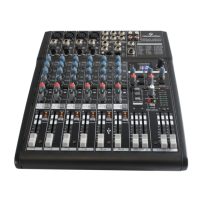
(11) EFF LEVEL
Controls the output level of the eect.
(12) TAPE
This knob adjusts the volume level of the signal connected to TAPE IN stereo RCA.
(13) DIGITAL MULTI-EFFECT
Digital signal processor with 16 eects. It has three keys (DOWN, UP and ENTER) and
a display for selecng and indicang the number of the selected eect. Following the
list of eects:
Program Eect List
1 Hall 1
2 Hall 2
3 Room 1
4 Room 2
5 Room 3
6 Plate 1
7 Plate 2
8 Plate 3
9 Chorus
10 Flanger
11 Delay 1
12 Delay 2
13 Chorus/Room 1
14 Chorus/Room 2
15 Vocal Cancel
16 Rotary Speaker
F
A B C D E
G
H
11
12
13


 To Next Page