EasyManua.ls Logo

Soundstream VIR-7830 - User Manual

Soundstream VIR-7830
27 pages
Print Icon
To Next Page IconTo Next Page
Loading...
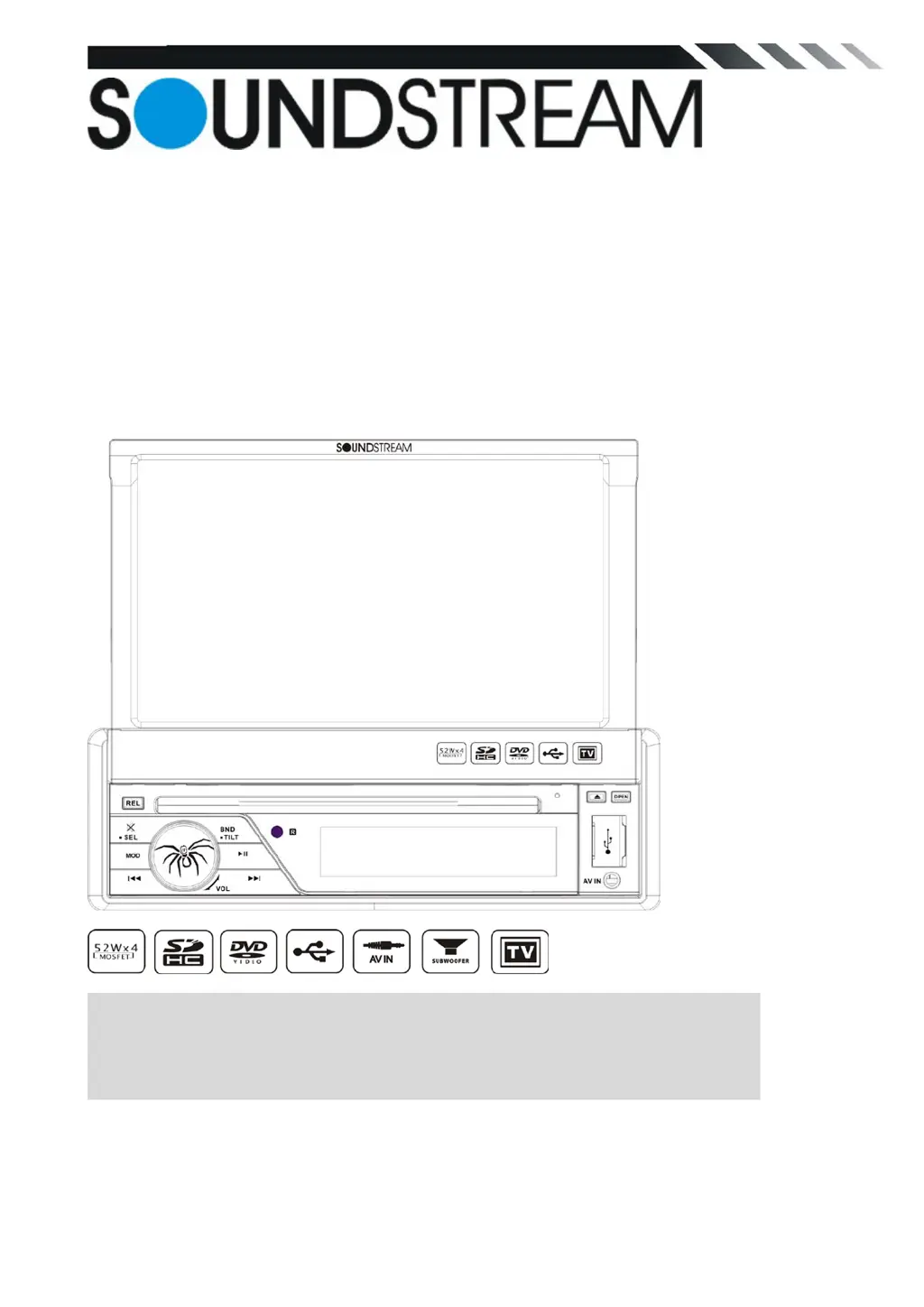
VIR-7830/ VIR-7830T
In-Dash 7” Monitor
Touch Screen
DVD/CD/MP3/MP4
AM/FM Radio
Built-in TV tuner
Owner’s Manual
Take the time to read through this owner’s manual.
Familiarity with installation and operation procedures will help you obtain the best
Performance from your new DVD-receiver.

Questions and Answers

Summary

WARNING!

Environmental and Power Precautions

Guidelines for connecting power, operating environment, and temperature considerations.

Usage and Device Care

Precautions for disc handling, monitor operation, LCD care, and remote control usage.

Safety and Installation

Warnings about driving safety, installation placement, and maintenance procedures.

Accessories

Included Hardware and Components

Lists physical parts like washers, straps, bolts, screws, mounting collar, and release keys.

Included Documentation and Peripherals

Lists items like remote control, warranty card, user manual, cables, and trim ring.

INSTALLATION; UN-INSTALLATION

INSTALLATION (Figure 1)

Steps for installing the unit into the dashboard using a half sleeve and mount strap.

UN-INSTALLATION

Procedure for removing the unit using extraction keys.

WIRING CONNECTIONS

Wire Color and Function Guide

Lists the color coding for different wires and their corresponding functions.

Parking Brake and Reverse Camera Wiring

Explains how to connect the parking brake wire and reverse line for camera input.

Loudspeaker Connection Guidelines

Speaker Requirements and Wiring

Outlines necessary speaker specifications and provides diagrams for correct and incorrect connections.

Front Panel Overview

Panel Release and SEL;MUTE Button

Details the release button for the panel and the SEL/MUTE button for sound settings and muting.

Front Panel Controls

Mode Selection and Playback Controls

Covers MODE, playback navigation (<<, >>, Play/Pause), and volume control.

Monitor and System Functions

Explains monitor open/close, tilt, disc eject, reset, and AV/USB/DISC slots.

Sensors and Display Information

Describes the IR sensor and information display LCD.

REMOTE CONTROL FUNCTIONS

Media Playback and Mode Controls

Covers MODE, BAND/RANDOM, PLAY/PAUSE, EJECT, volume, and seeking buttons.

Setup, System, and Navigation Controls

Details buttons for SETUP, MENU, AUDIO, DUAL, OPEN/TILT, and navigation (Cursor, ENTER).

Special Features and Settings

Explains buttons for SUBTITLE, ANGLE, INT, A-B/ZOOM, OSD, and PBC/STOP.

Remote Control Button Operations

Playback and Search Functions

Details P.SCN/RPT, seek buttons (<<, >>), LOUD, PLAY/PAUSE, STOP/PBC, and INT buttons.

Menu, Setup, and Audio Options

Explains MENU, SUBTITLE, SETUP, ANGLE, AUDIO/GOTO, and SEL buttons.

Advanced Features

Covers A-B/ZOOM, DUAL, and Digit 0-9 buttons.

Remote Control Advanced Features

Dual Zone Mode Operation

Explains how to activate and control Dual Zone Mode for front and rear zones.

Monitor Tilt and OPEN;TILT Button

Details the OPEN/TILT button for monitor operation and tilt angle adjustment.

REMOVE BATTERY

Battery Replacement and Precautions

Provides notes on battery life, replacement, safety, and disposal.

MAIN MENU

RADIO PLAYER

How to start the Radio mode and control basic functions like volume, band, and station search.

DVD PLAYER

Playback Controls and Features

Details pause/play, stop, fast forward/rewind, repeat options, subtitle, and audio language selection.

DISC;USB;SD;MMC Interface

Media Playback Controls

Explains controls for mute, volume, play/pause, restart, track skipping, intro function, repeat, and random play.

TV Mode

AV-IN Mode

SETTING CONTROL

SOUND CONTROL

Details sound settings like EQUALIZER, BASS, TREBLE, BALANCE, and FADER.

System Settings

SOUND CONTROL (Sound 2)

Explains BEEP, LOUDNESS, and SUBWOOFER settings.

DISPLAY CONTROL

Covers SCREEN and BACKLIGHT settings.

RADIO CONTROL

Details AREA, STEREO, and LOCAL settings for the radio.

GENERAL CONTROL (General 1)

Introduction to the general settings menu.

General Settings Menu

General 1 and General 2 Settings

Covers DUAL, KEY, TILT MODE, CLOCK HOUR, and CLOCK SETTING configurations.

DVD SET UP MENU

Provides access to the DVD system settings main menu.

DVD Setup Options

Details Subtitle, Audio, and DVD Menu Language selections.

DVD Setup Configurations

Password and Parental Control

How to set/reset password and use parental control ratings.

TV SHAPE and NTSC;PAL Settings

Adjusts screen aspect ratio and video output format (NTSC/PAL).

DEFAULT and System Information

Covers factory reset option and viewing system information.

CALIBRATION

Touch Screen Calibration Procedure

Steps for calibrating the touch screen using a stylus.

Other functions

Subwoofer Setup

How to connect and enable the subwoofer output.

Parking and Back View Camera

Explains parking display conditions and back view camera connection.

TV SECTION (For VIR-7830 T only)

TV MENU Navigation

How to enter the TV menu and navigate setup pages.

Auto Program (Seek Mode)

How to perform automatic station search and configure system/audio settings.

TV Section Settings

System and Audio Configuration

Settings for TV system (SECAM, NTSC, PAL) and TV sound systems.

Channel Tuning and Memory

How to select channels, fine-tune, and enable station memory.

NOTES ON DISC

Disc Handling and Cleaning

Guidelines for holding, cleaning, and avoiding damage to discs.

Disc Storage and Irregular Shapes

Recommendations for storing discs and warnings against using irregular shaped discs.

TROUBLESHOOTING

General Troubleshooting

Solutions for power, sound output, button, and display errors.

CD and LCD Errors

Remedies for CD playback issues and small LCD display error messages.

Troubleshooting Guide

Power and Disc Loading Issues

Solutions for no power, inability to load discs, and unreadable discs.

Sound and Radio Performance

Remedies for no sound, sound skipping, and radio reception problems.

Operation and Installation Issues

Solutions for non-working keys, panel fit, and installation angle problems.

TECHNICAL SPECIFICATIONS

General and TFT Display Specs

Power, consumption, formats, dimensions, temperature, and TFT display details.

Radio and Audio Specifications

Frequency ranges for FM/AM radio, preset stations, audio response, and TV color system.

Summary

WARNING!

Environmental and Power Precautions

Guidelines for connecting power, operating environment, and temperature considerations.

Usage and Device Care

Precautions for disc handling, monitor operation, LCD care, and remote control usage.

Safety and Installation

Warnings about driving safety, installation placement, and maintenance procedures.

Accessories

Included Hardware and Components

Lists physical parts like washers, straps, bolts, screws, mounting collar, and release keys.

Included Documentation and Peripherals

Lists items like remote control, warranty card, user manual, cables, and trim ring.

INSTALLATION; UN-INSTALLATION

INSTALLATION (Figure 1)

Steps for installing the unit into the dashboard using a half sleeve and mount strap.

UN-INSTALLATION

Procedure for removing the unit using extraction keys.

WIRING CONNECTIONS

Wire Color and Function Guide

Lists the color coding for different wires and their corresponding functions.

Parking Brake and Reverse Camera Wiring

Explains how to connect the parking brake wire and reverse line for camera input.

Loudspeaker Connection Guidelines

Speaker Requirements and Wiring

Outlines necessary speaker specifications and provides diagrams for correct and incorrect connections.

Front Panel Overview

Panel Release and SEL;MUTE Button

Details the release button for the panel and the SEL/MUTE button for sound settings and muting.

Front Panel Controls

Mode Selection and Playback Controls

Covers MODE, playback navigation (<<, >>, Play/Pause), and volume control.

Monitor and System Functions

Explains monitor open/close, tilt, disc eject, reset, and AV/USB/DISC slots.

Sensors and Display Information

Describes the IR sensor and information display LCD.

REMOTE CONTROL FUNCTIONS

Media Playback and Mode Controls

Covers MODE, BAND/RANDOM, PLAY/PAUSE, EJECT, volume, and seeking buttons.

Setup, System, and Navigation Controls

Details buttons for SETUP, MENU, AUDIO, DUAL, OPEN/TILT, and navigation (Cursor, ENTER).

Special Features and Settings

Explains buttons for SUBTITLE, ANGLE, INT, A-B/ZOOM, OSD, and PBC/STOP.

Remote Control Button Operations

Playback and Search Functions

Details P.SCN/RPT, seek buttons (<<, >>), LOUD, PLAY/PAUSE, STOP/PBC, and INT buttons.

Menu, Setup, and Audio Options

Explains MENU, SUBTITLE, SETUP, ANGLE, AUDIO/GOTO, and SEL buttons.

Advanced Features

Covers A-B/ZOOM, DUAL, and Digit 0-9 buttons.

Remote Control Advanced Features

Dual Zone Mode Operation

Explains how to activate and control Dual Zone Mode for front and rear zones.

Monitor Tilt and OPEN;TILT Button

Details the OPEN/TILT button for monitor operation and tilt angle adjustment.

REMOVE BATTERY

Battery Replacement and Precautions

Provides notes on battery life, replacement, safety, and disposal.

MAIN MENU

RADIO PLAYER

How to start the Radio mode and control basic functions like volume, band, and station search.

DVD PLAYER

Playback Controls and Features

Details pause/play, stop, fast forward/rewind, repeat options, subtitle, and audio language selection.

DISC;USB;SD;MMC Interface

Media Playback Controls

Explains controls for mute, volume, play/pause, restart, track skipping, intro function, repeat, and random play.

TV Mode

AV-IN Mode

SETTING CONTROL

SOUND CONTROL

Details sound settings like EQUALIZER, BASS, TREBLE, BALANCE, and FADER.

System Settings

SOUND CONTROL (Sound 2)

Explains BEEP, LOUDNESS, and SUBWOOFER settings.

DISPLAY CONTROL

Covers SCREEN and BACKLIGHT settings.

RADIO CONTROL

Details AREA, STEREO, and LOCAL settings for the radio.

GENERAL CONTROL (General 1)

Introduction to the general settings menu.

General Settings Menu

General 1 and General 2 Settings

Covers DUAL, KEY, TILT MODE, CLOCK HOUR, and CLOCK SETTING configurations.

DVD SET UP MENU

Provides access to the DVD system settings main menu.

DVD Setup Options

Details Subtitle, Audio, and DVD Menu Language selections.

DVD Setup Configurations

Password and Parental Control

How to set/reset password and use parental control ratings.

TV SHAPE and NTSC;PAL Settings

Adjusts screen aspect ratio and video output format (NTSC/PAL).

DEFAULT and System Information

Covers factory reset option and viewing system information.

CALIBRATION

Touch Screen Calibration Procedure

Steps for calibrating the touch screen using a stylus.

Other functions

Subwoofer Setup

How to connect and enable the subwoofer output.

Parking and Back View Camera

Explains parking display conditions and back view camera connection.

TV SECTION (For VIR-7830 T only)

TV MENU Navigation

How to enter the TV menu and navigate setup pages.

Auto Program (Seek Mode)

How to perform automatic station search and configure system/audio settings.

TV Section Settings

System and Audio Configuration

Settings for TV system (SECAM, NTSC, PAL) and TV sound systems.

Channel Tuning and Memory

How to select channels, fine-tune, and enable station memory.

NOTES ON DISC

Disc Handling and Cleaning

Guidelines for holding, cleaning, and avoiding damage to discs.

Disc Storage and Irregular Shapes

Recommendations for storing discs and warnings against using irregular shaped discs.

TROUBLESHOOTING

General Troubleshooting

Solutions for power, sound output, button, and display errors.

CD and LCD Errors

Remedies for CD playback issues and small LCD display error messages.

Troubleshooting Guide

Power and Disc Loading Issues

Solutions for no power, inability to load discs, and unreadable discs.

Sound and Radio Performance

Remedies for no sound, sound skipping, and radio reception problems.

Operation and Installation Issues

Solutions for non-working keys, panel fit, and installation angle problems.

TECHNICAL SPECIFICATIONS

General and TFT Display Specs

Power, consumption, formats, dimensions, temperature, and TFT display details.

Radio and Audio Specifications

Frequency ranges for FM/AM radio, preset stations, audio response, and TV color system.

Soundstream VIR-7830 Specifications

General IconGeneral
BrandSoundstream
ModelVIR-7830
CategoryMonitor
LanguageEnglish

Related product manuals