VirTis BenchTop 2K, 4K and 6K Sentry 2.0 Controls
Revision 004, 12/09 13
LCD Display Functions
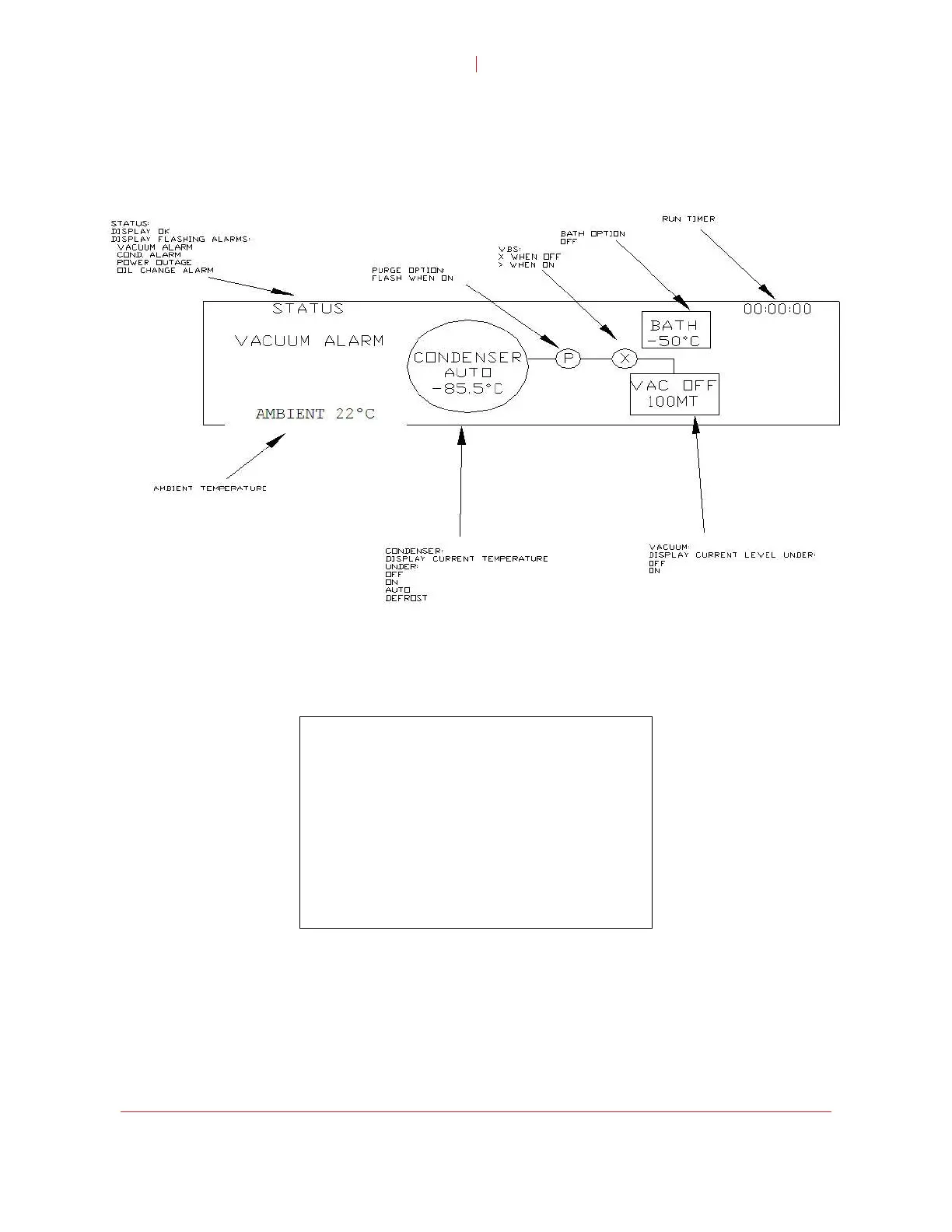
By default, the LCD display shows the system Synoptic screen. The Synoptic screen
gives a visual representation of the current operation and status of the unit. Alarm
messages, run time and system status are displayed.
Note: The actual synoptic screen may vary slightly from the illustration above.
© SP Industries, Inc. 2009
ain Menu
essing the MENU button while on the Synoptic screen displays the Main Menu. If
∧ Main Menu
M
Pr
the unit goes idle (no input after three minutes), the system will default back to the
Synoptic screen.
User Options >
Alarms >
Setpoints >
Vacuum Control 0000
Purge Off
Bath Off
Heat Off
Note: Tem are disabled except when the Synoptic
avigation within the menu screens is accomplished using the Up/Down (+/-) arrow
perature and vacuum control functions
screen is displayed. Bath and Heat functions are not available simultaneously.
N
buttons in conjunction with the MENU button. The Up/Down (+/-) buttons allow you to
scroll the cursor to the desired function and allows the value of a setpoint to be
changed. The MENU button is used to select the desired item.


 To Next Page