8 | LEXI
• Mode/Flash button:
1) The default startup is manual ash mode, long press the ash button
to switch to automatic ash mode, at this time, the LED display will
show a “ “ icon.
2) When the device selects the automatic ash mode, the screen
display icon “ “, press the ash button, then the device will start
ashing automatically
3) When the device selects the manual ash mode, the device can only
ash once every time the ash button is pressed.
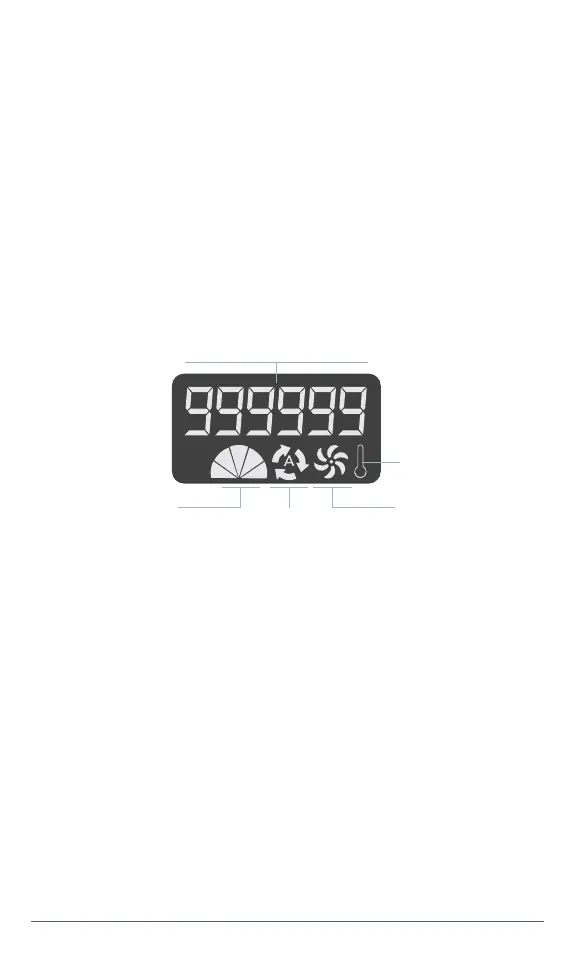
3.3.2 LCD display
Remaining Flashing Count
Gear
(Flash Intensity)
Cooling Fan
Auto Flash
Mode
Temperature
Warning
Explanation:
• Power button:
1. The value of the remaining ash count will decrease accordingly
with the number of uses. The initial value is 999999, and the screen
displays the “ “ icon.
2. The working mode have 5 level, a sector represents a level, and when
the corresponding level is selected, the corresponding number of
sectors will be displayed.
3. When the automatic ash mode is selected, there will be displayed “
” on the display, otherwise it is the manual ash mode.
4. When the cooling fan is turned on, there will be displayed “ ” on the
display.
5. When the product temperature is greater than 55°C, the temperature
alarm icon “ ” ashes.



 To Next Page