16 17
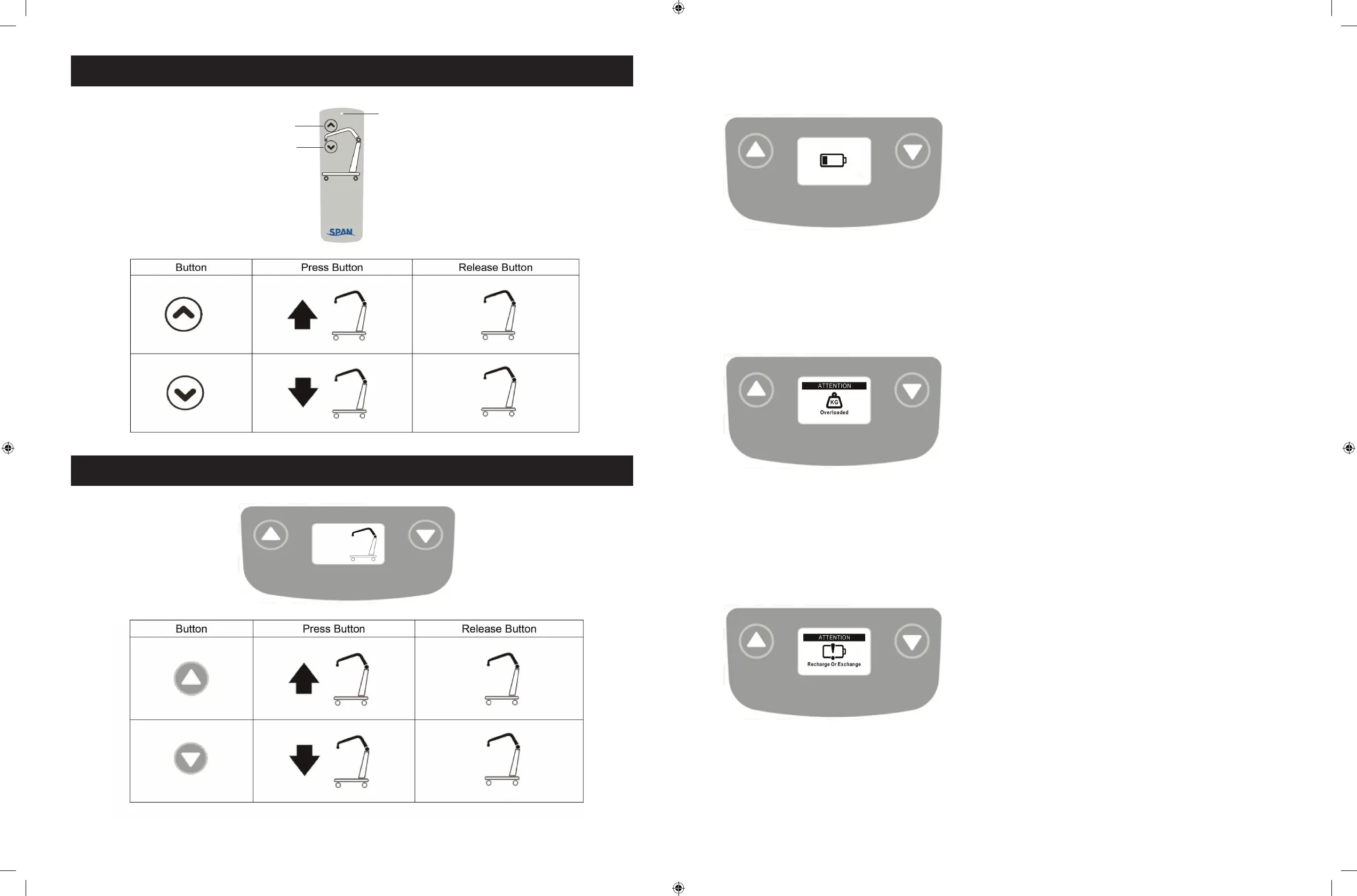
LED Indicator
* Green = In Use
* Blank = Standby
Lifting
Lowering
Warning! - Overloaded
During lifting if the lift is overloaded, the LCD
Display Panel will show the sign on the left and
lifting will be deactivated immediately.
• The buzzer will beep 3 times.
• Lowering the lift by pressing the DOWN
button is still allowed.
• The emergency stop button must be pressed
in and then release the button before further
lifting.
Warning! - Charge Battery Immediately
If the battery is critically low, the LCD Display
Panel will show the sign on the left either when
the emergency stop button is released or when
a button on the LCD Display Panel is pressed.
• Lift operation is deactivated.
• Battery needs to be charged immediately
before further use.
Warning! - Battery Low and Charging is Needed
If the battery needs to be charged, the LCD
Display Panel will show a blinking low battery
sign shown on the left either when the
emergency stop button is released or when a
button on the LCD Display Panel is pressed.
• Lift is still functioning.
• Buzzer will beep every 2 seconds.
• Battery needs to be charged immediately
after use.
Operating Lift: Using Hand Control
Operating Lift: Using LCD Display Panel



 To Next Page