10
ENGLISH
APPLICATION
ADJUSTING THE BRAKES
Brake adjustment method
QR Code Application
2
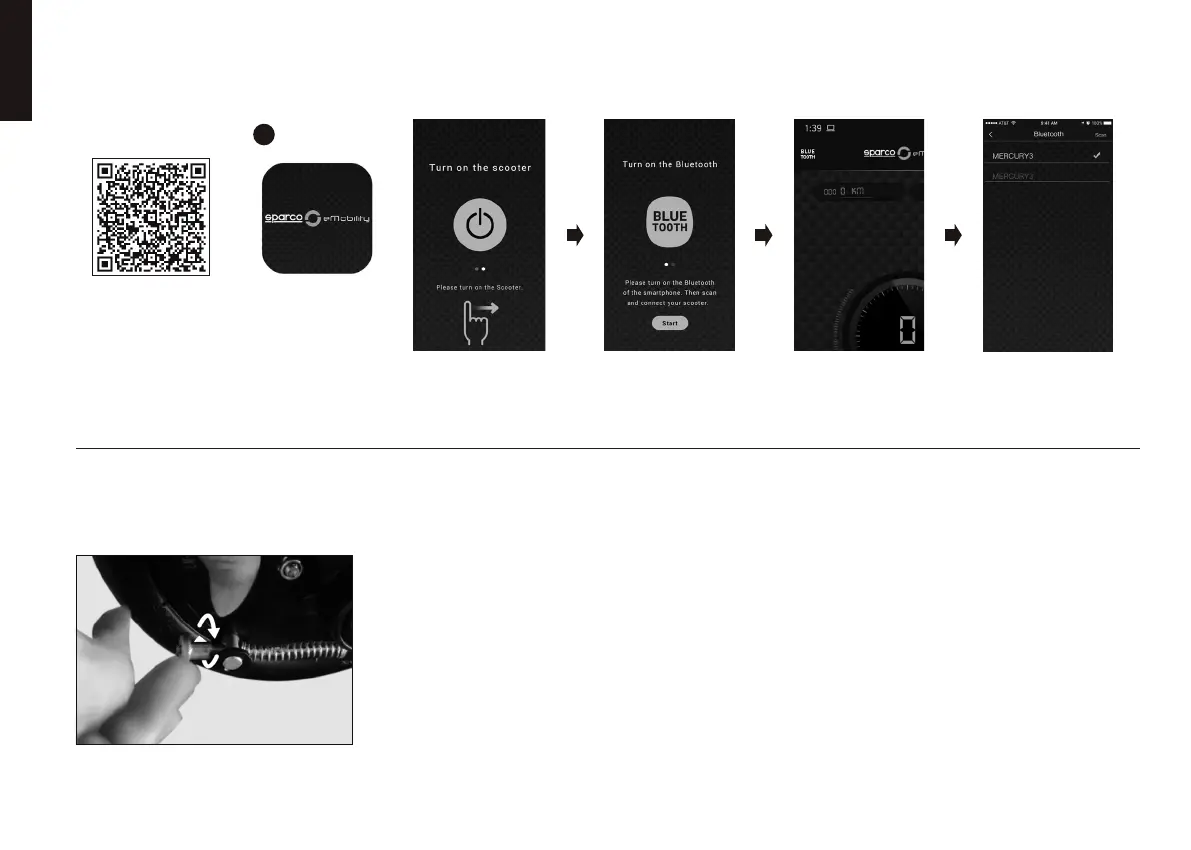
Download the APP
via QR Code or in
the APP Store:
“Sparco eMobility”
Once downloaded
click on the APP Icon.
Click on “Scooter” - If the green tick
shows up you successfully paired your
scooter - Click on the indicator on the
left top to get back to the dashboard.
To connect the scooter to
your phone, click on the
bluetooth symbol on the left
top to scan nearby devices.
When you see the above,
turn on Bluetooth
and press Start.
When you see the above,
turn on the Scooter
and swipe left.
To adjust the brake to it’s fully smoothness, screw or unscrew
the bolt at the end of the cable to tighten the spring and the brake.
To make it stronger, tighten the bolt more. To make it softer,
untighten the bolt a bit.
Make sure that the adjustment is still strong enough to brake
accordingly and without any danger towards you and every
other passenger.
FIRST TIME PASSWORD
000000


 To Next Page