8
ENGLISH
OPERATION + DISPLAY
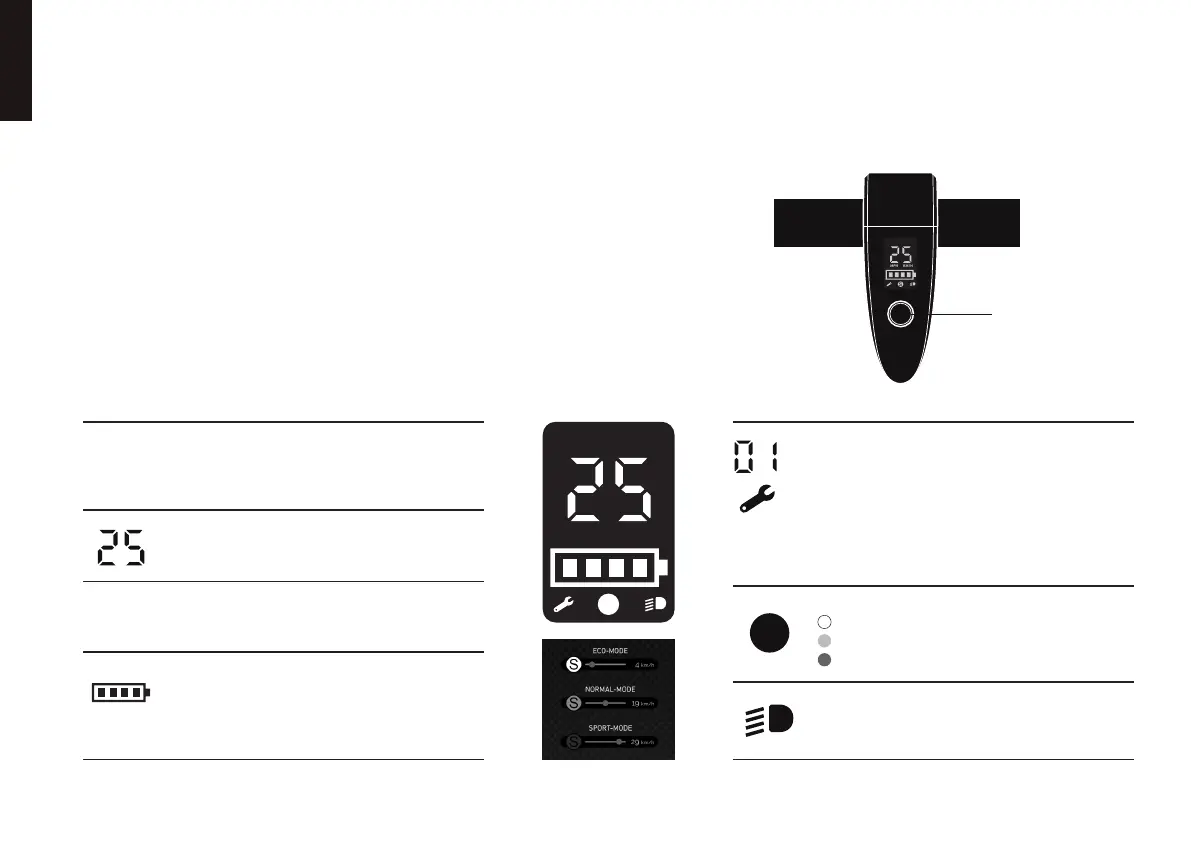
Introduction of LCD display
Operating instructions
1. Press the “ON/OFF” button for about 3 seconds to turn on the power, the buzzer will then
make a long beep.
2. In the power on status, short press the “ON/OFF” button to change the speed level.
3. In the power on status, double-press the "ON/OFF" button, the headlights and tail lights
will then light up simultaneously.
4. When the vehicle fails, the buzzer will make a continuous alarm sound of beep-beep-beep.
5. In the power on status, press the “ON/OFF” button for about 3 seconds to turn o the power.
6. In the power on status, if no operation is performed within 10 minutes, the system will shut
down automatically.
Icon description
“ON/OFF”
button
Blue Tooth
The Blue Tooth icon flashes when Blue Tooth is not
connected. The Bluetooth icon is always on after the
connection is successful.
Speed
When there is no fault, it shows the value
of the speed
Speed unit
Turn on icons for dierent speed units according
to dierent settings.
Battery Level
Four small squares display the battery power, a small
square is on behalf of 25% power, and the first
small square starts to flash when the battery power
is below 9%.
Error
When the vehicle fails, it displays the error code and
the buzzer sounds a continuous alarm beep-beep-beep,
the wrench icon will flash.
Error Code:
01: Hall 08: Motor 40: Brake
02: Accelerator 10: Controller
04: Battery 20: Communication
Speed Level
(white) : ECO Mode.
(orange) : NORMAL Mode.
(red) : SPORT Mode.
Light
When the vehicle turns on the light, the icon lights up,
and when the light is o, the icon does not light up.
KM/HMPH
S
MPH
KM/H
S
S
S
S
BLUE
TOOTH



 To Next Page