How It Works:
ASSEMBLE WRITE UPLOAD
Peel scker off back of
breadboard and sck into place.
Make sure the text on the RedBoard and
breadboard are facing up so you can read them.
a b c d e f g h i
1
2
3
4
5
6
7
8
9
10
11
12
13
14
15
16
17
18
19
20
21
22
23
24
25
26
27
28
29
30
a b c d e f g h i
1
2
3
4
5
6
7
8
9
10
11
12
13
14
15
16
17
18
19
20
21
22
23
24
25
26
27
28
29
30
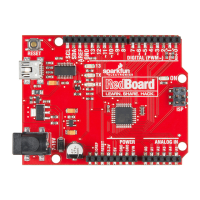
Screw the RedBoard down and into place.
IOREF
RESET
RESET
7-15V
SCL
SDA
AREF
GND
13
12
~11
~10
~9
8
7
~6
~5
4
~3
2
1
0
TX
RX
13
3.3V
5V
GND
GND
VIN
A0
A1
A2
A3
A4
A5
POWER
ANALOG IN
DIGITAL (PWM~)
ON
ISP
TX
RX
Connect the USB cable.
CIRCUIT #1 - Your First Circuit
Your RedBoard runs on 5V. is is the power that will be supplied from your computer via USB and
will be the driving force behind any components you use in your circuits. By plugging your RedBoard
into your computer, you are supplying it with just the right voltage it needs to thrive! 5V can’t hurt you,
so don’t be afraid to touch anything in your circuit. You can also power the RedBoard through the
barrel jack. e on-board voltage regulator can handle anything from 7 to 15VDC.
Page 18
IOREF
RESET
RESET
7-15V
SCL
SDA
AREF
GND
13
12
~11
~10
~9
8
7
~6
~5
4
~3
2
1
0
TX
RX
13
3.3V
5V
GND
GND
VIN
A0
A1
A2
A3
A4
A5
POWER ANALOG IN
DIGITAL (PWM~)
ON
ISP
TX
RX


 To Next Page