EasyManua.ls Logo

Specialized Turbo Elite - User Manual

Specialized Turbo Elite
11 pages
Print Icon
To Next Page IconTo Next Page
Loading...
1
2004 TURBO® ELITE
CYCLOCOMPUTER
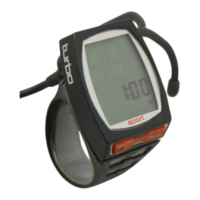
Congratulations on your purchase! You are now the
owner of one of the world’s most advanced cyclocomput-
ers. Your Specialized Turbo® Elite features a wireless
speed transmitter and a wired cadence sensor.
Additionally, it incorporates a revolutionary new backlit
three-line LCD screen. The large, easy to read, digits
allow you to view two functions simultaneously and the
alphanumeric dot matrix display provides a quick refer-
ence to the currently displayed function. The Turbo® Elite
has been designed to provide the best combination of
performance, features, durability and ease of use.
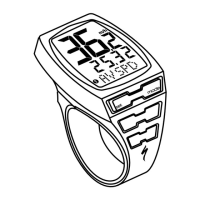
This illustration describes the screen display
and buttons
MODE/SET rocker switch
TOP Button (Backlight & Start/stop)
Dot-matrix Display Area
Digital Display Area
Wheel Option Indicator
MPH or KM/H indicator
1
3
4
6
2
8
7
5
FIGURE 1
Question and Answer IconNeed help?

Do you have a question about the Specialized Turbo Elite and is the answer not in the manual?

Summary

2004 Turbo Elite Cyclocomputer Introduction

Battery Installation and Replacement

Transmitter Battery Replacement

Procedure for replacing the battery in the wireless speed transmitter.

Mounting the Turbo Elite Cyclocomputer

Operation and Programming Guide

Setting Display Language

How to select the display language from six available options.

Miles or Kilometers Selection

How to choose between miles and kilometers for distance and speed.

Setting the Programmable Odometer

How to manually enter odometer mileage after battery replacement.

Wheel Circumference Selection

How to set tire size for accurate distance and speed calculations.

Setting the Clock

How to set the digital 12 or 24-hour clock.

Timer Selection

Overview of Automatic Timer (ATM) and Timer modes.

Interval Timer (INT)

How to set and use the programmable repeating countdown timer.

Distance Countdown Setup

Configure the feature to set an alarm for a specific distance.

Computer Functions Explained

Speedometer (SPEED)

Displays current speed in large digits on the top LCD line.

Average Speed (AVSPD)

Shows average speed on the lower Digital Display Area.

Maximum Speed (MXSPD)

Displays the highest speed recorded in memory.

Trip Distance (DST)

Records distance up to 999.99 miles/km and can be reset.

Odometer (ODO)

Records total distance traveled up to 99,999 miles/km.

Clock Functionality

Features a digital clock that can be set to 12 or 24-hour mode.

Second Wheel Option

Allows storing two different tire sizes for multiple bikes.

Troubleshooting Common Issues

Technical Specifications

Two Year Limited Warranty

Specialized Turbo Elite Specifications

General IconGeneral
BrandSpecialized
ModelTurbo Elite
CategoryBicycle Accessories
LanguageEnglish

Related product manuals